


Bitmain Antminer Logs and Errors Explained
AsicBoost · Diagnostics
Bitmain Antminer Logs and Errors
We break down Kernel Log messages on stock firmware and what to do about them.
This is a reference for logs and typical errors of Bitmain Antminer miners on stock firmware. Below we break down common log lines, what they mean and what to do. Lines marked "Normal" are routine operation and need no action.
Where to view logs on an ASIC Antminer
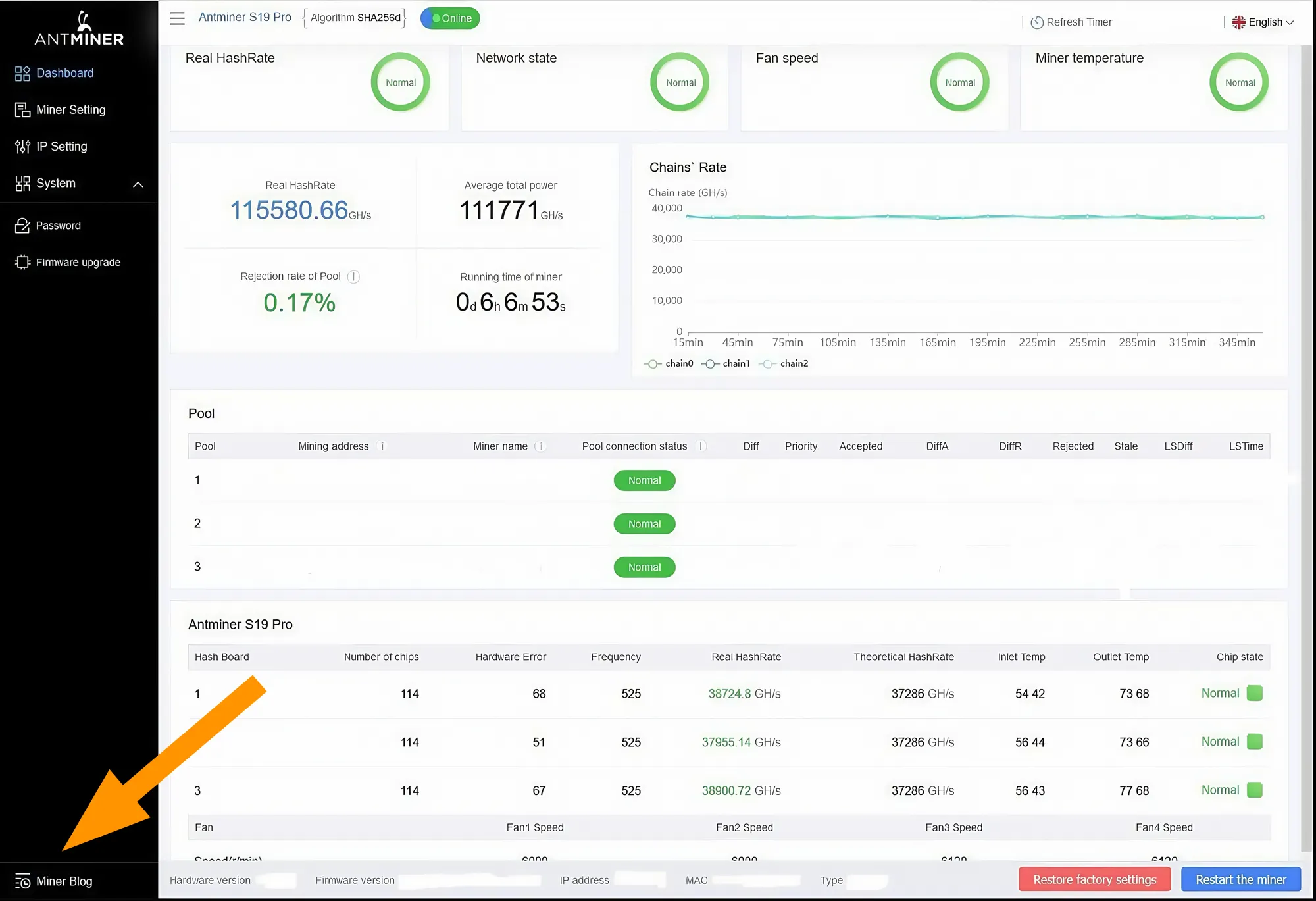
Log into the miner admin panel and click "Miner Log" in the bottom-left corner of the interface. Open the log and choose the type you need:
- Current log: usually for equipment that is faulty right now.
- Historical log: for analyzing unstable miners or reviewing past problems.
Nothing found. Try another query.
Hashboards and chips (ASIC detect)
| Log line | What it means | What to do |
|---|---|---|
chain[X]: find 0 asicchain find 0 asic, will power off this chain | The board does not respond, not a single chip is found. | Power the miner off, reconnect both power cables on this board and the ribbon cable, then power on. If the board still sees no chips, it needs diagnostics at a repair shop. |
chain[X]: only find 47-90 asic | Only some chips are found, the chain breaks off. | Reconnect the power cables and ribbon cable of the board. If it repeats, the chain or chips need repair. |
chain[X]: find 126 asic | All chips are found on the board (example for the S19 series). | Normal |
asic number is not enough | Fewer chips than normal for the model are found. | The board is faulty and needs diagnostics. |
chain X lower hash | The board delivers less hashrate than the others. | Compare its temperature and chip count with the other boards and check for CRC errors. If there are CRC errors, the board is degrading. |
disable chain X | The controller disabled the board; the miner keeps running without it at a lower hashrate. | Check the power and ribbon cable; most often the board needs repair. |
hashboard missingchain[X] is missing | The board does not respond at all. | Check the power, ribbon cables and board port. If it does not help, repair. |
CRC error on chain X | Chips transfer data with errors, the chain is unstable. | Occasional CRC errors are not critical. If they repeat, the board is degrading: you can mine temporarily, but it is better to send it for repair. |
nonce errorasic X timeout | A chip responds with errors or computes incorrectly. | A one-off error is normal. Frequent errors mean the board is degrading and needs repair. |
Tuning and calibration
| Log line | What it means | What to do |
|---|---|---|
start autotunebegin tuning chain Xtune chain X asic 0-125 | The search for chip frequencies and voltages has started. | Normal |
autotune fail | The board could not tune working frequencies (often on S21/S21+). | Reconnect the cables, do a factory reset and reinstall the firmware. If it does not help, the problem is usually in the board power circuit (VRM) and needs repair. |
calibration OK | Calibration completed successfully. | Normal |
calibration fail | The board could not be calibrated. | Restart. If it repeats, diagnose the board. |
Power: mains and PSU
| Log line | What it means | What to do |
|---|---|---|
voltage too lowvoltage too low, restart | The miner lacks voltage, the power has sagged. | Measure the socket voltage (about 220-240 V is normal), remove extension cords and splitters, check the power cable. If it repeats, replace the PSU. |
voltage too high | Voltage is above normal, which is dangerous for the miner. | Check the socket with a multimeter. If the PSU itself is over-voltage, replace it. |
PSU errorpsu error, reboot | The PSU is not working correctly. | Check the cable and contacts. A recurring error is a sign of a dying PSU, replace it. |
power lostpower low, reboot | Power was briefly lost or sagged, the miner rebooted. | Check the socket, cable and breaker. If all is fine, replace the PSU. |
power limit reachedlimited power mode | The miner reduced power itself due to insufficient supply. | Check the PSU temperature and the mains. If it repeats, replace the PSU. |
Board power (domain voltage / VRM)
| Log line | What it means | What to do |
|---|---|---|
domain voltage abnormaldomain voltage unstable | The voltage on the board is unstable, a problem of the board itself, not the mains. | The board needs repair and cannot be fixed at home. |
set volt xxvolt adjust | The miner is adjusting the chip voltage. | Normal |
volt too low for chain X | The board lacks power for stable operation. | Check the PSU. If it is fine, the board is degrading and needs repair. |
VRM protection triggered | The board power circuit protection (VRM) has triggered, typical for S21/T21. | The board is faulty, repair. |
overcurrent on chain | Too much current on the board. | Check the power; most likely repair. |
Temperature and fans
| Log line | What it means | What to do |
|---|---|---|
Temp[X]: 90-97 °C (S21) | For the S21 this is a normal operating temperature. | Normal |
Temp[X]: 95-100+ °Ctemp too high, rebootoverheat, shutdown | Overheating; protection will trigger soon or the miner has already rebooted. | Urgently improve airflow, remove dust, check the room temperature. |
temp sensor errorread temp failsensor connection lost | The board temperature sensor cannot be read. | Check the ribbon cable. If it is stable on one board, repair. |
Fatal Error: some fan lost!fan lost, reboot | One of the fans is not spinning or not reporting RPM. | Swap the fans: if the error moves to another number, replace the fan. If it stays on the same one, repair the controller. |
check fan NUM: 2Fan speed = 0 (start phase) | The expected number of fans; at startup the RPM is not up yet. | Normal, as long as proper RPM appears afterwards. |
PIC, EEPROM and control board
| Log line | What it means | What to do |
|---|---|---|
pic init okread temp sensor ok | The service controllers and sensors have started. | Normal |
pic errorpic init failread pic fail | The board microcontroller (PIC) does not respond. | Most often board repair; sometimes fixed by reflashing the PIC on a bench. |
EEPROM erroreeprom checksum faileeprom not found | The board memory is corrupted or unreadable. | Usually board repair or reflashing the EEPROM with a programmer. Reflashing the miner rarely helps. |
control board lost chaincontrol board errorcontrol board reboot | A control board fault. | Reconnect the ribbon cables, do a factory reset and reflash. If it persists, replace the control board. |
gpio init error | The controller cannot initialize the board control lines (typical for S17/T17). | Almost always board repair. |
Miner and reboots (watchdog)
| Log line | What it means | What to do |
|---|---|---|
bmminer startcgminer startFound bmminer | The main mining process that computes the hashrate has started. | Normal |
restart bmminerbmminer not running, restart | The mining process crashed, the system is bringing it back up. | Look at the lines above in the log: temperature, chips, power, network. |
watchdog: restart miner | The miner froze or stopped hashing, the watchdog restarted it. | Study the 10-30 lines above: temperature, CRC, power, network. |
fatal error, rebootingchain X asic status abnormal, reboot | A hard hardware error or a frozen board. | Check which chain or sensor failed. Usually repair. |
Network, pool and shares
| Log line | What it means | What to do |
|---|---|---|
stratum connectstratum connectedauthenticate success | Pool connection and authentication succeeded. | Normal |
socket connect failedsocket send error | The miner cannot connect to the pool or send data, no internet. | Check the cable and router, try another pool. |
DNS resolve failed | The pool address cannot be resolved (DNS problem). | Set public DNS in the router, for example 8.8.8.8 or 1.1.1.1. |
reconnectingnetwork error, retrystratum connection interrupted | The connection is unstable or dropping. | Check the internet, cable and router. |
stratum authentication failed | Wrong worker or password. | Check the worker string in the pool settings. |
pool slow/downnull work receivedpool failed: retry | The pool is unresponsive or sends empty work. | Switch the pool or wait. |
accepted share | The pool accepts shares, the miner is working. | Normal |
rejected sharestale sharehigh stale rate | Some shares are rejected or stale due to network latency. | If rejects exceed 3%, check the internet and latency. With high stale, replace the cable or router. |
hashrate now = 0 (fans spinning) | The miner is connected but receives no work from the pool. | Check the network, pool and DNS. |
Model-specific messages
| Log line | What it means | What to do |
|---|---|---|
S19: start voltage tuneS19: voltage calibration | S19 series: tuning and calibration of circuit voltages. | Normal, unless it repeats as an error. |
S19: asic index abnormalS19: hashboard mismatch | A chip order fault or the board does not match the firmware/model. | Check CRC and firmware compatibility. Sometimes the board is not original. |
S21/T21: chip detect timeoutS21/T21: critical temp: hashing stopped | The chips did not initialize in time, or a critical temperature was reached. | Check the ribbon cable and cooling. If the chips do not initialize, board repair. |
L7: pll errorL7: autotune failL7: chip temp abnormal | L7: the PLL frequency was not set, autotune failed, or a temperature sensor issue. | Check power, temperature and sensors. If needed, lower the frequency or send the board for repair. |
Hydro: water temp highHydro: pump speed lowHydro: flow sensor errorERROR_WATER_REVERSE | Hydro models: water overheating, slow pump, no flow, or supply and return swapped. | Check the cooling loop and pump. On ERROR_WATER_REVERSE, swap the supply and return lines. |
Board healthy and want more control and monitoring? Install AsicBoost firmware with HashCore Toolkit.
Install with HashCore Toolkit FAQ
Where can I view Bitmain miner logs?
Log into the miner admin panel and click "Miner Log" in the bottom-left corner of the interface. Then choose the current log (for equipment that is faulty right now) or the historical log (for analyzing past problems).
What if a board finds no chips (find 0 asic)?
Power the miner off, reconnect both power cables of that board and the ribbon cable, then power on. If the chips are still not found, the board needs diagnostics at a repair shop.
Is 90-95 °C dangerous?
For the S21 this is a normal operating temperature. On any model 95-100 °C and above means you should urgently improve airflow, remove dust and check the room temperature.
Why does the miner keep rebooting?
Common causes: overheating, power sag or a failing PSU, board and chip errors (CRC, missing chips), losing the pool. Look 10-30 lines above the reboot line to find the cause.
Can an EEPROM error be fixed?
Rarely. It usually means board repair or reflashing the EEPROM with a programmer. Reflashing the miner itself seldom helps.
What does "chain find 0 asic" mean?
The board does not respond and no chips are found. Power the miner off, reconnect both power cables of that board and the ribbon cable, then power on. If the chips are still not found, the board needs repair diagnostics.
What to do about "autotune fail"?
Reconnect the cables, do a factory reset and reinstall the firmware. If it does not help, the problem is usually in the board power circuit (VRM) and needs repair.
What do CRC errors in the log mean?
Chips on the board transfer data with errors. Occasional CRC errors are not critical, but if they repeat the board is degrading: you can mine temporarily, but it is better to send it for repair.
Why does the pool reject shares (rejected or stale)?
Some shares are rejected or go stale due to network latency. If rejects exceed 3%, check the internet and latency. With high stale, replace the cable or router.
What to do about "voltage too low"?
Measure the socket voltage (about 220-240 V is normal), remove extension cords and splitters, check the power cable. If the error repeats, replace the PSU.
Help
ASIC miners: the full guideHow ASICs work, how to pick a model, connect it and keep it running.Telegram supportWe will help you read the log and find the causeStock firmwareRoll back to factory software and SD imagesAML unlockIf rollback is blocked on new stockAsicBoost documentationAll features of the firmware