


Lower ASIC power draw on AsicBoost firmware
Energy efficiency: how to pay less for electricity
The second reason to put on the firmware, and in Spain usually a weightier one than overclocking. Electricity here is expensive, so joules per terahash have to be counted seriously.
Energy efficiency is measured in joules per terahash, J/TH. That is power draw divided by hashrate. The lower the number, the cheaper each terahash costs you. The L series uses a different unit, J/MH, because its hashrate is in megahashes. You cannot compare J/TH with J/MH.
| J/TH | How to read it |
|---|---|
| 30 and below | High efficiency, current models on an economy profile |
| 30 to 35 | Standard for a working fleet |
| above 40 | Low efficiency, on an expensive tariff this mode loses money |
What the firmware actually does
It lowers frequency together with voltage. Chip power draw depends on voltage in a non linear way, roughly as a square, while hashrate depends on frequency linearly. So a small voltage cut gives a noticeable saving in watts for a small loss of terahashes. Every economy profile is built on this.
Then the same per chip autotuning comes in. In economy mode it looks for the lowest voltage at which the chip still computes without errors. Stock cannot do that: there is one voltage for the whole board, and it is set with a margin for the fussiest chip.
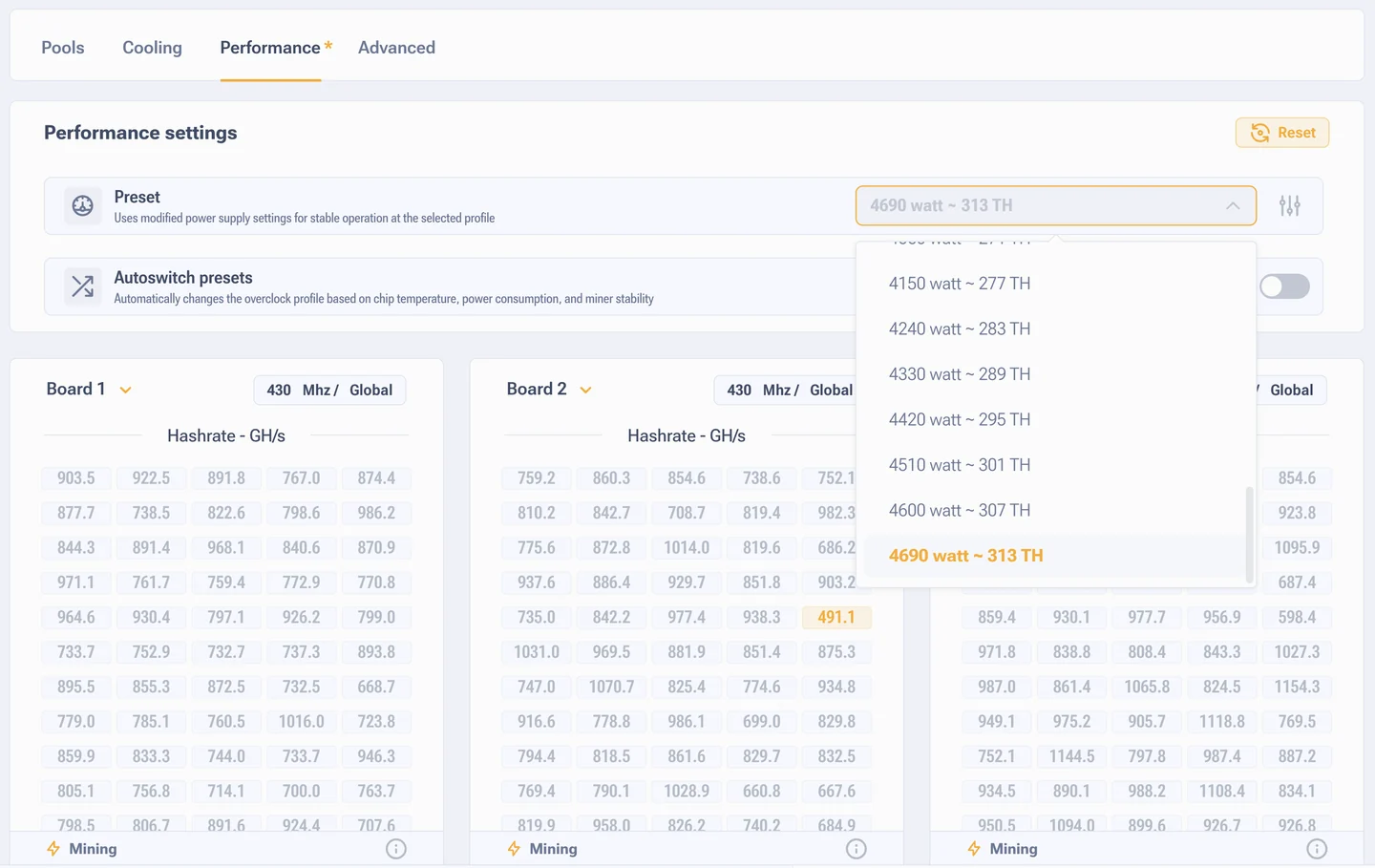
Low power mode
If the goal is the electricity bill and not terahashes, take a profile below stock. On an S19 that usually means losing 5 to 10% of hashrate while saving 15 to 20% of the power draw. The developer claims up to 30% better efficiency in low power mode, in practice on a healthy ASIC with proper cooling we see 15 to 25%.
What else cuts the bill
- Pause instead of idling. When the pool link drops, stock keeps hashing into nothing and keeps drawing power. The firmware can stop mining and drop the fan speed. The opposite behavior is configurable too, see advanced settings, the offline mining item.
- Automatic profile switching. Nights are cooler, so a higher profile fits then, and a lower one during the day. All of it runs without you, the setting is in the performance section.
- SHA-256 optimization. AsicBoost technology cuts energy use on compatible pools, up to 15% claimed. It does not work with every pool, check the status in the pool table, Boost column.
- Order in the cooling. A heatsink clogged with dust raises the temperature, the firmware raises the fan speed, the fans eat watts. A cleanup sometimes gives more than tuning.
How to check the saving is real
The power draw widget on the x19 series and on the L7 shows a calculated value, not a measurement. It comes from a formula for the selected profile and can be off by hundreds of watts, especially on worn chips. On the x21 series, on the S19 Hydro and on the L9 the value is read straight from the power supply, and that one you can trust.
The only honest way to confirm the saving on the other models: a smart plug or a Smart PDU. Measure a day before and a day after, the difference shows up at once. More on where the number comes from in the section on the power draw widget.