


Antminer network settings in AsicBoost firmware
Network: address, DNS and connection test
A ten minute section that then goes untouched for years. But small network details are what break farm monitoring most often.
Hostname
The name the ASIC appears under on the local network, in the DHCP list on the router and in
search utilities. The default is usually Antminer, and when twenty of those sit
on one network, finding the right one turns into a job.
Name them by location: S21-01, S21-IMM-LEFT,
FARM-A3. It is the same rule as for worker names on
pools, and it is better when the names match.
DHCP or a static address
| DHCP | Static IP | |
|---|---|---|
| Setup | Nothing to do, the router hands out the address | You fill in address, mask, gateway, DNS |
| Risk | The address changes after a reboot | An error in the mask or gateway cuts the ASIC off the network |
| Who for | Homes and small setups | Farms, monitoring, proxies, strict firewall rules |
The compromise used most often: leave DHCP on, but reserve the address on the router by MAC. Then the address is fixed and there is nothing to set up on the ASIC.
An example of a static setup: address 172.16.251.96, mask
255.255.255.0, gateway 172.16.251.1. The gateway is your router,
the ASIC reaches the pools through it.
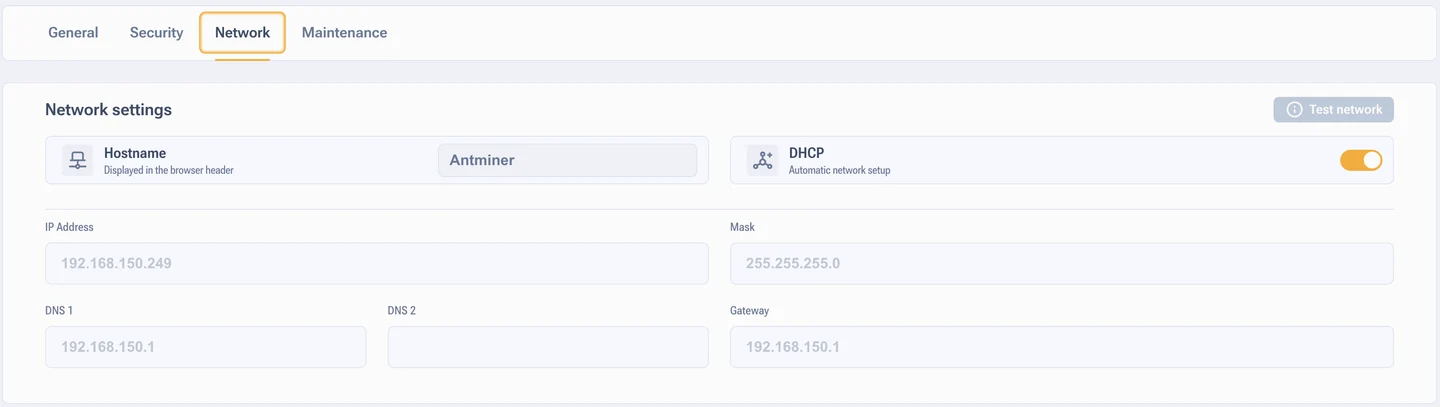
DNS
Without working DNS the ASIC will not turn the pool address into an IP. The log gets a message about failing to resolve the hostname, and hashrate falls to zero on a network that looks alive.
A working pair for diagnostics: 8.8.8.8 and 8.8.4.4.
The example in the documentation also shows OpenDNS 208.67.222.222 paired
with 8.8.8.8. Either option works, what matters is having two addresses.
Network test
The built-in check looks at gateway reachability, DNS operation and internet access. There is a separate window as well where you can ping a specific host.
Use it in three cases: the ASIC does not see the pool, you changed network hardware, you have just updated the firmware. It is faster than guessing from the logs.