


Pools table on the firmware dashboard
Pools table: what each column means
The table shows whether the work of the ASIC reaches the pool. Hashrate in the interface is worth nothing without accepted shares.
| Column | What it shows |
|---|---|
| Pool URL | Pool address and port |
| Status | Active pool or backup |
| Diff | Current share difficulty, set by the pool |
| Accepted | Accepted shares, the main working number |
| Rejected | Rejected by the pool |
| Stale | Late shares, sent after the job changed |
| Last share | Time since the last share was sent |
| Latency | Delay to the pool in milliseconds |
| Boost | Status of the accelerated mode, if the pool supports it |
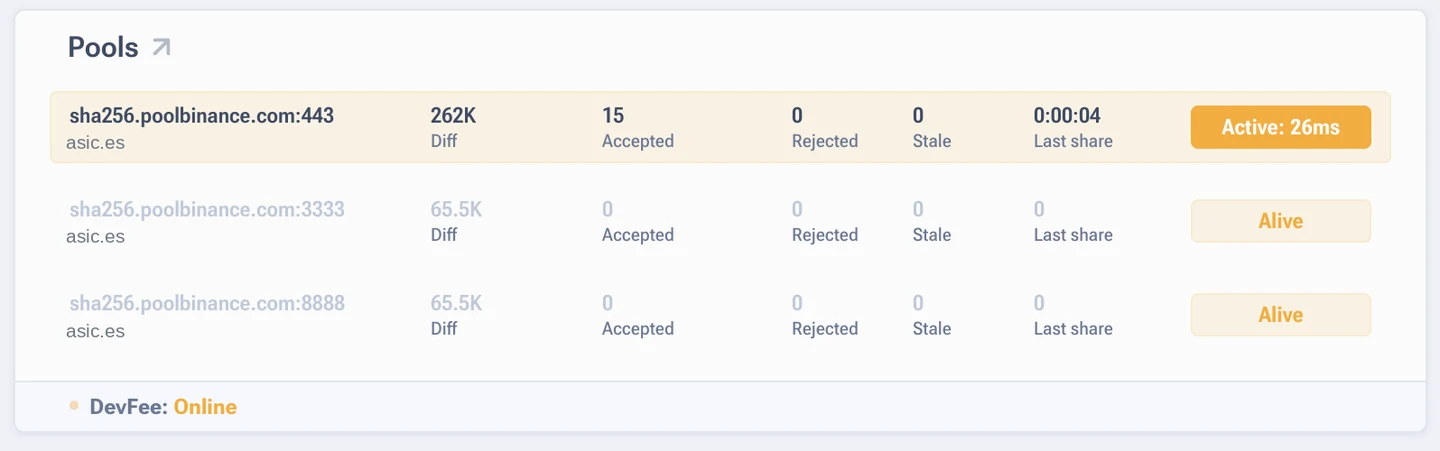
How to read it
- Accepted is growing, Rejected and Stale sit near zero. Normal operation, no need to look further.
- Rejected and Stale are noticeable next to Accepted. Usually the network: high latency, an unstable link, a distant pool server. Less often the worker settings are wrong.
- Last share keeps growing and has passed a couple of minutes. The ASIC stopped sending work. Check hashrate and logs.
- Latency in the hundreds of milliseconds. Take a pool server that is closer geographically, for Spain that means the European entry points.
One percent of rejected and stale shares is acceptable. Five percent and above means you are already losing money on the network, not on mining.
An ASIC works with one pool only
Hashrate is not split between pools. The first one in the list is the main one, the rest take
over when the link drops. How to set up a backup is in the section on pools.
Quick answers
What is a stale share in plain words?
The ASIC finished a result for a job the pool had already replaced. The work is done, but it came late. Often it points to network latency.
The Boost column is empty, is that bad?
It means the pool does not support the mode, or the mode is not in use. It has no effect on stability.