


Hashrate gain with AsicBoost custom firmware
How much hashrate the firmware really adds
The first reason people put on custom firmware. No sales talk below: how the hashrate actually grows, how much of a gain we see in practice, and when there will be none at all.
Bitmain stock firmware holds the chips at one frequency and one voltage, with a margin sized for the worst unit in the batch. That margin is generous, because the maker needs every ASIC to run, not just the lucky ones. Custom firmware takes that margin for itself.
Where the extra hashrate comes from
There are two mechanisms, and they work together.
First: raising the chip clock. SHA-256 hashrate scales linearly with frequency, so 715 MHz instead of 705 MHz is an immediate plus in terahashes. The power supply and the cooling pay for it.
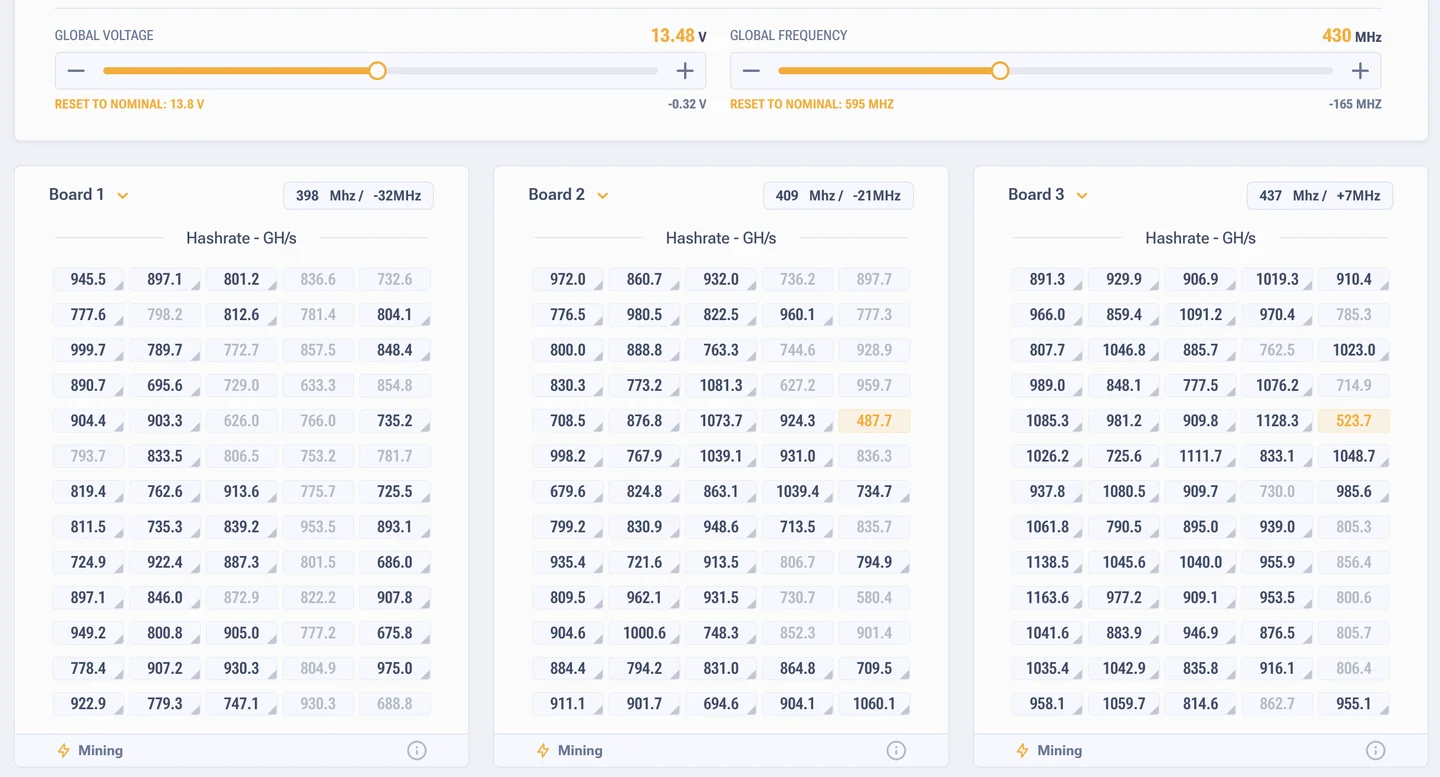
Second, and this one matters more: autotuning picks frequency and voltage separately for every chip on the hash board. Chips from one batch differ, a spread in silicon quality is normal. Stock drives them all the same, so the weak chips throw hardware errors and the strong ones stay underused. Autotuning splits them into their own modes: the weak ones get lowered, the strong ones get raised. That is the second half of the gain, and the drop in HW errors as well. How to set this by hand is covered in the section on performance.
What you get in practice
The +50% figure turns up in custom firmware ads everywhere. It is the ceiling for rare lucky cases, usually on old hardware with a heavily held back stock and a modified power supply. Do not plan around it.
A realistic target at normal temperatures and with the standard power supply: 15 to 20%. That is the range the developer documentation confirms, and it matches what we see in the workshop.
| Model | Stock | After tuning | Power draw |
|---|---|---|---|
| Antminer S19 Pro | 110 TH/s | about 127 TH/s | roughly 3800 W |
| Antminer S19 Pro, aggressive profile | 110 TH/s | up to 140 TH/s | roughly 4500 W |
| Antminer L7 | 8800 MH/s | about 9300 MH/s | a few hundred watts more |
Look at the second row. A gain of 27% looks good right up to the moment you check the power draw: 700 extra watts per ASIC means a separate line, a separate breaker and noticeably more heat in the room. That profile makes sense with cheap electricity and good cooling, in every other case the moderate one pays better. What you pay for the top profiles we covered separately, in the section on wear from overclocking.
What eats the gain
- Dev fee. On the S and T series it is 2.8% of hashrate, on the L series (L7 and L9) 1.8%. Count the gain after the fee, otherwise the economics are just drawn on paper. More in the section on the dev fee.
- Power supply. The standard APW12 on an S19 runs into its limit and goes into protection. Overclocking above stock needs power headroom, otherwise you get dropped chip chains instead of terahashes.
- Temperature. Above 75 °C the firmware starts lowering the profile itself, and at 85 to 90 °C chips degrade fast. In summer, in an unprepared room, the gain melts away.
- Chip quality. An ASIC with a repair history and partly degraded chips overclocks worse than a new one. You can see it in the autotuning results already.
Who gets the gain easily and who does not
Easy: S19 Pro, S19j Pro, S19 XP and S21 in a room with proper extraction, on a healthy power supply, with inlet air up to 30 °C. After autotuning these ASICs settle on a stable profile in one night and then run for months.
Hard: ASICs in a closed garage with no air coming in, units with chips that are already falling apart, builds with no name Chinese power supplies. Here the firmware will show the problem rather than add speed. Still, that is useful too.