


Logs and the diagnostic report in AsicBoost firmware
Logs: where to look for the cause and how to collect a report
When the widgets show something odd and the charts only record the moment, the cause is in the logs. There are four categories, and you should not mix them up.
| Category | What goes in it |
|---|---|
| Status | Mining start and stop, restarts, temperature events |
| Miner | Hash board activity, frequencies and voltages, chip errors, hashrate deviations |
| Autotuning | Search for stable frequencies, stabilisation attempts, rollbacks to safe values |
| System | System boot, service start, updates, kernel errors |
Buttons in the log panel: copy, collect a diagnostic report, clear the logs by category, collapse and close. Clearing is handy before you check a new profile: a clean log reads faster.
History depth is limited by the memory of the controller, so a long archive is not kept in the panel. If you need logs going back months, pull them out over the API into your own monitoring system.
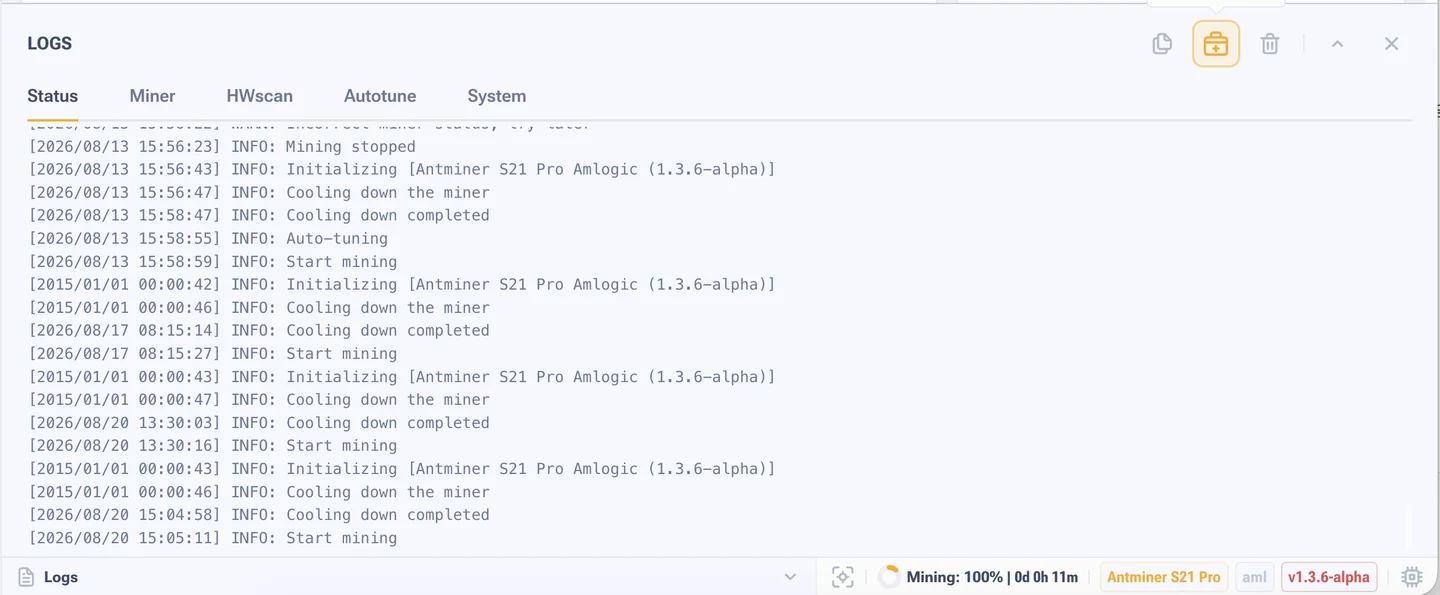
Typical entries
| Entry | What it tells you |
|---|---|
Restarting (2 of 3) | Repeated initialisation attempts. Look at how the third one ended |
Miner initialization failed | The boards did not come up. Often after an update or with wrong settings |
Temperatures [38 - 41] C | The cooling stage at start, the spread across the sensors |
| Countdown 120, 110, 100 | A fixed cooling pause, built into the algorithm of the model |
Specific entries and error codes are taken apart on a separate page, Antminer logs and errors.
Diagnostic report
It is an archive that gathers everything at once: system and mining logs, the state of boards and chips, cooling and power parameters, the pool configuration and your description of the problem.
- Open the technical support section in the left menu, or the report icon in the log panel.
- Describe the problem: when it started, how it shows up, how often it repeats, what you have already tried.
- Press "Create report".
- Download the archive and send it to us on Telegram together with a screenshot of the interface.
If the web interface is unreachable and there is nothing to collect a report with, take the boot log of the control board over UART.