


Advanced settings in AsicBoost firmware
Advanced settings: protection, recovery, danger zone
If the performance section is about overclocking, the advanced settings are about survival. Everything that decides whether the ASIC gets through the night without you sits here.
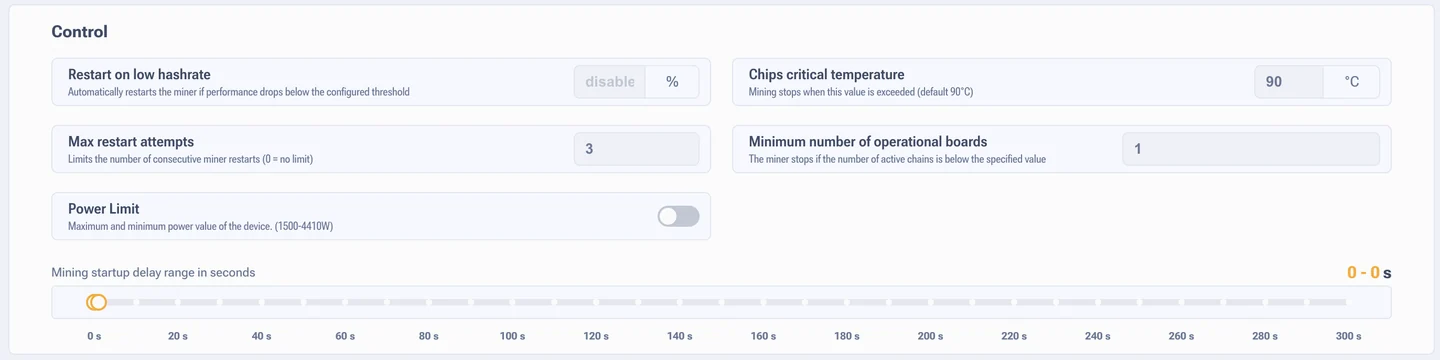
The "Control" block
Restart on low hashrate
The threshold runs from 0 to 99%, where 0 turns the function off. The system compares actual hashrate against the theoretical one, which is counted as chip frequency multiplied by the number of cores and divided by 1000.
Timings: the first check comes no earlier than 5 minutes after mining starts, or 10 minutes with fast start. The check does not run during a preset change, in the first 5 minutes after startup, if less than 3 minutes have passed since the start, and during autotuning. After that it polls every 90 seconds.
What it is for: it pulls the ASIC out of the state where the chips are stuck or a board has hung while mining formally continues.
Maximum number of reboots
Limits how many automatic restarts can run one after another. Zero means an endless loop until performance comes back. The limit saves you from permanent reboots on a hardware fault: the ASIC stops, and you see it.
Critical chip temperature
The default is 90 °C, the adjustment range is 50 to 120 °C. This is a hard stop, not a recommendation. The system looks at the hottest chip, and where per-chip measurement is not available, at the hottest sensor.
Lowering it for no reason does harm: you get extra shutdowns in summer. Raising it is risky: chips degrade long before 100 °C. Reference points for normal heat are collected in the section on the temperature widget.
Minimum number of working chains
How many hash boards have to be up before mining is allowed. Every board is checked whether it is enabled in the settings or not, and whether all chips on it are detected or not.
Example: an ASIC has 4 boards. At a value of 4 it will not start if one has died. At a value of 3 it carries on with the three good ones. Which board dropped out is visible in the board table.
Delay before mining starts
The range is 0 to 300 seconds. You set a window, for example 160 to 200 seconds, and the system picks a random value inside it for each ASIC. The pause runs until the power supply is initialised.
The point is randomisation: after a power cut the whole farm starts staggered instead of all at once, and the grid does not take an instant peak. The sensors also get time to settle.
The "Other" block
Fast start
Speeds up initialisation by dropping part of the delays. Only for hardware you trust. The effect depends on the model: on the S21 Pro the cooling stage is fixed at 120 seconds, and fast start gives nothing there.
How to tell whether it will help: read the startup log. A line like
Temperatures [38 - 41] C with a shrinking spread means the ASIC really is
cooling down and fast start will help. A countdown of 120, 110, 100 means a hard coded
pause, and there is nothing to work around it with. Startup lines are read in the logs.
Check domain balance
Watches how even the voltage is and how stable the chips are inside the domains. If a domain's hashrate falls below 50% of the calculated value, the system force restarts the chips on that chain.
Especially useful when the temperature swings: it got cold, then warm again, and the chips do not recover by themselves. The function does not run with autotuning on, before full initialisation, during a preset change and in the first 2 minutes after startup. After that the check goes every 10 minutes. Keep it on.
Check chain integrity
Polls every chip on the boards and waits for a reply. The reaction to a chip that does not answer depends on the hardware: on ASICs with PIC controllers only the problem chain is switched off, on ASICs without PIC the whole unit is switched off.
Check voltage settings
Works only on models with PIC. It fires on any voltage change: by hand, by autotuning or by the system. Through the PIC it measures the actual voltage from the power supply on a given chain, and work stops if it does not match the set value.
What is monitored is the voltage from the power supply to the chain, not the internal voltage of the chips. It protects against bad profiles and against firmware errors.
Adapt voltage to temperature
Adjusts the voltage on the fly to match current heat so that hashrate does not drift. The logic: in automatic cooling mode, if fan duty has risen by 4% since the previous reading, the system tries to lower the voltage. In manual and immersion mode the voltage goes down when temperature rises by 3% and up when it falls.
The function waits and stays out of the way until the ASIC has initialised, until the final working voltage is set, while raised startup voltage is enabled, during preset switching and during autotuning.
Useful with unstable cooling. If your conditions are even all year round, people usually turn it off.
Quiet mode
Holds the fans at 50% during startup and shutdown. Chip cooling then takes twice as long. A thing for living spaces and test benches, pointless on a farm.
Auto retune on chain break
On a chain break error the system goes further than a restart: it drops the overclocking profile and runs autotuning again. It fires for two reasons: chain integrity is broken, or the power supply has hit its power limit.
Continue mining after a reboot
On: an ASIC that was paused carries on mining by itself after a power cut. Off: the system remembers the pause and stops again. On farms this is usually on.
Lower the profile on error
On overheating or a chain break the preset drops one step. About the break: the power supply has a limit, above it the supply goes into protection, the chips stop answering, and the system reads that as exceeding power. If the new profile has not been tuned yet, tuning starts itself.
Offline mining
When the internet drops, the ASIC keeps hashing and draws the same power as before. All the hashrate from that period goes nowhere, shares are not sent to the pool.
Why this is needed at all. First: in hard frost, stopping an ASIC can leave the hardware overcooled. Second: at a large site, hundreds of ASICs stopping at once dumps the load off the grid, and switching them back on gives a sharp spike. In every other case the function just burns electricity.
Automatic chip power control
Frequency balancing inside the rows: the system finds chips with poor heat removal and shifts frequency over to their cooler neighbours. Total row hashrate does not drop, and the overheated chips live longer. It helps run high profiles with an imperfect layer of thermal paste.
Danger zone
Ignore faulty temperature sensors
The sensors split into front ones, at the cold air inlet, and rear ones, at the outlet where the heat is highest. The option covers the front ones only: if they break, the ASIC carries on. If even one rear sensor fails, mining is stopped immediately, and there is no way around that.
Ignore chip sensors
For models with per-chip measurement: L9, S21, T21 and their relatives. Sensors like these sometimes report plainly false values, jumps of 50 degrees and more. The option throws out bad readings from individual chips, while overheat protection keeps working off the general board sensors.
Allow chains to be switched off without PIC
Lets you switch off hash boards on ASICs without PIC controllers. The problem is that without PIC a board cannot be de-energised in software. The only way to "switch it off" is to hold it permanently in reset, that is, still under voltage.
By the technical guidance of Bitmain specialists the method is very dangerous: with a serious fault, holding a board in reset for a long time can burn components out. It is used for deep diagnostics and entirely at the owner's risk.
Raise chip voltage at startup
A temporary voltage lift during initialisation. Some chips need it just to get their cores running at all. It is kept separate because permanent work at raised voltage is risky: temperature climbs, and in heat the power supply can hit its limit and go into protection.
When overclocking above stock parameters this function is best turned off, that is, set to 0.
Bad chip hashrate threshold
The criterion the tuner uses to decide that a chip is hopeless. In the first stage of tuning the performance of every chip is measured: if it is below the threshold, the chip is marked bad, gets a reduced frequency and is not optimised any further.
A high threshold, 80% for example, makes the tuner stricter: it will try to pull more chips up to nominal. A low threshold leaves more chips running at half strength.