


Cooling setup in AsicBoost firmware
Cooling: modes, target temperature and limits
A section people open for three reasons: too loud, too hot, or non standard cooling fitted.
Three modes
| Mode | How it works | Who for |
|---|---|---|
| Auto | The firmware holds fan speed itself to keep chips at the target temperature | Almost everyone |
| Manual | Fixed PWM, for example 40, 70 or 100%, whatever the heat | Test benches and special cases |
| Immersion | Fans off, control runs off liquid temperature | Immersion, no fan emulators needed |
Manual mode looks tempting, but it takes away the ASIC's ability to react to heat. In normal operation leave it on auto. Actual speed for each fan is in the cooling table.
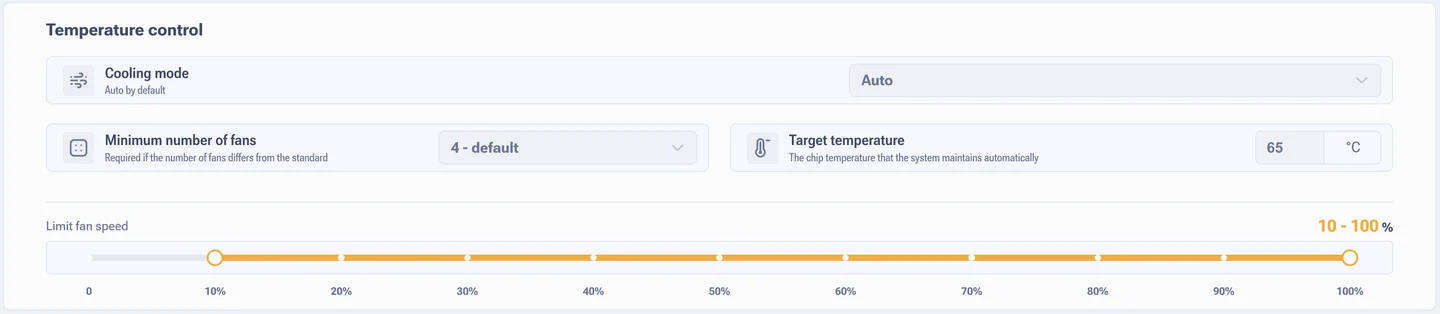
Target temperature
The default is 65 °C and it suits every model. The firmware drives the fans so that chips stay near that mark. Reference points from real work: 60 to 65 °C is fine, around 70 °C is acceptable, from 75 °C step in, from 85 to 90 °C chips degrade fast.
Dropping the target to 55 °C makes no sense: the fans go to maximum, noise climbs, and the gain in service life sits inside the margin of error.
Minimum fan count
The default is 4, and for a standard Antminer that is the right value. The parameter says how many fans have to be running. If there are fewer in fact, the ASIC warns you, cuts power or refuses to start.
There is a second use for it. When a fan's Hall sensor breaks and the speed reads wrong while the impeller still spins, lowering this parameter lets you keep working without switching the protection off entirely. A stopgap until the fan is replaced, not a permanent setting.
Fan speed limit
A slider from 10 to 100%. The lower bound stops the fans from halting altogether, the upper one holds down noise and wear.
Limits on hydro versions
Hydro ASICs will not start if the spread between the highest and lowest chip temperature is more than 10 degrees, if the highest chip temperature is above 60 °C, or if the temperature is below 20 degrees. This is not a fault, it is protection: starting the pump and the chips with a temperature skew is risky.
In practice that means in winter, in a cold room, you warm the hydro loop first, and with a wide spread you go looking for an air pocket or a blocked channel.