


Pool setup in AsicBoost firmware
Pools: three servers, priority and switching
It is quick to set up and it rarely breaks, but this is where people most often lose a day of work over one typo in a worker name.
Fields
| Field | What to put in | Example |
|---|---|---|
| URL | Pool address together with the port | btc.viabtc.com:3333 |
| Worker | Usually the account and the worker name through a dot | wkr5b.s19 |
| Password | Most pools take any value | x |
A worker name may hold latin letters, digits, underscore and hyphen. Empty fields mean the pool is not used.
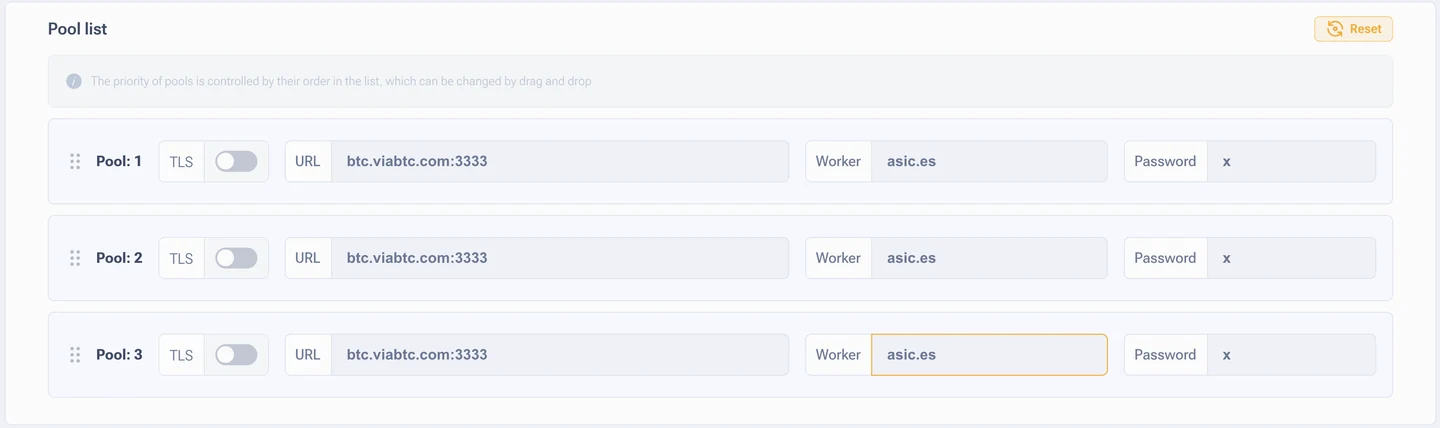
Priority and switching
The order in the list is the priority. The ASIC always tries to work with the first pool, and moves to the second only when the link drops, when accepted shares stop coming for a long time, or on protocol errors. The order changes by dragging the rows.
Hashrate is never split between pools. At any moment the ASIC works with exactly one pool, and that pool is the one marked active in the pools table.
How it is set up in practice
- Two pools at minimum. One server goes down, the work carries on. Cheap insurance.
- Different domains or addresses even for the same pool. If one node of the pool drops out, the second address saves you. Fully identical rows make no sense.
- Clear worker names.
s21-hall-a-03reads in the pool statistics far better thanworker1. In half a year you will thank yourself. - A nearby server. For Spain take the European entry points, latency has a direct effect on the share of late shares.
After changing the pools it is enough to wait for the automatic apply, or to press "Restart mining". A full reboot is not needed.
Pools after the firmware is installed
By default the pool settings carry over from the stock firmware. Check them right after installation: worker names often stay from the previous owner, and on used ASICs that is a surprise of its own.