


Chip wear and stability under ASIC overclocking
Wear from overclocking: what the terahashes cost
No sales talk here. Overclocking is work beyond the factory mode, and it has a price. The point is to pay it knowingly.
What actually wears out
Silicon degrades from heat and voltage, and heat counts for more here. A chip that runs for years at 60 °C will outlast a chip running at 80 °C by a wide margin. Hence a simple conclusion: overclocking with good cooling is far safer than moderate overclocking in a stuffy room.
The second thing that suffers is the power supply. Running at the power limit shortens the life of the capacitors, and a degraded supply starts to sag on voltage, which brings errors on the chips. The circle closes.
Signs that an ASIC is running on the edge
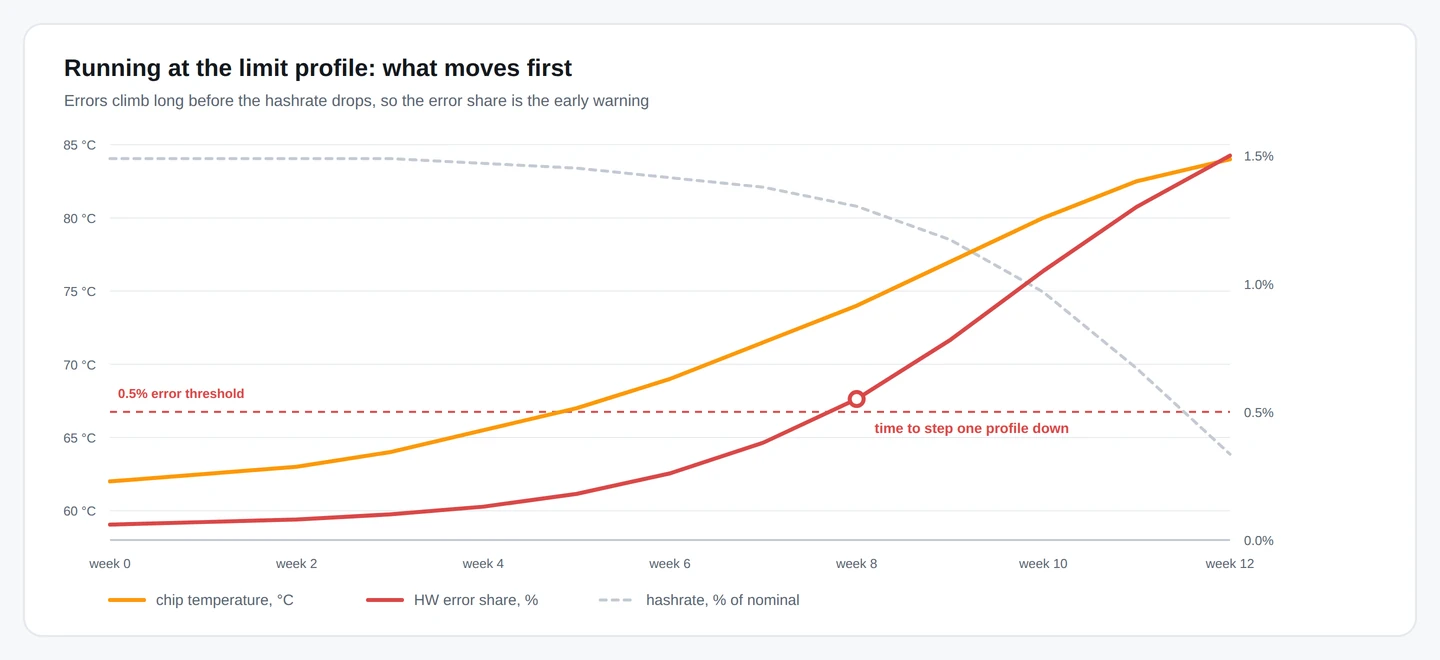
- The error rate is above 0.5% and slowly climbing.
- The firmware drops frequencies on individual boards more often than it used to.
- Occasional restarts in the logs with no clear cause.
- Fan duty has gone up at the same room temperature.
- Efficiency in J/TH creeps up month after month.
Any one of these signs means it is worth stepping down one profile. Losing a couple of percent of hashrate is cheaper than replacing a hash board.
What matters for stability
| Factor | Why it matters |
|---|---|
| Power supply headroom | Past the limit the supply goes into protection, and the firmware sees chains drop out |
| Cooling | Temperature directly sets how fast the chips degrade |
| Mains quality | Voltage sags give errors that look like a chip problem |
| Ambient conditions | Dust, humidity and temperature swings matter more than they seem |
On balance
In most cases a profile with a bit of headroom brings in more money than the maximum one. Count it this way: an ASIC on the maximum profile puts out 4% more, but once every two days it goes into a restart and loses 20 minutes. The arithmetic does not favour the record.
One more honest detail: autotuning is not all powerful. Some chips stay unstable, and you either live with a lowered frequency on them or turn the overall settings down. That is a normal outcome, not a sign of bad firmware.