


Firmware security: passwords, SSH and API keys
Security: password, SSH and access keys
An ASIC on a shared network is a computer with money inside. Three settings in this section close off almost every real way hashrate gets stolen.
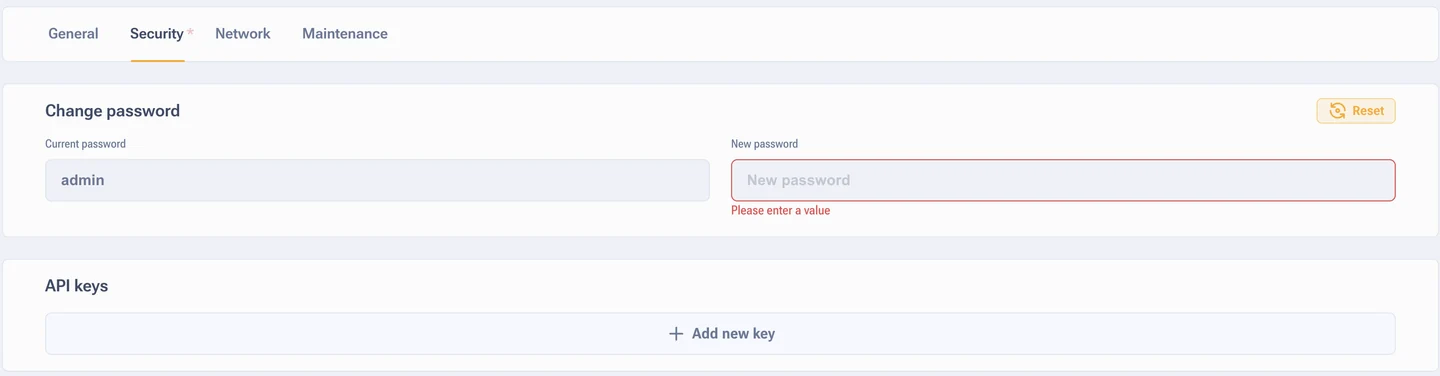
Web interface password
By default on AsicBoost firmware it is admin. On Bitmain stock firmware
the password is a different one, root. These are two separate firmwares,
not two variants of one password, and the confusion costs people hours of diagnostics.
You have to change the password if the ASIC sits on a shared network, if it came back from hosting, or if installers had access to it. Everyone knows the default password, including the authors of malware that scans networks looking for miners.
SSH control
Three options: change the standard passwords, change the port, turn SSH off completely. If you do not use the console, turn it off. That closes the most popular password guessing route in one move.
API keys
Keys give external systems access to the ASIC without a browser: monitoring, farm managers, proxies, pools. There are two types of key.
| Key | Access level | What it is for |
|---|---|---|
| Node key | The whole device | Central monitoring, work through proxies and control panels |
| Miner key | The mining process | Start and stop, mode changes, reading hashrate and board status |
The add button creates a new key, and each one has a delete icon beside it. The practice is simple: a separate key for every system, not one universal key for everything. You connect a service for a while, then delete the key.
Short checklist
- Changed the web interface password right after the install.
- Turned SSH off, or at the very least changed the port and the password.
- Went through the API key list and deleted the ones you do not remember.
- Made sure the ASIC does not face outward directly: access over VPN or the local network.
- Checked the built-in antivirus, especially on used hardware. More in the section on built-in protection.