


Consumption widget in AsicBoost firmware
Consumption: where the number is measured and where it is calculated
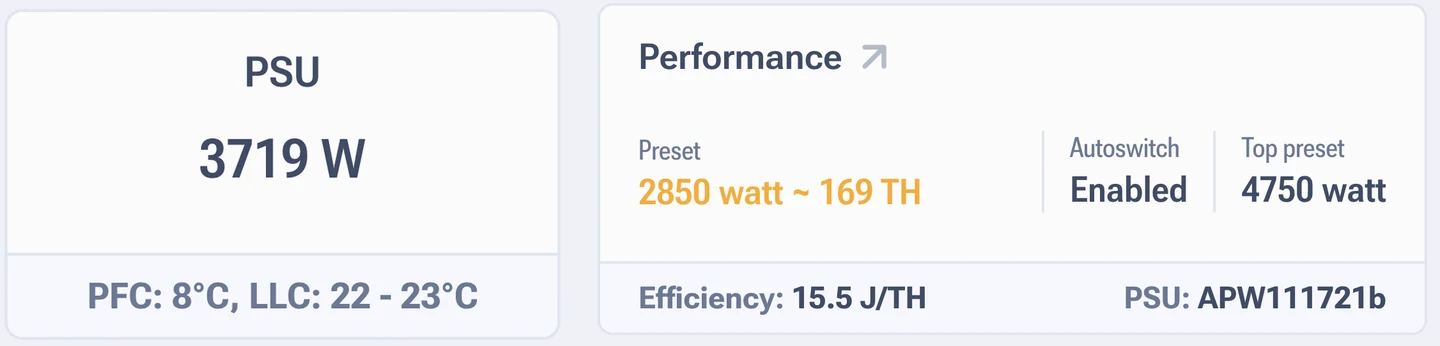
The same widget shows different things on different models: on some it is a reading from the power supply, on others a value worked out from a formula. The gap runs into hundreds of watts.
| Models | What is shown |
|---|---|
| The whole x21 series, S19 Hydro, L9 | A reading taken from the power supply interface bus |
| The whole x19 series, L7 | A calculation based on the selected autotuning profile |
On newer power supplies such as the APW171215c the firmware gets data straight from the PSU, and the temperature of the power components is read from there too. That number you can trust.
The APW12 fitted in air cooled S19 units has no interface bus. The firmware works out consumption from an empirical formula tied to the profile. The formula knows nothing about room temperature, chip wear or the state of the power supply itself. A gap of 200 to 400 W against the socket turns up regularly.
Why it shows zero
Zero in the widget on the x19 series means no autotuning profile is selected. There is nothing to calculate from, the formula needs a profile. Pick a preset in the performance section and the value appears.
How to find out the real consumption
A smart plug or a Smart PDU, there is no other way. Measure a full day of work and compare it with the widget. If you are planning the wiring for a farm, work from the measurement and add headroom: breakers and cable are sized for the peak, not for the average. Power ranges are collected in the section on power.
On the S19 the widget is good for comparing profiles against each other: it honestly shows that profile A is heavier than profile B. For the electricity bill, take the socket reading.