


ASIC miner: a full guide to cryptocurrency mining hardware
asic.es knowledge base
Mining hardware in plain words: how it works, what to buy, how to run it
What an ASIC is and how it differs from a computer, what it is built from, which algorithms and coins it mines, how to match a miner to your tariff and your room, how to wire it up, service it and repair it. The guide runs on a catalogue of 212 models and 11 algorithms, with links to the write ups on manufacturers, networks and the profitability sums.
The short version
- ASIC is the slang name for industrial cryptocurrency mining hardware, usually built for one algorithm. The name comes from the Application-Specific Integrated Circuit inside. It computes thousands of times more cheaply than general purpose hardware. What an ASIC is
- The miner is tied to one network for its whole working life. You pick the algorithm and the coin first, the model only after that. Algorithms and coins
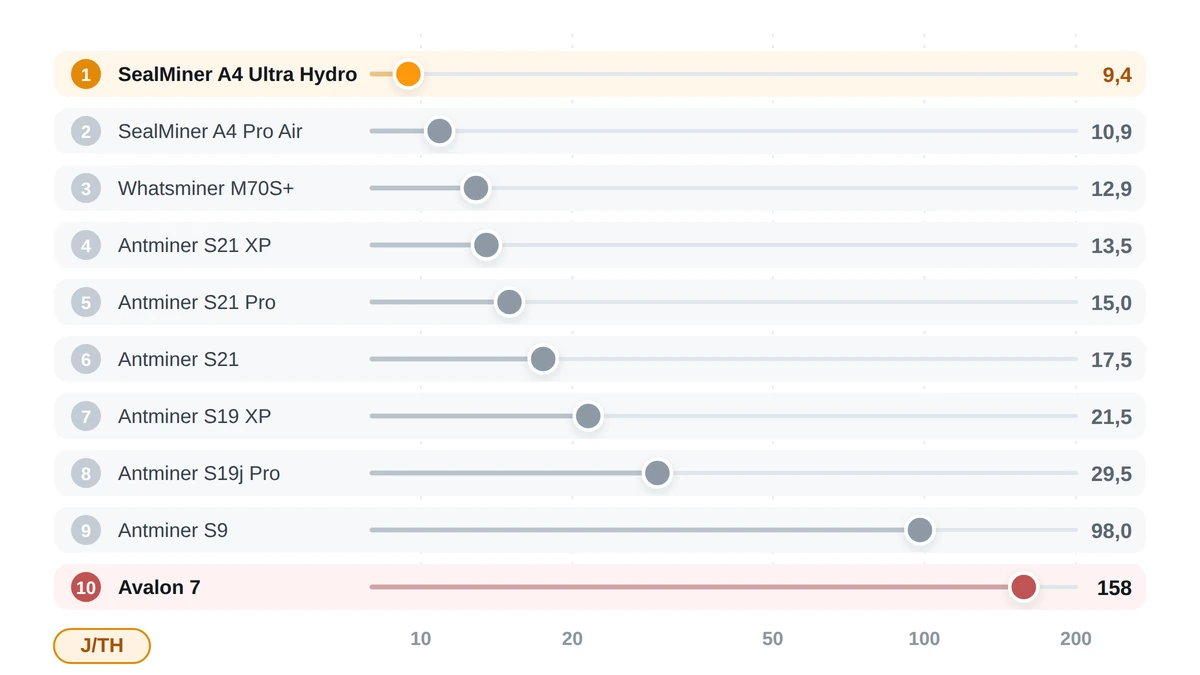
- The number that matters on a spec sheet is not hashrate but energy efficiency in J/TH: inside SHA-256 the catalogue spread is close to seventeenfold. Specifications
- Your electricity tariff sets the break even point, so the sums are always personal. How to choose and the profitability calculator
- An industrial miner is as loud as site plant, and every watt it draws ends up as heat in the room. Ventilation and cooling
- Custom firmware gives you autotuning, power profiles and undervolting, and you can roll back to stock at any time. It only asks you to watch temperatures. Firmware
- More than half of all faults are dust, cables, the PSU and pool settings, not dead chips. Faults
- Three sums right here on the page: a hashrate converter, an electricity bill and a miner picker by algorithm. Tools
01What an ASIC is
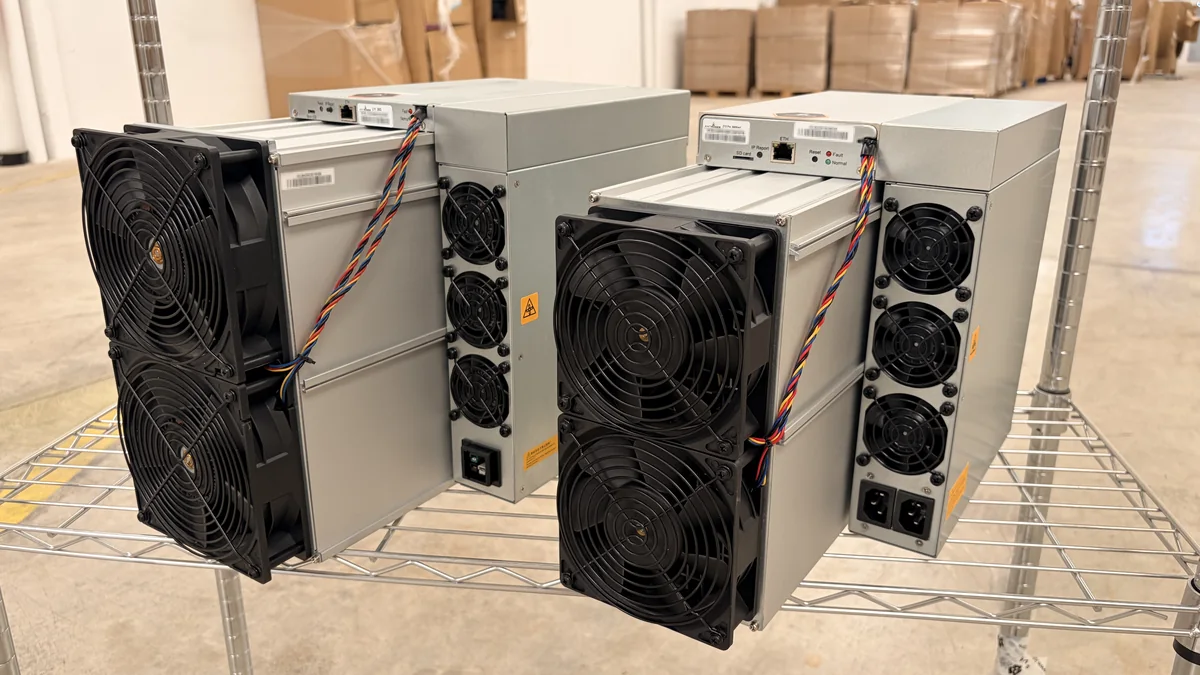
Buyers all ask the same thing: it is just a very powerful computer, right? No, and the difference is not in the power. ASIC stands for Application-Specific Integrated Circuit, and the word that matters there is specific. In mining, ASIC is above all the slang name for the complete industrial mining unit, and by extension the chip inside it: case, power supply, fans, control board, several hash boards with dozens or hundreds of those chips each. The logic of the calculation goes into the silicon when the die is drawn. After that it never changes: not with firmware, not with settings, not for money.
That is where the split with a computer starts. A processor runs any program because it reads instructions from memory and switches between jobs: this millisecond it recalculates a spreadsheet, the next one it serves the network, then it draws the interface. A graphics card is built differently. It does thousands of identical operations at once, but its cores stay programmable, so the same card renders a scene today and takes on different maths tomorrow. A mining chip has no instruction set, no general arithmetic unit, no cache. It does one thing: take the input and give back the result of the hash function it was drawn for.
What a circuit for one job actually means
An engineer takes an algorithm, say SHA-256, unrolls it into a circuit of logic gates and repeats that circuit on the die as many times as area and heat will take. On an ordinary processor most of the area goes to cache, instruction decoder, branch predictor, memory controllers, buses. A mining chip needs none of it. The input for one attempt is under a hundred bytes, the chip almost never reaches for external memory, and there are no branches at all. The area that frees up goes to extra cores, while clock and voltage stay low, because the win comes from core count.
An analogy from the shop floor. A mill and a lathe will make any part you like, each to its own drawing, with setup, in tens of minutes. A stamping die built for one single part turns it out in a second, needs no setup and can do nothing else. An ASIC is the stamping die. Retooling it is impossible: another part needs another die, so another piece of silicon and a new production run at the fab.
- TransactionsTransfers from the network gather in a queue and wait for room in a block.
- ASICThe chip takes the block template and runs through variants, it can do nothing else.
- ComputationOne attempt is one run of the hash function, and attempts number in the trillions per second.
- HashThe result of a run. What is needed is one that comes out below the network target.
- New blockA hash that fits closes the block, the network checks it and accepts it.
- RewardThe block reward and the transaction fees go to whoever found it.
Six steps of one round. The asic covers the middle only, the network does the beginning and the end.
The ladder leaves out the pool. The network gathers unconfirmed transactions into a candidate block, the pool turns that into a job and hands it to the miners connected to it, and the ASIC runs through the service number in the block header. The same cycle step by step is in how an ASIC works, the money side in the Proof of Work section.
Where the gain of hundreds and thousands of times comes from
The gap with general purpose hardware is not counted in percent. One modern chip holds from a few hundred to a few thousand independent hash cores, and each runs the rounds of the function down a pipeline and returns a result every clock. A processor needs dozens of instructions for the same operation, register traffic, scheduler work. The multipliers stack on top of each other:
- specialisation: nothing spare on the die, almost the whole area is useful logic;
- parallelism: thousands of cores per die, dozens of chips per hash board, several boards in the case;
- operating point: low voltage at a moderate clock, where the energy of one calculation bottoms out;
- process node: the finer the node, the smaller the gate capacitance and the loss on every switch.
You see it in the efficiency figures. The best SHA-256 miner in the catalogue spends 9.45 J/TH, the thirstiest one still turning up spends 157.53 J/TH, almost a seventeenfold spread inside one algorithm. General purpose hardware sits orders of magnitude behind on this job, and nobody has counted it seriously for years. Architectures are compared in ASIC against GPU, FPGA and CPU, miners side by side in the profitability calculator.
What you pay for specialisation is room to manoeuvre. A SHA-256 ASIC mines bitcoin and the other coins on that algorithm, and it will never move to Scrypt or kHeavyHash, not with firmware, not with settings: the logic blocks for that are physically absent. The catalogue holds 212 models across 11 algorithms, and every model stays tied to its own algorithm for its whole service life. When a coin stops being mined, the miner either moves to another network on the same algorithm or goes for scrap. What hardware exists for each one is in the algorithms section.
02History: from processor to purpose built chip
It started on ordinary desktop computers, and a few years later the sums were running on dies from the same fabs that make phone processors. Each handover follows one logic: once a job becomes a mass job and stops changing, a narrower device takes it over and the previous generation leaves the market.
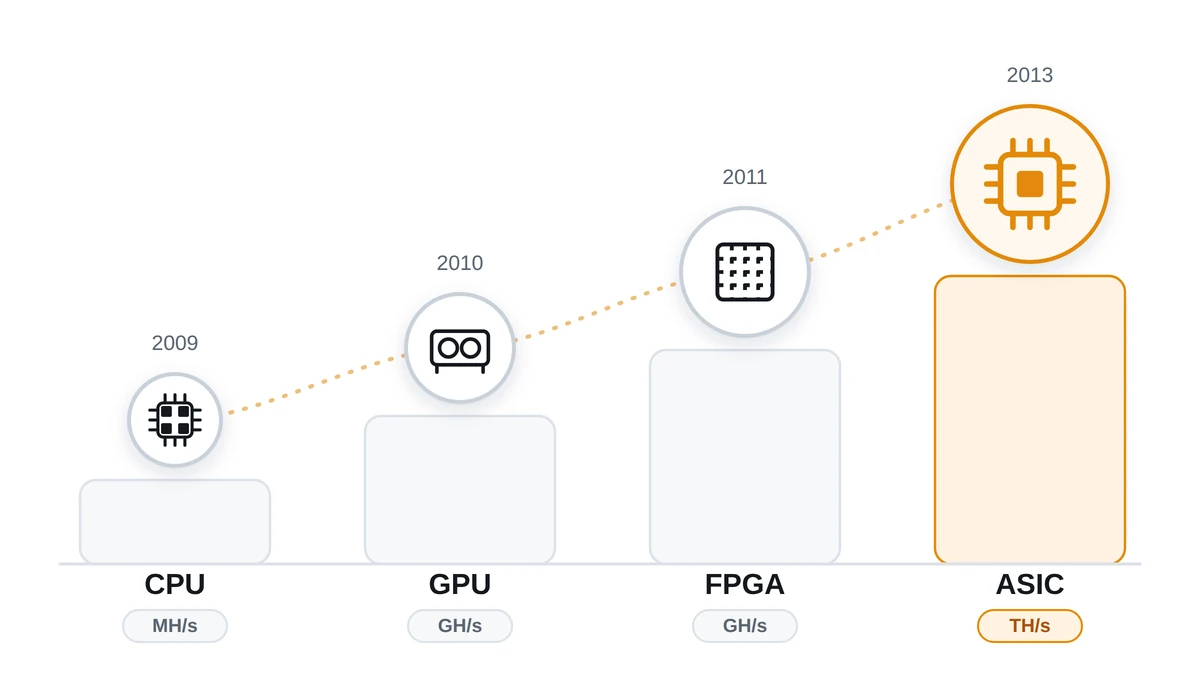
Every step gave tens of times in speed and several times in energy, not percentages. The old kit went out fast, because network difficulty follows the combined power of everyone mining: more efficient hardware arrives, the old stops paying for its electricity and gets switched off.
2009: processors
The bitcoin network started in January 2009, and the first blocks were counted by the central processors of ordinary PCs. The miner lived inside the wallet, no separate hardware was needed, speed was measured in megahashes per second. While there were few participants and difficulty sat on its floor, that was enough to find blocks on your own. Economics as we know it did not exist: you spent the electricity of a home computer, and the reward had no market price.
2010: graphics cards
In 2010 miners for graphics processors appeared, and that was the first real jump. SHA-256 falls nicely onto mass parallelism: a card carries hundreds of simple cores, beat a processor by tens of times and won several times over on energy per calculation, though it pulled more from the wall. Farms of several cards on one motherboard followed, with risers and open racks. That was also when people first found out, in their own living rooms, that the heat has nowhere to go. And that was when pools took shape, because finding blocks alone had become too rare an event.
2011: FPGA
The next step up is the field programmable gate array, the FPGA. Inside a chip like that there is no ready made circuit, only an array of cells and configurable wiring between them, set up for the job you need. FPGA builds for mining showed up around 2011. On raw speed per chip they did not always beat a graphics card, but on energy they won several times over: the hashing circuit was laid out directly, with no general pipeline and no video memory. The step was a short one. FPGAs showed that hardware costs less than software here, and the next question came straight away: why pay for reprogramming if nobody plans to change the algorithm.
2013: the first production ASICs
The first production mining ASICs shipped in 2013. Canaan sent miners out among the first, with the Avalon series, then came Bitmain with the Antminer line, then the rest, and later MicroBT grew up among them with Whatsminer. Exact dates of those first shipments are still argued about, the order of events matters more. The difference with the previous generation was no longer a matter of degree: a fixed circuit produced a hash orders of magnitude cheaper in energy, and graphics cards left SHA-256 in about a year. Who is who is collected in the brands section, and the earliest player has its own write-up in Canaan.
The race down the process nodes
From there the story became a race for nanometres and for joules. The first dies were made on nodes around 110 nm, then came 55, 28, 16, 10 and 7 nm, and today's chips are made at 5 and 3 nm. The circuit design moved with them: lower supply voltage, denser pipelines, cleaner clock distribution across the die, chips binned by quality. Efficiency followed this path:
- the first production units burned thousands of joules per terahash;
- the generations of the mid-2010s came down to hundreds, and models like that are still in the catalogue, the worst at 157.53 J/TH;
- current air cooled miners sit somewhere between 11 and 20 J/TH;
- the top of the catalogue is 9.45 J/TH, a single digit number at last.
The demands on the site changed with them. Early miners ate hundreds of watts and went straight into a domestic socket. The catalogue now holds both 65 W and 20,000 W, and SHA-256 hashrate stretches from 4 TH/s to 1,350 TH/s. The top of that range is an industrial load: its own line, its own breaker, air in and air out worked out in advance, often three phase as well.
Where it stands now: water and liquid
Air hit its ceiling first. Hydro versions take the heat off the board with a heat exchanger, so power density goes up and noise drops a long way. Immersion builds go further and sink the boards in dielectric fluid. Both are taken apart in the hydro cooling section and the immersion section. The efficiency leader of the catalogue, those same 9.45 J/TH, uses liquid heat removal, though the best air models are only just behind now. Firmware grew in weight too: factory frequency control is cautious, which is why a separate class of custom firmware with hand tuned modes appeared.
03What an ASIC is made of
Inside, an industrial ASIC is laid out much the same way whoever built it. A metal tube of a case, a stack of hash boards in it, fans at both ends, the PSU along one side, a small single board computer. Eight parts. Almost every symptom that reaches the workshop comes back to one of them, so here is each: what it does, what numbers it carries, where it breaks.
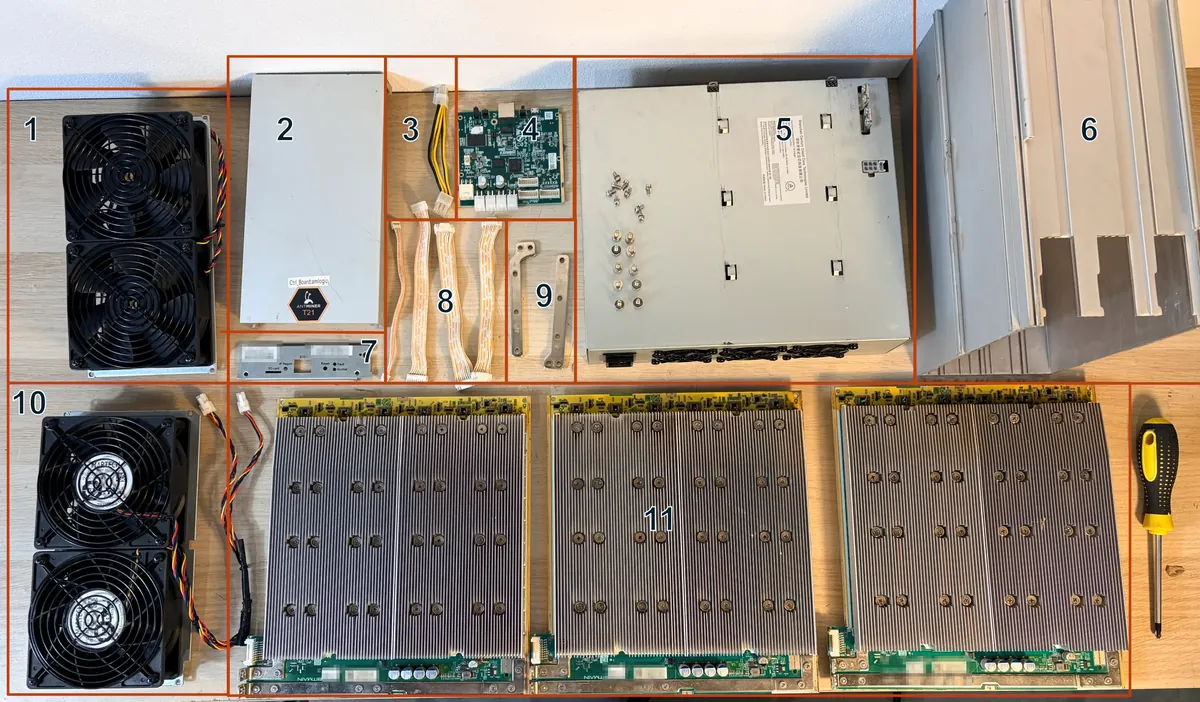
- Front fans, air intake
- Control board cover
- Control board power cable
- Control board
- Power supply
- Aluminium chassis
- Control board front panel
- Data ribbon cables, 18 pins
- Power terminals
- Rear fans, air outlet
- Three hash boards
The control board
The control board is a single board computer that runs the miner. On it sits an ARM based SoC, usually 256 to 512 MB of RAM and 1 to 8 GB of flash (eMMC or NAND) with a Linux firmware. It brings up the network over Ethernet, takes work from the pool, hands it to the hash boards and sends the solutions back. In the same loop it polls the sensors, drives the fans and serves the web interface.
One manufacturer uses several types of control board, and they are not interchangeable: each type needs its own firmware file. At Bitmain that is the BeagleBone and Xilinx generations plus the boards on Amlogic (AML) chips. Other brands have their own. You read the type off the markings on the board. The model name tells you nothing here.
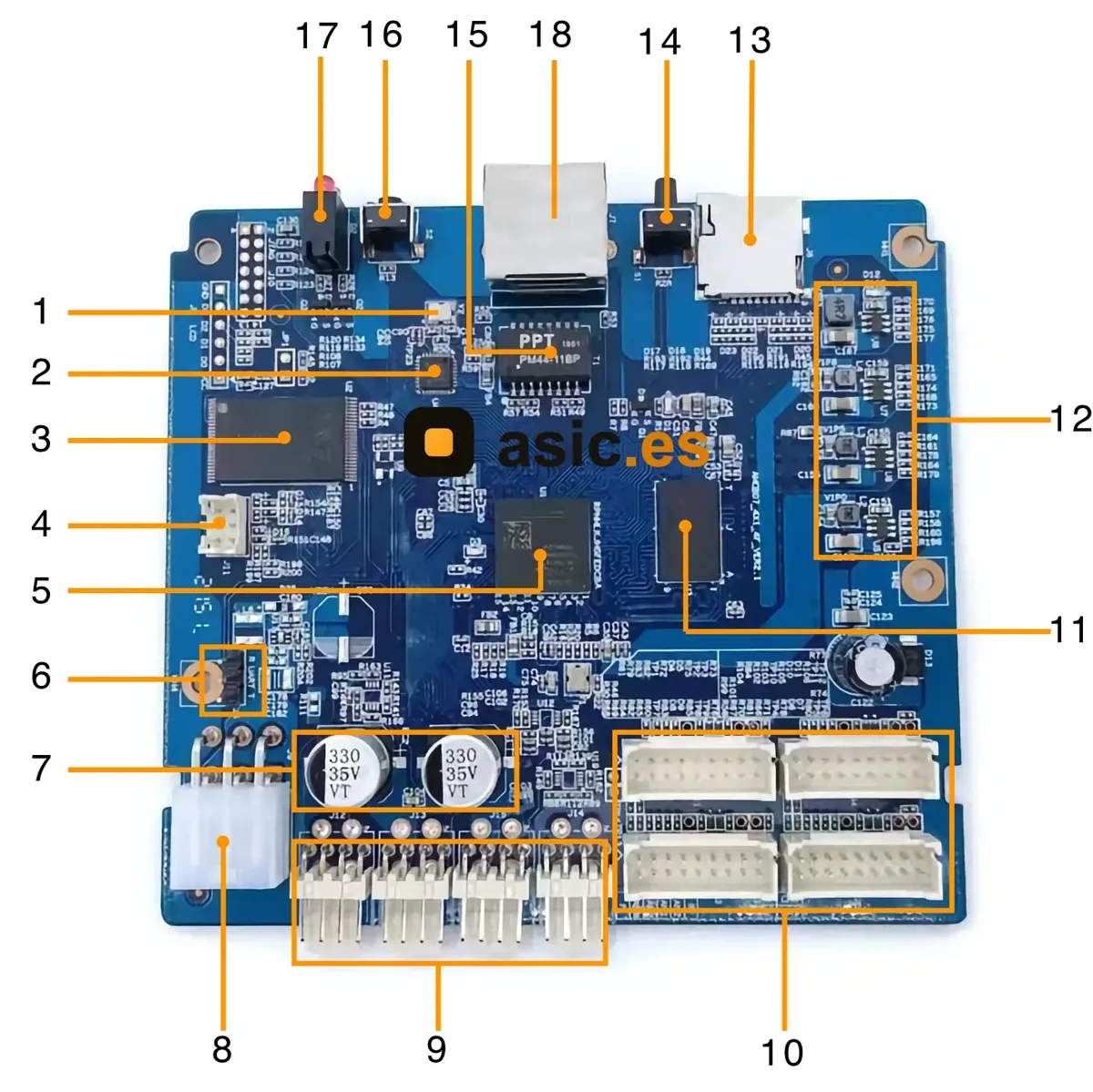
- 25 MHz crystal oscillator
- Ethernet transceiver
- Flash memory
- 4-pin PSU data connector
- Main control processor
- External data interface
- Filter capacitors
- 6-pin power connector
- Four fan connectors
- Four hash board ribbon connectors
- DDR memory
- Power control section
- SD card slot
- IP Report button
- Ethernet isolation transformer
- Reset button
- Indicator LEDs
- RJ45 connector
Amlogic boards ship locked from the factory: the bootloader checks the signature, and a third party build will not install until the board is unlocked. That is a separate procedure, written out in the section on unlocking AML control boards. Factory images for rolling back sit in the stock firmware catalogue.
Hash boards
A typical miner has three. Some have two, some four. A hash board is a long PCB with a row of ASIC chips on it, and all the useful work happens there. The chips sit in a chain: work arrives from the control board at the first chip, then travels neighbour to neighbour, and answers come back the same way.
On the power side the chips are grouped into domains wired in series on DC. The board takes roughly 8 to 20 V DC depending on the generation, and PSUs in the latest Antminer series put out 12 to 15 V. A single chip gets a fraction of a volt out of that, around 0.3 to 0.5 V. The scheme saves copper and keeps working currents down. It has a flip side.
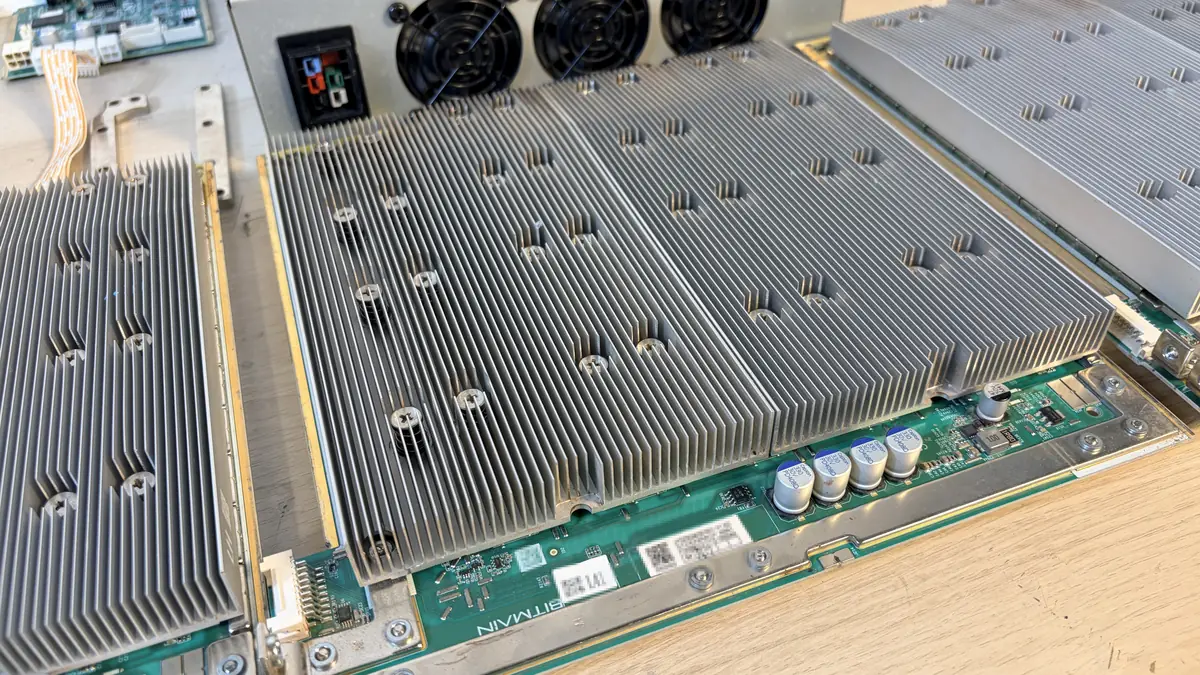
One burnt chip breaks the logic chain and the power path at once. After that the controller sees only part of the chips (75 out of 76, say) or no board at all, and the whole hash board drops out: a third of the hashrate gone in a second. Symptoms are worked through in the section on faults, chip level replacement in the repair section.
ASIC chips
ASIC stands for application specific integrated circuit. The die is designed around one function, in a miner around one hash function, SHA-256 for example. Its clock speed is modest and the throughput is still enormous. Three things add up to that. The full breakdown of Bitmain chips by generation, with chips per board and domains, lives on the Antminer chips page.
- Nothing spare in the chip: no instruction decoder, no cache, no scheduler, no general purpose I/O. The logic of the algorithm is laid straight into the silicon, and one clock does work that costs a CPU dozens of clocks.
- Process node. Mining dies today come off lines of roughly 5 to 12 nm. The finer the node, the less energy a transistor switch costs and the weaker the heating.
- Parallelism. A single die runs from hundreds to a few thousand identical hashing engines, each with its own nonce counter.
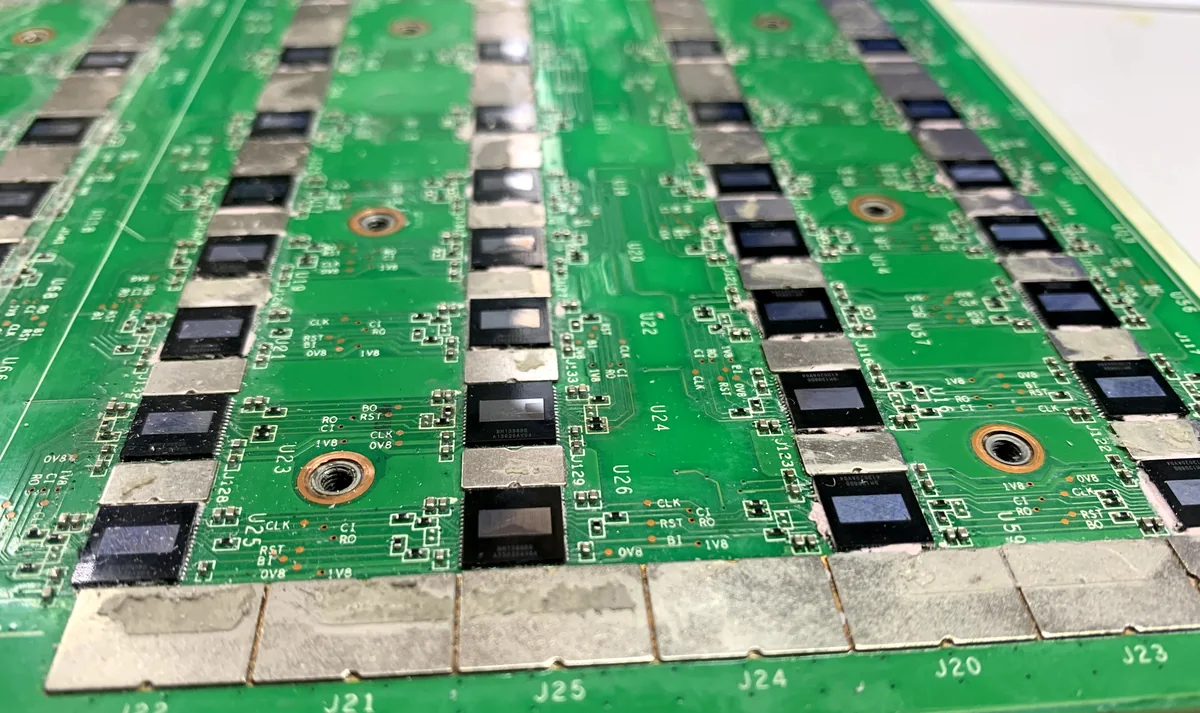
The price for that is the loss of generality. A SHA-256 chip physically cannot compute Scrypt, and no reflash will change it. The generation of the die also sets the efficiency: across SHA-256 the catalogue spreads from 9.45 to 157.53 J/TH, nearly seventeen times between old and new hardware. Settings will not close that gap.
The PSU
The PSU turns 220 V AC (380 V three phase on the heavy models) into the low DC voltage the hash boards need, 12 to 15 V on the recent series. Rated power is picked with 15 to 25 percent of headroom over the miner's nameplate draw. Inrush current and sag in the mains eat that rating faster than the label suggests, and after an overclock the headroom shrinks further.
Efficiency on current units runs 93 to 96 percent, which is the 80 PLUS Platinum and Titanium classes. The figures look close until you convert them into watts: the gap between 90 and 95 percent on a 3,500 W unit is about 200 W of extra heat in the room and the same again on the electricity bill. Every hour, around the clock.
Running at 95 to 100 percent of rating wears the unit down. Capacitors heat up, output ripple grows. The fan inside the PSU gives up before the case fans do. So after an overclock through the AsicBoost custom firmware we watch board temperatures and, separately, the headroom left in the PSU. Wiring and cable cross section are in the section on electrical supply, breakers as well.
Fans
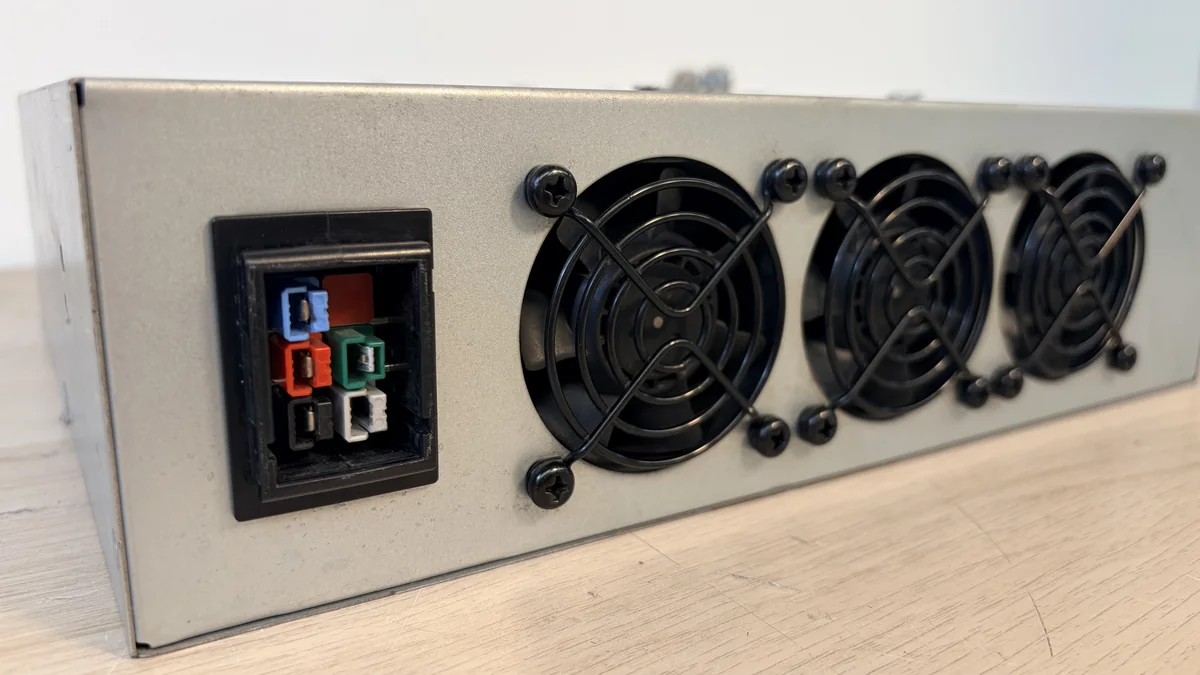
The first thing anyone learns about an air cooled ASIC is the howl. Noise climbs with fan speed and tops out at 80 dB and above. The industrial standard is two fans of 120 by 120 by 38 mm, 140 mm on some models. That 38 mm thickness is the point: a thin 25 mm case fan does not build the pressure the unit needs and is useless in a miner.
Working speeds are 3,000 to 6,000 rpm, up to 8,000 on the heavy models. What to read is not airflow but static pressure: the air has to be pushed through a duct packed tight with heatsinks. A fan with a big flow rating and low pressure gives a nice number on the datasheet and no cooling in practice.
Power and control run over a four pin connector with PWM and a tacho. The firmware reads the speed, and if a fan stalls or drops below its threshold the miner stops hashing on its own. That is protection, not a breakdown. Picking a replacement by size and connector is described in the section on spare parts, fan speeds as well.
Heatsinks
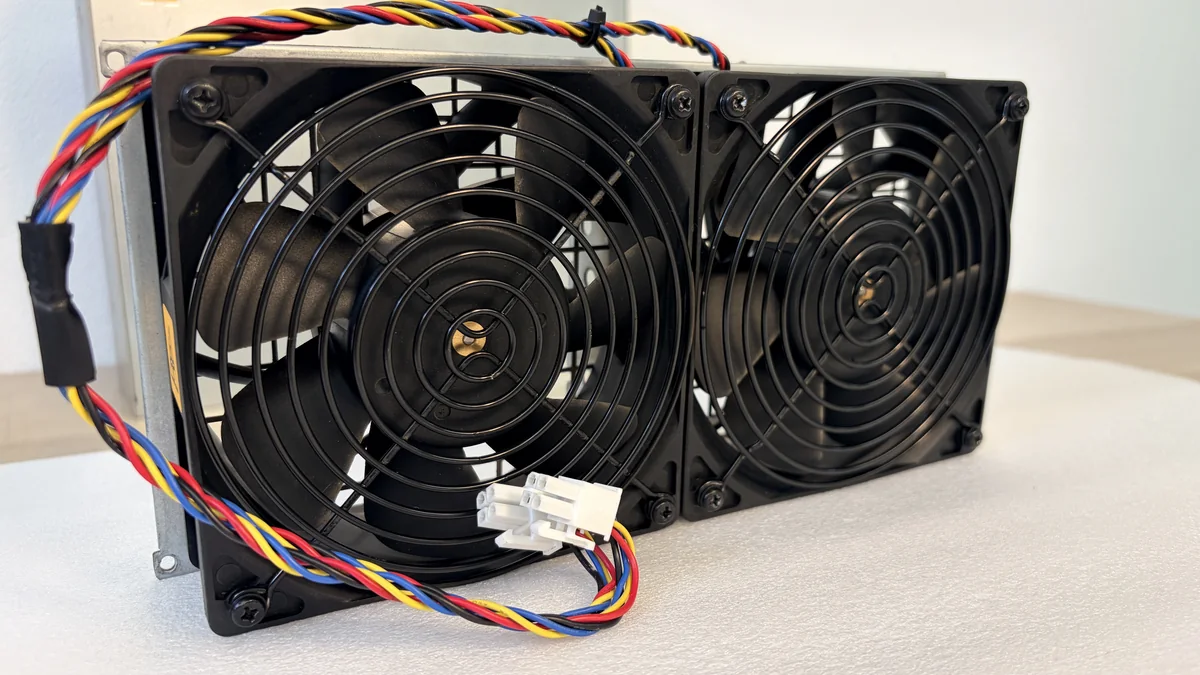
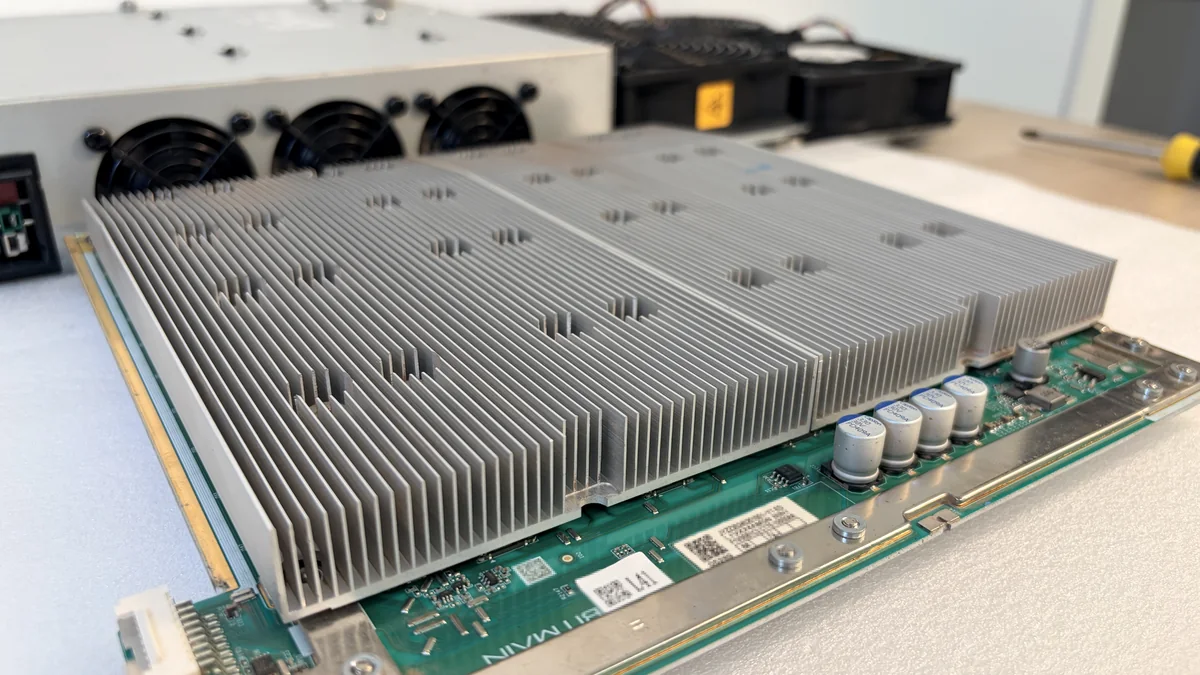
A heatsink found loose on opening turns up more often than we would like, nearly always on a unit that has just been moved. Which is why an ASIC travels only in its factory packaging and never lies flat. How many heatsinks a chip gets depends on the generation: on the older series and on the S17 every chip has its own, on both sides of the board, while from the S19 on a single finned block runs across the whole row on top.
The material is usually aluminium, on some boards a copper base with aluminium fins. Copper pulls heat off the small area of a die noticeably better, but it costs more and weighs more, so it goes in selectively. The way it is seated changed from one generation to the next, the table below has the differences.
| Generation | How the heatsink is held | What the heat passes through |
|---|---|---|
| S9, T9, L3+, T15 | glued to the chip | thermal adhesive |
| S17, T17 | soldered to the chip, one per chip | solder |
| S19, L7, D9 and later | screwed to the board, spring loaded | thermal paste |
The model lists are not exhaustive and there are exceptions inside a generation. Repair follows from this too: a glued or soldered heatsink comes off with heat, a screwed one unscrews.
Thermal pads go where heat has to come off the power components of the board and where the gap to the case needs filling.
How well it all sits decides everything. A fraction of a millimetre of tilt, dried out adhesive or an air bubble under the base gives one chip a local hotspot, and the firmware answers by dropping the clock on the whole board. The miner keeps running, the log is clean, the pool figure is simply below nameplate, and the owner spends months looking in the wrong place.
Temperature sensors
There are two measuring points. External sensors sit on the hash board, usually two to four per board, at the air inlet and at the outlet. The die itself also has a built in diode sensor, and the firmware polls it over the same bus that carries the work.
Thresholds come from the firmware. At the first one (roughly 80 to 90 degrees on the die) throttling kicks in: the controller drops clock and voltage, hashrate falls, the unit keeps working. At the second (around 100 to 125 degrees, depending on the generation) hashing stops altogether and an alarm line lands in the log.
Pushing those thresholds up for a few extra percent of hashrate is a bad idea. The margin between working die temperature and the start of degradation is small, and an overheated chip does not die at once. It runs unstable for weeks and drops off later, when nobody links it to the overclock any more. Alarm lines in the log are read in the section on faults.
Cables and connectors
Assembly mistakes repeat themselves: feeding one hash board from two different PSUs, not pushing a connector home until it clicks, swapping the ribbon cables around, applying power with the signal ribbon disconnected, fitting a home made molex adapter. A connector that is not fully seated announces itself by arcing, then by melted plastic and charred contacts.
The power side is simple. Cables run from the PSU to each hash board with six pin PCI-E connectors, and the heavy models use screw terminals or busbars instead. One contact carries about 8 to 9 A, so a whole connector takes on the order of 20 to 25 A. That is why a board gets several of them, and every single one has to be plugged in.
The signal side is flat ribbon cables from the control board to the hash boards. They carry work and answers, and telemetry goes the same way. Then the fan power cables and the RJ-45 twisted pair to the Ethernet port. The right order of connection is in the section on starting up.
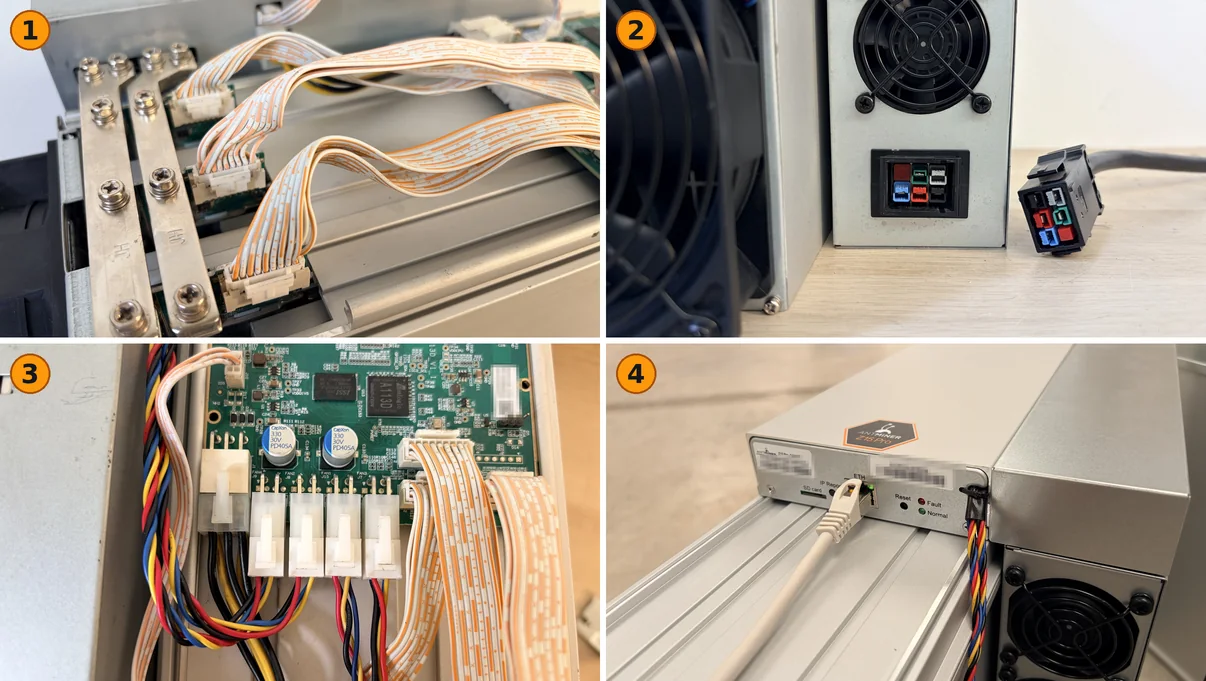
- Flat ribbons from the control board and power busbars on the hash boards
- The power connector on the PSU and its mate on the cable
- Control board connectors: power, four fans, ribbons
- Twisted pair in the Ethernet port
04How an ASIC works, step by step
The miner runs the same cycle of five steps. It turns as long as power is on, and the result does not change it: right up to the comparison with the target, a failed attempt looks like a winning one.
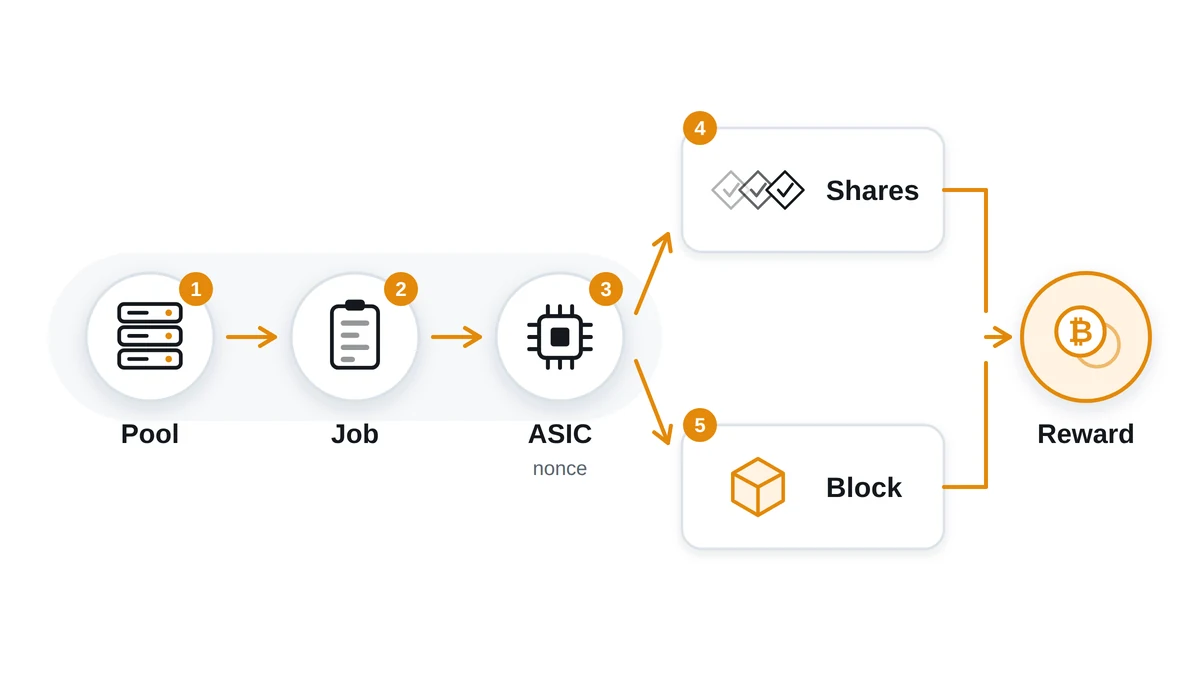
- The job from the pool. The control board holds a Stratum connection and gets the header of a candidate block: the previous block link, the root of the transaction tree, the time, the current difficulty target, the range the miner may search.
- Nonce sweep and hashing. The chip drops a service number, the nonce, into the header, runs the data through the hash function and gets a 256 bit result. Cores run in the thousands, so attempts go at once and not in turn.
- Comparison with the target. The result is read as a big number and compared against the target. Almost every time it comes out above, the attempt is dropped in one clock and the counter moves on.
- Sending a share or a block. Hash below the easier pool target, the miner sends a share. Hash below the real network target, the pool publishes the block and the other nodes confirm it.
- Crediting the payout. The pool counts accepted shares, works out each participant's part and sends the payout to your address on its own schedule, minus its fee.
What a share is and why it is needed
A share is proof of work done against a lowered bar. The real network target is such that one unit can hunt a block for years, and income cannot be split honestly between thousands of participants on found blocks alone. So the pool hands out its own target, millions of times easier, and counts how many of those each worker sent in. A share is worth nothing by itself. It never goes out to the network, it is a counter of contribution. The side benefit shows in diagnostics: the reject rate climbs when a miner runs hot, sits above its stable overclock or hangs on a bad link.
The scale of the sweep explains why that counter was needed. A 100 TH/s miner makes 100 trillion attempts a second and still finds no block on its own over 24 hours. Hashrate is attempts per second, not a data rate: such a unit needs the most modest link there is, because jobs and answers weigh bytes.
The sweep keeps no memory of what came before. Every attempt is independent, the chance is the same each time, and a billion variants already thrown away do not make the next luckier. The miner does not creep up on a solution, it spins a lottery at enormous speed. So the moment of a find cannot be predicted, and income over the long run exists only as an average over time, taken apart in the profitability section.
05How mining works: Proof of Work, difficulty, reward
Proof of Work is a way of agreeing on the order of transactions without trusting anyone. The right to write the next block goes to whoever shows the result of the computation first: faking it is impossible, checking it is easy. The work proves that real resources went into the block: electricity and ASIC hours. Rewriting history means doing all that work again and outrunning the network, so the higher the combined power, the dearer an attack. When a completed block arrives, any node checks:
- that the hash of the header really is below the current difficulty target;
- that the link to the previous block leads to the tip of the known chain;
- that the transactions inside the block are valid and the same coins are not spent twice;
- that the reward is no larger than the emission the rules permit at this height, plus the fees collected.
A node spends milliseconds on those checks, while finding a suitable hash costs the network ten minutes of work from every miner on the planet. That asymmetry is the whole point of Proof of Work: the solution is expensive, the check almost free, so thousands of nodes watch every block independently and none has to trust the rest.
The hash and why it cannot be reversed
A hash function turns data of any length into a string of fixed length. Three properties matter: the same input always gives the same output, one flipped bit changes the whole result, and the original data cannot be recovered except by brute force. There is no reverse operation, and not because nobody has worked one out: the function deliberately stirs the bits and keeps none of the structure. That is what keeps mining an honest lottery: the only way to find a suitable hash is to try variants. The functions themselves are taken apart in the write-ups on SHA-256 and Scrypt.
Difficulty and how it gets recalculated
Difficulty is how small the hash you find has to be for the block to be accepted. The lower the target, the more rarely a random attempt lands inside it. The network tunes that bar itself so that blocks keep arriving at the same interval, however many miners get switched on. Bitcoin recalculates every 2,016 blocks, roughly two weeks, aiming at ten minutes between blocks. Litecoin uses the same step of 2,016 blocks but an interval of about two and a half minutes, and Kaspa corrects difficulty on practically every block. The meaning is the same everywhere: difficulty follows the total hashrate with a lag.
Where the reward comes from
The reward for a block has two parts. The first is emission, the new coins the network creates on a schedule for whoever found the block. The second is the fees of the transactions in that block: senders pay for priority, and on a busy network the share of fees grows a lot. Emission is written into the protocol rules and does not depend on how much hardware is plugged in. More miners on the network means the same coins divided between more participants.
A halving is the planned cut of emission by half. In bitcoin it happens every 210,000 blocks, roughly once every four years, and on the day it lands the emission income of every miner drops by half inside one block. Other coins work the same way, litecoin steps every 840,000 blocks. For the owner this is the harshest of the planned risks: difficulty stays where it was, energy costs what it cost, the takings are cut in half. Only a rise in price, a bigger share of fees or a move to more efficient miners can pull it back.
The second constant factor is the growth of the total hashrate. The share of one miner is its hashrate divided by the hashrate of the whole network, and that fraction shrinks every time competitors bring new capacity online. The ASIC does not get slower: the same terahashes, just fewer coins for them. Hence the practical rule, that profitability is counted with headroom for difficulty growth and not on today's figure. Every variable of that calculation, electricity tariff and pool fee included, sits in the profitability section, and a given model can be run through the calculator.
06Which algorithms ASICs support
A hashing algorithm is a function the network makes the ASIC recompute billions of times a second. The internal mechanics are of no use to a buyer, but the consequence is: an ASIC chip is etched for one function and physically cannot compute another. A graphics card moves from coin to coin in a couple of minutes. A Scrypt miner will never compute SHA-256, however many firmwares you flash into it.
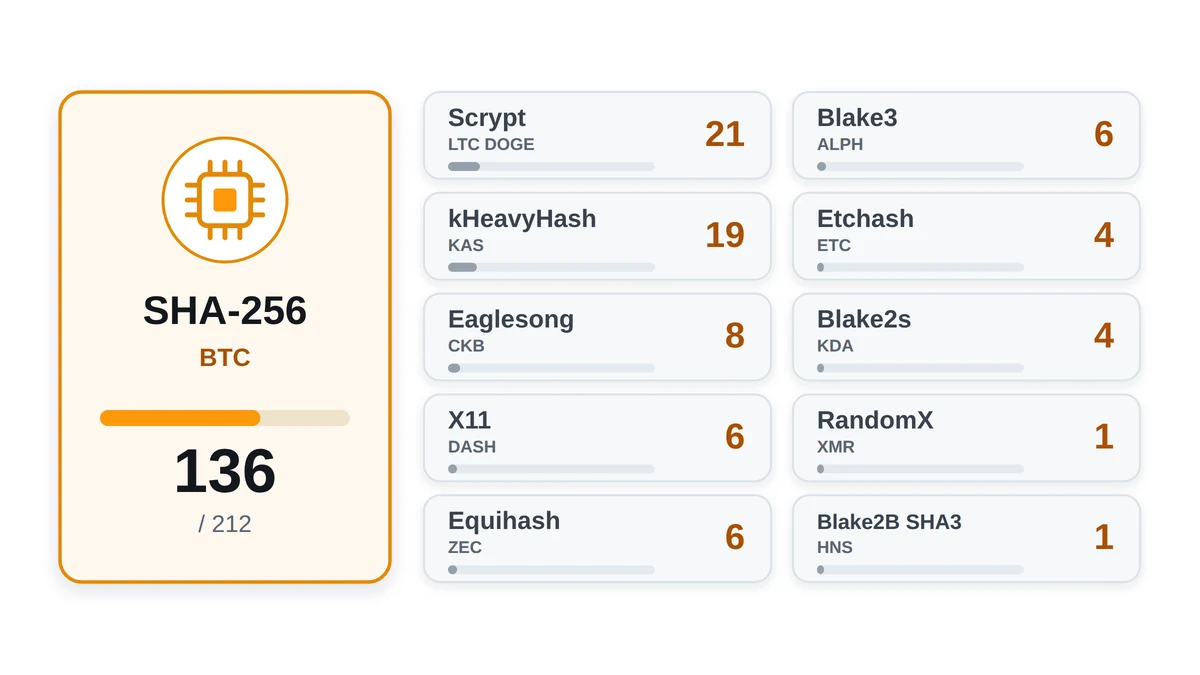
So picking an algorithm means picking a network for the miner's whole service life. Pool, wallet, sometimes even the coin can be swapped inside one algorithm. The algorithm cannot. The catalogue holds 212 models and 11 algorithms, and the skew is huge: 136 sit on SHA-256, the other ten algorithms share 76.
There is the opposite trouble too, rare but real: the algorithm gets changed by the network, not the buyer. Developers rework the hashing function to push specialised hardware out, and a whole fleet built for the old function turns to scrap in one hard fork. So an algorithm is judged on two things at once, efficiency figures and where the community stands. Networks built for ASICs from the start behave more predictably than the ones that fought them off.
The eleven algorithms in the catalogue
- SHA-256: the Bitcoin network, with Bitcoin Cash and eCash sitting on the same function. 136 models, the biggest hardware market and the harshest competition.
- Scrypt: the Litecoin network, with Dogecoin running alongside in the same process. 21 models, and demand has held for years.
- kHeavyHash: the Kaspa network, nothing else to pick from. 19 models, generations turn over fast and old ones lose their point just as fast.
- Eaglesong: the Nervos CKB network, one coin, 8 models. New hardware shows up rarely.
- X11: the Dash network, 6 models. Narrow niche, and almost all of it is previous generation gear.
- Equihash: the Zcash network and its forks, 6 models. A small market that barely gets refreshed.
- Blake3: the Alephium network, one coin, 6 models. The youngest algorithm in the catalogue.
- Etchash: the Ethereum Classic network, 4 models from two brands. The memory in them puts these miners closer to a graphics card than to a usual ASIC.
- Blake2s: the Kadena network, 4 models, again only two brands for the whole algorithm.
- RandomX: the Monero network, one model in the catalogue, the Antminer X5. This algorithm used to run on ordinary processors.
- Blake2B+SHA3: the Handshake network, one model, the Antminer HS3. A thin, niche market.
Why figures from different algorithms cannot be put side by side
The units are written the same way across algorithms, but the work behind them differs. J/TH on SHA-256 and J/TH on kHeavyHash are not one quantity: a terahash in Bitcoin and a terahash in Kaspa are counted by different functions, with a different amount of computation per hash and a different network difficulty. The line "9.45 J/TH for the best SHA-256 miner against 116.67 J/TH for the best kHeavyHash one" does not mean the first is twelve times better. It means nothing. Two separate worlds, each with its own block reward, coin price and crowd of competitors.
Miners are compared inside one algorithm and on two quantities at once: how much a unit computes and how much it eats doing so. Hence the different efficiency units in the catalogue: J/TH for SHA-256, kHeavyHash, Eaglesong, Blake3 and Blake2s, J/MH for Scrypt and Etchash, J/GH for X11, J/kSol for Equihash, J/kH for RandomX. The spread inside one algorithm is huge all the same. On SHA-256 it runs from 9.45 to 157.53 J/TH, almost seventeen times between the best and the worst miner on the same work.
The table below gathers all eleven algorithms: how many models fall to each, what the hashrate is measured in, what efficiency spread the miners show, which coin carries the network. The ranges are wide because one row holds both fresh models and older gear that still pays for itself where electricity is cheap. How these figures turn into a result is in the section on profitability, and a single model is quicker to run through the calculator.
| Algorithm | Main networks | Models in catalogue | Efficiency of the best and the worst model | ASIC exists |
|---|---|---|---|---|
| SHA-256 | Bitcoin, Bitcoin Cash, eCash | 136 | 9.45 to 157.53 J/TH | yes |
| Scrypt | Litecoin, Dogecoin | 21 | 0.15 to 3.75 J/MH | yes |
| kHeavyHash | Kaspa | 19 | 116.67 to 650 J/TH | yes |
| Eaglesong | Nervos CKB | 8 | 48.5 to 1398.23 J/TH | yes |
| X11 | Dash | 6 | 1.6 to 36.82 J/GH | yes |
| Equihash | Zcash | 6 | 3.15 to 12.92 J/kSol | yes |
| Blake3 | Alephium | 6 | 225 to 500 J/TH | yes |
| Etchash | Ethereum Classic | 4 | 0.32 to 0.8 J/MH | yes |
| Blake2s | Kadena | 4 | 19 to 128.12 J/TH | yes |
| RandomX | Monero | 1 | 6.37 to 6.37 J/kH | yes |
| Blake2B+SHA3 | Handshake | 1 | 231 to 231 J/TH | yes |
Catalogue models by algorithm
The lists are built from the shop catalogue. Inside each algorithm the models are sorted by energy efficiency, best first. Every name leads to the profitability sums for that model.
SHA-256: 136 models from best efficiency to worst
| Model | Hashrate | Power | Efficiency |
|---|---|---|---|
| SealMiner A4 Ultra Hydro | 886 TH/s | 8372 W | 9.45 J/TH |
| SealMiner A4 Pro Hydro | 680 TH/s | 7412 W | 10.9 J/TH |
| SealMiner A4 Pro Air | 336 TH/s | 3662 W | 10.9 J/TH |
| Antminer S21 XP Hydro | 473 TH/s | 5676 W | 12 J/TH |
| SealMiner A3 Pro Hydro | 660 TH/s | 8250 W | 12.5 J/TH |
| SealMiner A3 Pro Air | 290 TH/s | 3625 W | 12.5 J/TH |
| Avalon A16XP | 300 TH/s | 3850 W | 12.83 J/TH |
| Whatsminer M70S+ | 244 TH/s | 3140 W | 12.87 J/TH |
| Whatsminer M73S+ | 540 TH/s | 7200 W | 13.33 J/TH |
| Whatsminer M76S+ | 390 TH/s | 5200 W | 13.33 J/TH |
| Antminer S21 XP Immersion | 300 TH/s | 4050 W | 13.5 J/TH |
| Antminer S21 XP | 270 TH/s | 3645 W | 13.5 J/TH |
| SealMiner A3 Hydro | 500 TH/s | 6750 W | 13.5 J/TH |
| Whatsminer M70S | 250 TH/s | 3375 W | 13.5 J/TH |
| Whatsminer M7DS | 680 TH/s | 9200 W | 13.53 J/TH |
| Avalon A16 | 282 TH/s | 3900 W | 13.83 J/TH |
| Whatsminer M78S | 472 TH/s | 6550 W | 13.88 J/TH |
| SealMiner A3 Air | 260 TH/s | 3640 W | 14 J/TH |
| Whatsminer M76S | 362 TH/s | 5200 W | 14.36 J/TH |
| Whatsminer M73S | 500 TH/s | 7200 W | 14.4 J/TH |
| Whatsminer M73 | 512 TH/s | 7424 W | 14.5 J/TH |
| Whatsminer M78 | 464 TH/s | 6728 W | 14.5 J/TH |
| Whatsminer M70 | 236 TH/s | 3422 W | 14.5 J/TH |
| Whatsminer M7D | 634 TH/s | 9200 W | 14.51 J/TH |
| Whatsminer M79S | 1350 TH/s | 20,000 W | 14.81 J/TH |
| SealMiner A2 Pro Air | 255 TH/s | 3790 W | 14.86 J/TH |
| SealMiner A2 Pro Hyd | 500 TH/s | 7450 W | 14.9 J/TH |
| Antminer S21 Pro | 234 TH/s | 3510 W | 15 J/TH |
| Antminer S21+ Hydro | 319 TH/s | 4785 W | 15 J/TH |
| Teraflux AI3680 | 375 TH/s | 5625 W | 15 J/TH |
| Whatsminer M72S | 264 TH/s | 4000 W | 15.15 J/TH |
| Whatsminer M76 | 336 TH/s | 5200 W | 15.48 J/TH |
| Whatsminer M66S++ | 356 TH/s | 5518 W | 15.5 J/TH |
| Whatsminer M6DS++ | 592 TH/s | 9200 W | 15.54 J/TH |
| Whatsminer M79 | 920 TH/s | 14,500 W | 15.76 J/TH |
| Whatsminer M60S++ | 226 TH/s | 3600 W | 15.93 J/TH |
| Antminer S21 Hydro | 335 TH/s | 5360 W | 16 J/TH |
| Teraflux AT2880 | 260 TH/s | 4160 W | 16 J/TH |
| Whatsminer M72 | 246 TH/s | 4000 W | 16.26 J/TH |
| Antminer S21+ | 216 TH/s | 3564 W | 16.5 J/TH |
| Antminer S21 Immersion | 301 TH/s | 4967 W | 16.5 J/TH |
| SealMiner A2 Hyd | 446 TH/s | 7360 W | 16.5 J/TH |
| SealMiner A2 | 226 TH/s | 3730 W | 16.5 J/TH |
| Whatsminer M60S+ | 212 TH/s | 3600 W | 16.98 J/TH |
| Whatsminer M63S+ | 424 TH/s | 7208 W | 17 J/TH |
| Whatsminer M66S+ | 318 TH/s | 5406 W | 17 J/TH |
| Whatsminer M6DS+ | 540 TH/s | 9200 W | 17.04 J/TH |
| Antminer S21 | 200 TH/s | 3500 W | 17.5 J/TH |
| Avalon A15XP-206T | 206 TH/s | 3667 W | 17.8 J/TH |
| Teraflux AH3880 | 600 TH/s | 10,740 W | 17.9 J/TH |
| Avalon A1566I | 249 TH/s | 4500 W | 18.07 J/TH |
| Avalon A1566 | 185 TH/s | 3420 W | 18.49 J/TH |
| Whatsminer M63S | 390 TH/s | 7215 W | 18.5 J/TH |
| Whatsminer M66S | 298 TH/s | 5513 W | 18.5 J/TH |
| Whatsminer M60S | 186 TH/s | 3441 W | 18.5 J/TH |
| Avalon Q | 90 TH/s | 1674 W | 18.6 J/TH |
| Avalon A15-194T | 194 TH/s | 3647 W | 18.8 J/TH |
| Antminer T21 | 190 TH/s | 3610 W | 19 J/TH |
| Antminer S19 XP+ Hydro | 279 TH/s | 5301 W | 19 J/TH |
| Whatsminer M63 | 366 TH/s | 7283 W | 19.9 J/TH |
| Whatsminer M66 | 280 TH/s | 5572 W | 19.9 J/TH |
| Whatsminer M60 | 172 TH/s | 3422 W | 19.9 J/TH |
| DesiweMiner K10Ultra | 170 TH/s | 3485 W | 20.5 J/TH |
| Antminer S19 XP Hydro | 255 TH/s | 5304 W | 20.8 J/TH |
| Whatsminer M63S++ | 478 TH/s | 10,000 W | 20.92 J/TH |
| Teraflux AI2500 | 250 TH/s | 5250 W | 21 J/TH |
| Avalon Mini 3 | 37.5 TH/s | 800 W | 21.33 J/TH |
| Antminer S19j XP | 151 TH/s | 3247 W | 21.5 J/TH |
| Antminer S19 XP | 141 TH/s | 3032 W | 21.5 J/TH |
| Avalon Made A1466 | 150 TH/s | 3230 W | 21.53 J/TH |
| Teraflux AT1500 | 185 TH/s | 4070 W | 22 J/TH |
| Whatsminer M53S++ | 320 TH/s | 7040 W | 22 J/TH |
| Whatsminer M56S++ | 240 TH/s | 5280 W | 22 J/TH |
| Whatsminer M50S++ | 160 TH/s | 3520 W | 22 J/TH |
| DesiweMiner K10Pro | 170 TH/s | 3825 W | 22.5 J/TH |
| Antminer S19k Pro | 120 TH/s | 2760 W | 23 J/TH |
| Avalon Nano 3S | 6 TH/s | 140 W | 23.33 J/TH |
| Whatsminer M53S+ Hydro | 290 TH/s | 6960 W | 24 J/TH |
| Whatsminer M50S+ | 130 TH/s | 3120 W | 24 J/TH |
| Avalon Made A1446 | 135 TH/s | 3310 W | 24.52 J/TH |
| Avalon Made A1366 | 130 TH/s | 3250 W | 25 J/TH |
| Whatsminer M53S Hydro | 260 TH/s | 6760 W | 26 J/TH |
| Whatsminer M50S | 126 TH/s | 3276 W | 26 J/TH |
| Antminer S19 Pro+ Hydro | 198 TH/s | 5445 W | 27.5 J/TH |
| Antminer S19j Pro+ | 122 TH/s | 3355 W | 27.5 J/TH |
| Whatsminer M56S | 200 TH/s | 5550 W | 27.75 J/TH |
| Whatsminer M53 | 228 TH/s | 6612 W | 29 J/TH |
| Whatsminer M50 | 114 TH/s | 3306 W | 29 J/TH |
| Antminer S19 Pro Hydro | 184 TH/s | 5428 W | 29.5 J/TH |
| Antminer S19a Pro | 110 TH/s | 3245 W | 29.5 J/TH |
| Antminer S19j Pro | 104 TH/s | 3068 W | 29.5 J/TH |
| Antminer S19 Pro | 110 TH/s | 3250 W | 29.55 J/TH |
| Avalon Made A1346 | 110 TH/s | 3300 W | 30 J/TH |
| Whatsminer M30S++ | 112 TH/s | 3472 W | 31 J/TH |
| Whatsminer M56 | 178 TH/s | 5550 W | 31.18 J/TH |
| BlockMiner Model 740a | 150 TH/s | 4900 W | 32.67 J/TH |
| BlockMiner Model 520i | 112 TH/s | 3700 W | 33.04 J/TH |
| Whatsminer M30+ | 100 TH/s | 3400 W | 34 J/TH |
| Whatsminer M30S+ | 100 TH/s | 3400 W | 34 J/TH |
| Antminer S19 | 95 TH/s | 3250 W | 34.21 J/TH |
| Antminer S19a | 96 TH/s | 3312 W | 34.5 J/TH |
| Avalon Nano 3 | 4 TH/s | 140 W | 35 J/TH |
| Antminer T19 Hydro | 145 TH/s | 5438 W | 37.5 J/TH |
| Antminer T19 | 84 TH/s | 3150 W | 37.5 J/TH |
| Avalon 1246 | 90 TH/s | 3420 W | 38 J/TH |
| Whatsminer M30S | 86 TH/s | 3268 W | 38 J/TH |
| DesiweMiner K9S | 130 TH/s | 4950 W | 38.08 J/TH |
| Antminer S17 Pro | 53 TH/s | 2094 W | 39.51 J/TH |
| Antminer S17+ | 73 TH/s | 2920 W | 40 J/TH |
| Avalon 1166 Pro | 81 TH/s | 3400 W | 41.98 J/TH |
| Whatsminer M31S+ | 80 TH/s | 3360 W | 42 J/TH |
| Antminer S17e | 64 TH/s | 2880 W | 45 J/TH |
| Antminer S17 | 56 TH/s | 2520 W | 45 J/TH |
| Whatsminer M31S | 70 TH/s | 3220 W | 46 J/TH |
| Innosilicon T3-43T | 43 TH/s | 2100 W | 48.84 J/TH |
| Antminer T17+ | 58 TH/s | 2900 W | 50 J/TH |
| Ebit E12+ | 50 TH/s | 2500 W | 50 J/TH |
| Avalon 1126 Pro | 68 TH/s | 3420 W | 50.29 J/TH |
| Avalon 1146 Pro | 63 TH/s | 3276 W | 52 J/TH |
| Innosilicon T3+ 52T | 52 TH/s | 2800 W | 53.85 J/TH |
| Antminer T17e | 53 TH/s | 2915 W | 55 J/TH |
| Antminer T17 | 40 TH/s | 2200 W | 55 J/TH |
| Innosilicon T3-39T | 39 TH/s | 2150 W | 55.13 J/TH |
| Ebit E12 | 44 TH/s | 2500 W | 56.82 J/TH |
| Antminer S15 | 28 TH/s | 1596 W | 57 J/TH |
| Innosilicon T3+ 57T | 57 TH/s | 3300 W | 57.89 J/TH |
| Innosilicon T3 50T | 50 TH/s | 3100 W | 62 J/TH |
| Avalon 1047 | 37 TH/s | 2380 W | 64.32 J/TH |
| Avalon 1066 | 50 TH/s | 3250 W | 65 J/TH |
| Antminer T15 | 23 TH/s | 1541 W | 67 J/TH |
| Avalon 921 | 20 TH/s | 1700 W | 85 J/TH |
| Antminer S9j | 14.5 TH/s | 1350 W | 93.1 J/TH |
| Antminer S9i | 14 TH/s | 1320 W | 94.29 J/TH |
| Antminer S9 | 13.5 TH/s | 1323 W | 98 J/TH |
| Antminer T9+ | 10.5 TH/s | 1432 W | 136.38 J/TH |
| Avalon 7 | 7.3 TH/s | 1150 W | 157.53 J/TH |
Scrypt: 21 models from best efficiency to worst
| Model | Hashrate | Power | Efficiency |
|---|---|---|---|
| SealMiner DL1 Hydro | 52,500 MH/s | 7823 W | 0.15 J/MH |
| SealMiner DL1 Air | 25,000 MH/s | 3725 W | 0.15 J/MH |
| ElphaPex DG2+ | 20,500 MH/s | 3900 W | 0.19 J/MH |
| Antminer L9 (16 GH/s) | 16,000 MH/s | 3360 W | 0.21 J/MH |
| ElphaPex DG2 | 16,000 MH/s | 3520 W | 0.22 J/MH |
| ElphaPex DG 1+ | 14,000 MH/s | 3950 W | 0.28 J/MH |
| ElphaPex DG Hydro 1 | 20,000 MH/s | 6200 W | 0.31 J/MH |
| ElphaPex DG 1 | 11,000 MH/s | 3420 W | 0.31 J/MH |
| ElphaPex DG 1 Lite | 11,000 MH/s | 3410 W | 0.31 J/MH |
| ElphaPex DG 1S | 10,000 MH/s | 3100 W | 0.31 J/MH |
| ElphaPex DG Home 1 | 2000 MH/s | 620 W | 0.31 J/MH |
| Antminer L7 (9.5 GH/s) | 9500 MH/s | 3425 W | 0.36 J/MH |
| Goldshell E-DG1M | 3400 MH/s | 1800 W | 0.53 J/MH |
| Goldshell Mini-DOGE II | 420 MH/s | 400 W | 0.95 J/MH |
| Goldshell Mini-DOGE Pro | 205 MH/s | 220 W | 1.07 J/MH |
| Goldshell Mini-DOGE | 185 MH/s | 233 W | 1.26 J/MH |
| Goldshell LT Lite | 1000 MH/s | 1450 W | 1.45 J/MH |
| Goldshell LT5 Pro | 2000 MH/s | 3100 W | 1.55 J/MH |
| Antminer L3+ | 504 MH/s | 800 W | 1.59 J/MH |
| Antminer L3++ | 580 MH/s | 942 W | 1.62 J/MH |
| Innosilicon A4 Dominator | 280 MH/s | 1050 W | 3.75 J/MH |
kHeavyHash: 19 models from best efficiency to worst
| Model | Hashrate | Power | Efficiency |
|---|---|---|---|
| IceRiver KS7 | 30 TH/s | 3500 W | 116.67 J/TH |
| IceRiver KS7 Lite | 4.2 TH/s | 500 W | 119.05 J/TH |
| Antminer KS5 Pro | 21 TH/s | 3150 W | 150 J/TH |
| Antminer KS5 | 20 TH/s | 3000 W | 150 J/TH |
| IceRiver KS5M | 15 TH/s | 3400 W | 226.67 J/TH |
| IceRiver KS2 Lite | 2 TH/s | 500 W | 250 J/TH |
| IceRiver KS0 Ultra | 0.4 TH/s | 100 W | 250 J/TH |
| IceRiver KS5L | 12 TH/s | 3400 W | 283.33 J/TH |
| iBeLink BM-KS Max | 10.5 TH/s | 3400 W | 323.81 J/TH |
| Goldshell KA-BOX | 1.18 TH/s | 400 W | 338.98 J/TH |
| Antminer KS3 | 9.4 TH/s | 3500 W | 372.34 J/TH |
| Goldshell KA-BOX Pro | 1.6 TH/s | 600 W | 375 J/TH |
| IceRiver KS3 | 8 TH/s | 3200 W | 400 J/TH |
| IceRiver KS0 PRO | 0.2 TH/s | 100 W | 500 J/TH |
| IceRiver KS3M | 6 TH/s | 3400 W | 566.67 J/TH |
| IceRiver KS2 | 2 TH/s | 1200 W | 600 J/TH |
| IceRiver KS1 | 1 TH/s | 600 W | 600 J/TH |
| IceRiver KS3L | 5 TH/s | 3200 W | 640 J/TH |
| IceRiver KS0 | 0.1 TH/s | 65 W | 650 J/TH |
Eaglesong: 8 models from best efficiency to worst
| Model | Hashrate | Power | Efficiency |
|---|---|---|---|
| Antminer K7 | 63.5 TH/s | 3080 W | 48.5 J/TH |
| Goldshell CK6 | 19.3 TH/s | 3300 W | 170.98 J/TH |
| Goldshell CK Lite | 6.3 TH/s | 1200 W | 190.48 J/TH |
| Goldshell CK-BOX II | 2.1 TH/s | 400 W | 190.48 J/TH |
| Goldshell CK6-SE | 17 TH/s | 3300 W | 194.12 J/TH |
| Goldshell CK5 | 12 TH/s | 2400 W | 200 J/TH |
| Goldshell CK-BOX | 1.05 TH/s | 215 W | 204.76 J/TH |
| Antminer K5 | 1.13 TH/s | 1580 W | 1398.23 J/TH |
X11: 6 models from best efficiency to worst
| Model | Hashrate | Power | Efficiency |
|---|---|---|---|
| Antminer D9 | 1770 GH/s | 2839 W | 1.6 J/GH |
| Antminer D7 | 1286 GH/s | 3148 W | 2.45 J/GH |
| FusionSilicon X7 | 262 GH/s | 1420 W | 5.42 J/GH |
| Innosilicon A5 | 65 GH/s | 1500 W | 23.08 J/GH |
| Innosilicon A5 DashMaster | 38 GH/s | 1250 W | 32.89 J/GH |
| iBeLink DM22G X11 | 22 GH/s | 810 W | 36.82 J/GH |
Equihash: 6 models from best efficiency to worst
| Model | Hashrate | Power | Efficiency |
|---|---|---|---|
| Antminer Z15 Pro | 840 kSol/s | 2650 W | 3.15 J/kSol |
| Antminer Z15 | 420 kSol/s | 1510 W | 3.6 J/kSol |
| Antminer Z11 | 135 kSol/s | 1418 W | 10.5 J/kSol |
| Innosilicon A9++ ZMaster | 140 kSol/s | 1550 W | 11.07 J/kSol |
| Innosilicon A9 ZMaster | 50 kSol/s | 620 W | 12.4 J/kSol |
| Innosilicon A9+ ZMaster | 120 kSol/s | 1550 W | 12.92 J/kSol |
Blake3: 6 models from best efficiency to worst
| Model | Hashrate | Power | Efficiency |
|---|---|---|---|
| Antminer AL1 | 15.6 TH/s | 3510 W | 225 J/TH |
| IceRiver AL3 | 15 TH/s | 3500 W | 233.33 J/TH |
| IceRiver AL0 | 0.4 TH/s | 100 W | 250 J/TH |
| Goldshell AL-BOX II Plus | 1 TH/s | 480 W | 480 J/TH |
| Goldshell AL-BOX II | 0.72 TH/s | 360 W | 500 J/TH |
| Goldshell AL-BOX | 0.36 TH/s | 180 W | 500 J/TH |
Etchash: 4 models from best efficiency to worst
| Model | Hashrate | Power | Efficiency |
|---|---|---|---|
| Jasminer X16-Q | 1950 MH/s | 620 W | 0.32 J/MH |
| Jasminer X16-P | 5800 MH/s | 1900 W | 0.33 J/MH |
| Antminer E9 Pro | 3680 MH/s | 2200 W | 0.6 J/MH |
| Antminer E9 | 2400 MH/s | 1920 W | 0.8 J/MH |
Blake2s: 4 models from best efficiency to worst
| Model | Hashrate | Power | Efficiency |
|---|---|---|---|
| Antminer KA3 | 166 TH/s | 3154 W | 19 J/TH |
| Goldshell KD6 | 29.2 TH/s | 2630 W | 90.07 J/TH |
| Goldshell KD5 | 18 TH/s | 2250 W | 125 J/TH |
| Goldshell KD-BOX | 1.6 TH/s | 205 W | 128.12 J/TH |
RandomX: 1 model from best efficiency to worst
| Model | Hashrate | Power | Efficiency |
|---|---|---|---|
| Antminer X5 | 212 kH/s | 1350 W | 6.37 J/kH |
Blake2B+SHA3: 1 model from best efficiency to worst
| Model | Hashrate | Power | Efficiency |
|---|---|---|---|
| Antminer HS3 | 9 TH/s | 2079 W | 231 J/TH |
07Which cryptocurrencies you can mine
The order here is back to front: the algorithm and the miner first, the coin after. Hardware is nailed to its algorithm, and inside one there are usually one or two coins. "Buy an ASIC for Kaspa" is a normal sentence. "Move an ASIC from Kaspa to Bitcoin" is nonsense, the chips inside are different.
Two coins from one miner: Litecoin and Dogecoin
Scrypt is the rare case where one ASIC brings in two coins at once. Litecoin and Dogecoin share an algorithm, and the pool sends the solutions it finds into both networks through merged mining. No extra power for that, the electricity is spent once, the payout arrives in two coins. Which is why Scrypt miners hold their price longer than their age suggests: income comes from two sources, and a slide in one coin is partly cushioned by the other.
Three networks on SHA-256
SHA-256 formally gives a choice of three catalogue networks: Bitcoin, Bitcoin Cash and eCash. Switching takes as long as it takes to type another pool address into the web interface. No full reboot, mining restarts by itself and settles down within a few minutes. In practice almost all the hashrate goes to Bitcoin: difficulty is higher there, but the reward with fees is bigger. The other two are kept as a fallback and checked against the calculator. Hopping between networks weekly is a bad idea, it wrecks the payout statistics of the pool scheme.
Algorithms with a single coin
The other catalogue algorithms have one network each, so there is nothing to choose. Kaspa on kHeavyHash, Alephium on Blake3, Nervos CKB on Eaglesong, Handshake on Blake2B+SHA3, Kadena on Blake2s. Next to them Dash on X11, Zcash on Equihash, Ethereum Classic on Etchash, Monero on RandomX: forks for these algorithms exist on paper, but by network size and payout liquidity the main coin is almost always the only one.
The conclusion is unpleasant, and better taken before the purchase than after: a miner on a single coin algorithm has no fallback. Developers fall out, the price slides, the block reward gets cut on schedule, and the hardware has nowhere to go. SHA-256 and Scrypt have a cushion. kHeavyHash, Blake3, Eaglesong, Blake2s and Blake2B+SHA3 do not.
The payout arrives in the coin of the network you compute, not in euros. Between what you mine and the electricity bill there is always an exchange or a broker with its own fees, its own withdrawal limits and a document check. Coins from small networks sell worse: a large order moves the price, and the withdrawal drags on longer than with Bitcoin or Litecoin. Liquidity is as much a purchase parameter as power draw, and thin networks lose on it hardest.
What to do when the economics go bad
- Recompute the miner in the calculator at today's price and your tariff, not the figures from the day you bought.
- Cut the power draw: custom AsicBoost firmware takes the miner into economy modes and lets you match frequencies to your tariff, developer fee 2.8 percent.
- Work by the clock: shut the gear down in the expensive hours and catch up at night, if your contract is hourly.
- Sell while the unit still interests the market. Old gear gets cheaper in steps, not smoothly.
- Do not buy a second one to average down: on a falling network that doubles the spend, not the income.
The table below lists the catalogue coins with their algorithms and the number of models available for each network. Look not at the name but at the two neighbouring columns: how many models exist for the network and how far apart they are. A narrow choice of hardware usually drags a narrow choice of pools and slow repairs along with it. Write-ups of individual coins, with block reward and network specifics, are in the coin reference.
| Coin | Ticker | Algorithm | Models in catalogue |
|---|---|---|---|
| Bitcoin | BTC | SHA-256 | 136 |
| Bitcoin Cash | BCH | SHA-256 | 136 |
| eCash | XEC | SHA-256 | 136 |
| Litecoin | LTC | Scrypt | 21 |
| Dogecoin | DOGE | Scrypt | 21 |
| Kaspa | KAS | kHeavyHash | 19 |
| Nervos CKB | CKB | Eaglesong | 8 |
| Dash | DASH | X11 | 6 |
| Zcash | ZEC | Equihash | 6 |
| Alephium | ALPH | Blake3 | 6 |
| Ethereum Classic | ETC | Etchash | 4 |
| Kadena | KDA | Blake2s | 4 |
| Monero | XMR | RandomX | 1 |
| Handshake | HNS | Blake2B+SHA3 | 1 |
08ASIC manufacturers
There are not many brands on the market, and almost every one keeps its own lane. One covers all the algorithms at once, the second lives on SHA-256 alone, the third makes little boxes for the home. Below are the catalogue brands seen from the service bench: what boards are inside, how the documentation looks, how easy a spare part is to get.








Bitmain (Antminer)
The company started in 2013 and has set the pace for the industry ever since. Antminer is the broadest lineup in the catalogue: 58 models, the only brand with miners for all eleven algorithms, from mass market SHA-256 gear to the single Antminer X5 on RandomX and Antminer HS3 on Blake2B+SHA3. A second line follows from the same fact. Bitmain control boards are predictable, the web interface is documented, the used parts market is alive, so previous generation units are repaired and resold more easily than with other brands.
For our shop Bitmain carries a separate weight: it is the only brand in the catalogue with custom AsicBoost firmware. It fits 28 models: the Antminer S19 and S21 series, plus T9+, T19, T21, L7 and L9. There is no such firmware for Whatsminer, Avalon, IceRiver or Goldshell, so if you count on fine tuning frequencies and voltages, settle that before you buy. Generations, revisions and the usual weak spots are on the Bitmain page.
MicroBT (Whatsminer)
The second largest manufacturer and Bitmain's main rival on SHA-256. Whatsminer is deliberately single subject: 48 models, all of them SHA-256, the whole engineering effort in one task. The strong side is density and water. Both extreme points of the catalogue for a single unit sit here: up to 1,350 TH/s and up to 20,000 W on the M79S. Nobody puts that in a flat or feeds it from a household socket. It needs a ready loop with a heat exchanger.
Whatsminer control boards and interface are its own, and on the bench you feel it: Antminer tooling does not fit, part of the work goes differently, spares in Europe take longer to find. Sort that out before the repair, not after. Questions about a specific board we go through in the repair section, brand history and model lines are on the MicroBT page.
Canaan (Avalon)
The oldest brand in the industry: the first serial mining ASICs shipped to buyers were Avalons, and the company listed before its competitors. 22 models in the catalogue, pure SHA-256. Two branches: industrial miners in the numbered series, and the home ones, Nano, Mini and Q, built for quiet work in a living room and an ordinary socket. The home branch holds the bottom of the catalogue on hashrate, 4 TH/s on the Avalon Nano 3, and it sells on noise and size, not efficiency.
The worst efficiency in the catalogue on SHA-256 is here too: 157.53 J/TH on the old Avalon 7. Roughly ten years separate it from the recent series, and the gap shows at once in the figures. Generations, the home branch and what makes an Avalon different on the bench are on the Canaan page.
Bitdeer (SealMiner)
A young brand, it came into hardware from a large mining operator and went straight to the top on efficiency. The best figures in the catalogue on two algorithms belong to SealMiner: 9.45 J/TH on SHA-256 with the A4 Ultra Hydro and 0.15 J/MH on Scrypt with the DL1 Hydro. Both record models are hydro, so the advantage opens up only where a water loop is already built. Air versions of the same series start up more simply and match hydro on efficiency, but give noticeably less hashrate per unit. The catalogue record exists in the hydro build and nowhere else.
Goldshell
The brand made its name with box miners for the rare algorithms. In the catalogue Goldshell covers Scrypt, Eaglesong, Blake2s, Blake3, kHeavyHash, exactly the networks where big manufacturers keep one model or none. A BOX is a compact case, moderate power draw and tolerable noise, which is why these units get taken home or bought as a first look at mining, with no separate room. Compactness is paid for in efficiency: junior BOX models sit at the bottom of their algorithms. The AL-BOX on Blake3 is 500 J/TH, the worst position in that algorithm in the catalogue, and the box models on kHeavyHash give from 340 to 375 J/TH. The other home option is the Avalon Nano and Q branch on SHA-256, more about it in the Canaan write-up.
IceRiver
A kHeavyHash specialist and in practice the reference point for Kaspa: of the 19 models on that algorithm, 13 are its own. Both extremes are its own too, best efficiency 116.67 J/TH on the KS7 and worst 650 J/TH on the KS0. That KS0 also holds the bottom of the whole catalogue on power draw, 65 W, a desktop box on the level of a laptop charger. Its second direction is Blake3 with the AL series.
ElphaPex
A one algorithm brand: Scrypt only, DG series only. Three builds: air, hydro and the home box DG Home 1 at 620 W. It appeared late and still took a visible share of Litecoin and Dogecoin mining, because it offered dense miners where the choice had rested on one competitor lineup for years.
Jasminer
The only alternative to Bitmain on Etchash, two models in the catalogue. The X16 series is built around memory rather than pure hash logic, and it eats noticeably less than the rest of the market: the best efficiency of the algorithm, 0.32 J/MH, on the X16-Q at 620 W per unit. For a home that is the rare case where a serious miner fits a modest electricity bill.
The other catalogue brands
- Innosilicon: a veteran with models on SHA-256, Scrypt, X11, Equihash. Today mostly previous generation gear with a high power draw.
- iBeLink: small series for rare algorithms, two models in the catalogue, one on X11 and one on kHeavyHash.
- Teraflux: a young brand on SHA-256, 5 models, betting on dense miners for industrial sites.
- DesiweMiner: SHA-256, mid class industrial models, seen less often than the rest.
- BlockMiner: SHA-256, two models, irregular supply.
- Ebit: SHA-256, models from previous generations, one off deliveries.
- FusionSilicon: X11, one model from a previous generation. All of them are covered on the small manufacturers page.
Factory specifications are written in the maker's own favour at every brand, and they all deserve the same distrust. Hashrate is quoted in the nominal mode. Power draw is measured at the power supply input at a convenient air temperature and mains voltage, with a tolerance of a few percent in the small print. In a warm room the miner goes into protection and drops its own frequency, so the real daily average sits below the datasheet. Comparing two models from different brands inside one algorithm, look at joules per unit of work, not the pretty hashrate number. Efficiency is what sets the electricity bill.
In practice the choice of brand rarely comes down to one efficiency figure. Four things get counted at once: whether there are spares and service in the EU, whether documentation and firmware are clear, whether control boards can be repaired, how fast the brand changes generations. Fast generation changes suit the buyer of new hardware and hurt the owner of old: the miner loses value in steps. Manufacturer write-ups with history and model lines sit in the brands section, and about a specific unit you get a faster answer in the support chat.
Back to contents ↑09The most popular series
Model names look like a random pile of letters and digits, but there is a system, roughly the same at every brand. A letter or a pair of letters is the purpose: algorithm and class of miner. The digit is the generation, the bigger the number the fresher the chip. Pluses, letters after the digit, the words Pro, Ultra, Lite are a step inside one generation, usually another frequency and power draw on the same board. Hydro and Immersion stand apart. They do not change the generation, they name the cooling build.
Antminer: the letter sets the algorithm
- S: the SHA-256 flagships, top hashrate of the generation, a recent example being the Antminer S21.
- T: the same SHA-256, a plainer step, cheaper, with worse efficiency.
- L: Scrypt, Litecoin together with Dogecoin, for example the Antminer L7.
- K: Eaglesong, Nervos CKB network.
- KA: Blake2s, Kadena network.
- KS: kHeavyHash, Kaspa network, for example the Antminer KS5 Pro.
- D: X11, Dash network.
- Z: Equihash, Zcash network.
- E: Etchash, Ethereum Classic network.
- HS: Blake2B+SHA3, Handshake network.
- X: RandomX, Monero network.
- AL: Blake3, Alephium network.
Neighbouring letters are easy to mix up, and the miners do not interchange: KS computes Kaspa, KA computes Kadena, K computes Nervos CKB. Three different networks, three different chips. Check the algorithm in the specification, not the first letter of the name.
Whatsminer: generation by digit, step by pluses
The whole brand lives on the letter M, then the number. The first digit is the generation: M3x, M5x, M6x, M7x. The second is the cooling build. Zero air, three hydro, six immersion: M50, M60, M70 are air, M53, M63, M73 hydro, M56, M66, M76 immersion. The word Hydro does not reach the name of every hydro model, so the build is checked by the number and the specification, not by the print on the box. Numbers outside that trio exist too, like the M72, M78 and M79, read the same way.
The suffix S means a reinforced version, S+ and S++ are the next steps inside the same generation: higher frequency, higher power draw. It all reads linearly. The Whatsminer M70S is seventh generation, air, reinforced version. The M70S+ is one step above, same generation.
Avalon, IceRiver, Goldshell, ElphaPex
Avalon has historically used four digit numbered series, where the leading digits mean the chip generation. Later came short designations with the letter A and a suffix, for example the Avalon A16XP, where XP is the top step. The home branch moved into separate names: Nano is a desktop unit, Mini mid sized, Q the quiet model for a living room.
At IceRiver the kHeavyHash lineup is the letters KS and a power digit from KS0 to KS7, so the IceRiver KS7 is the top of the row and the KS0 the bottom. The suffixes Lite, Pro, Ultra, L, M are steps inside one number, not a new generation. Goldshell works on "two letters plus BOX": the letters give the algorithm (KD is Kadena, KA is Kaspa, CK is Nervos CKB, AL is Alephium, LT is Litecoin), and BOX means a compact home case. ElphaPex is built on the DG series with a generation number, and the build is spelled out in a word: Home the home box, Lite the cut down step, Hydro the water loop.
How to read a full model name
A long name is read piece by piece, left to right. "Antminer S21 XP Hydro": brand first, the letter S says this is a SHA-256 flagship, 21 is the chip generation, XP the top step within it, and Hydro says there are no fans and a water loop is needed. "Whatsminer M60S++" reads by the same scheme: generation 60, reinforced version S, two overclocking steps inside the generation. On an Antminer the word Immersion means the build for submersion in dielectric fluid, Air is ordinary air. Which to choose is covered in the section on cooling types.
10Key specifications of an ASIC
The whole spec sheet of an ASIC fits into a dozen numbers, and those numbers carry very different weight. Below are the six figures miners actually get compared on, and what each means for the person who will live with the miner. How to read a full manufacturer sheet end to end is in the section on technical specifications.
Hashrate
Hashrate is the number of hashing attempts per second, the search speed. The units step up by a thousand: H/s, kH/s, MH/s, GH/s, TH/s, PH/s. Each algorithm has its habitual unit: SHA-256 and kHeavyHash are counted in TH/s, Scrypt in MH/s, Equihash in kSol/s, RandomX in kH/s.
The spread in the catalogue is huge even inside SHA-256 alone: from 4 TH/s on the desktop Avalon Nano 3 to 1,350 TH/s on the Whatsminer M79S. The live figure always floats, because finding a solution is random and the pool shows an average over its observation window. A deviation of 3 to 5 percent from nameplate is normal, and so is a dip in hot weather. A steady minus 10 percent or worse is already a symptom: dead chips in the chain, overheating or throttling.
Hashrate on its own says nothing about income or about the quality of the ASIC. It only means something next to power draw, and comparing models on both figures at once is easiest in the calculator.
Power draw
What counts is the power at the socket, not the number on the label. The manufacturer quotes draw at factory settings and an air temperature of about 25 degrees, and for the main brands that is already wall power: Bitmain notes measurement at the input in its specifications, MicroBT quotes total input power. The real figure still floats. It climbs when the air is hot and the fans go to maximum, and when the mains voltage sags, and the tolerance the manufacturer sets on draw is plus minus 5 percent.
We suggest hanging a wattmeter on the input instead of guessing, and on a farm putting a meter on the line. The catalogue spread is wide: from 65 W on the desktop IceRiver KS0 to 20,000 W on the heaviest hydro miners. Monthly consumption is one step of arithmetic: kilowatts times 24 times the number of days. The household tariff in Spain sits roughly in a band of 0.13 to 0.16 euros per kWh and it moves, industrial rates are lower. How draw enters the sums is worked through in the section on profitability.
Nameplate draw also dictates the wiring. A 3,500 W miner at 230 V pulls around 15 A, so it takes up almost a whole domestic circuit by itself, and models above 6,000 W are normally built for a three phase connection. At start up the current is briefly higher than nominal, so breakers and sockets are sized with headroom. Several units never go on one circuit.
Energy efficiency
Energy efficiency is watts divided by hashrate, and for SHA-256 it comes out in joules per terahash (J/TH). This is the main line on the sheet, and if you read only one, read this one. Hashrate can be bought by adding a second unit, while efficiency decides how much you pay for the same work: two 100 TH/s miners at 30 and at 20 J/TH earn the same, but the second one burns a third less electricity, and the gap piles up every month.
Catalogue ranges by algorithm: SHA-256 from 9.45 to 157.53 J/TH, Scrypt from 0.15 to 3.75 J/MH, kHeavyHash from 116.67 to 650 J/TH, X11 from 1.6 to 36.82 J/GH, Equihash from 3.15 to 12.92 J/kSol, Etchash from 0.32 to 0.8 J/MH. Inside one algorithm that is a ready made ranking: lower is better.
Operating temperature
The sheet quotes inlet air temperature, and the tolerance depends on the brand: Bitmain gives roughly minus 20 to plus 45 degrees, MicroBT minus 5 to plus 35, with the working optimum at 15 to 25. Above 30 degrees at the inlet a miner starts losing efficiency: the fans spin up, the draw goes up, the hashrate does not. Die temperature is counted separately, 60 to 85 degrees is the norm there, and past that throttling starts and the clock comes down.
Humidity is read separately (up to 90 percent without condensation is the usual limit) and so is dust. A layer of dust on the heatsinks lifts chip temperatures by ten degrees over a season, and it is the cheapest of all problems to cure. For a summer in Spain what matters is not the average room temperature but the peak: if the inlet sits above 35 degrees every afternoon, the unit will cut its clocks every day. The profitability sums then start from the reduced hashrate, not the nameplate one.
Noise level
An industrial air cooled miner puts out 72 to 85 dB at one metre, and some models reach 90 dB at full fan speed. For scale: 70 dB is a vacuum cleaner running right next to you, 85 dB is the level where a workplace hands out ear defenders. The quiet ones are desktop models at 35 to 55 dB, like the Avalon Nano line, whose history we went through in the piece on Canaan.
Noise is the main reason an air cooled ASIC does not stay in the house. There is no setting that brings the volume down to something bearable, since fan speed is tied hard to cooling and dropping it without losing hashrate will not work. The low frequency hum also travels through floors, so the neighbours hear it. Permitted noise levels in residential areas depend on the municipality and the time of day, so check the rules where you are. The workable options are a garage, a warehouse, a hydro loop or a desktop model that is quiet by design.
Cooling type
The sheet says one of three things: air, hydro or immersion. Air is the standard. Cheap and very loud. Hydro takes heat off the chips with water blocks, so the unit is quieter and holds higher clocks, but it needs a loop with a pump and a dry cooler. Immersion means the board goes into a dielectric fluid: no noise and no dust at all, and the demands on the room are at their highest. All three schemes with their pluses and minuses are in the section on cooling types.
The model name does not always say which cooling it is, and the difference is fundamental. A hydro version will not start at all without a loop already built, so putting it on a shelf and switching it on is not an option. What you check on the sheet is not one word but the numbers around it: coolant flow, required pressure, fitting diameter, inlet water temperature.
| Specification | What it means | What it decides when choosing |
|---|---|---|
| Hashrate | How many attempts per second: TH/s, MH/s, GH/s, kSol/s | Your share of network power and the size of the pool payout |
| Power draw | Power at the socket, PSU losses included | The electricity bill, cable cross section, breaker rating |
| Energy efficiency | Watts per unit of hashrate, J/TH for example | The first thing to read when comparing inside an algorithm |
| Operating temperature | Inlet air tolerance, plus a separate die threshold | Room ventilation and the risk of throttling in summer |
| Noise level | Sound pressure in dB at one metre | Whether it can go in the house and how the neighbours take it |
| Cooling type | Air, hydro or immersion | Cost of the plumbing, noise, the ceiling on overclocking |
| Algorithm | The hash function burned into the die | Which coins are open to you. It cannot be changed |
| Control interface | Ethernet, web interface, type of control board | Whether firmware and monitoring systems will run |
11Types of cooling
Almost all the power a miner pulls from the socket comes back out as heat. A 3,500 W miner is a 3,500 W heater that counts hashes on the side. It does no mechanical work. What differs is how you get the heat off the chips and where you send it. Three schemes work: air, a closed water loop, immersion in a dielectric fluid.
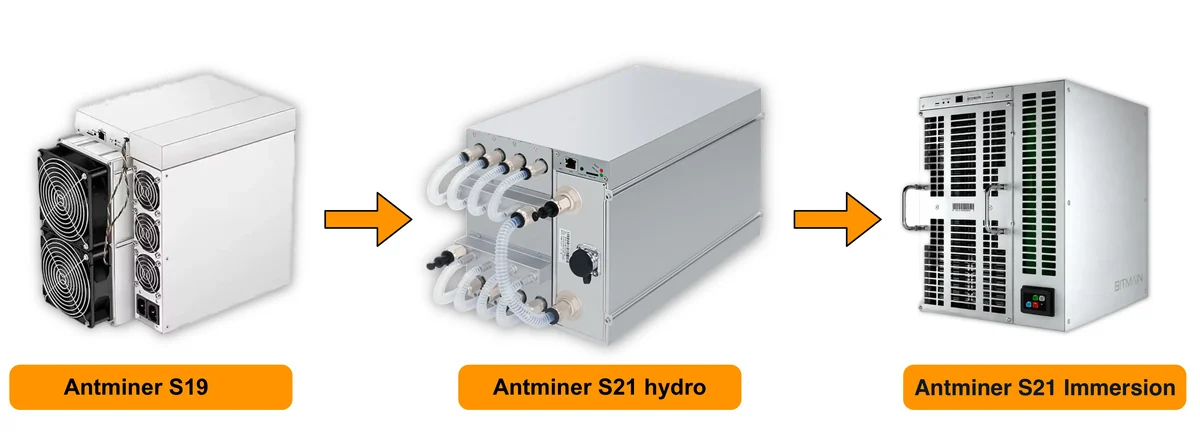 Air coolingHydro coolingImmersion cooling
Air cooling
The one everyone has seen: axial fans blow air through the heatsinks of the hash boards. S19 and S21 miners have four, two front and two back, cold air in the front, hot air out the back. One advantage, and a big one: give the miner power and a network cable and after that it only wants air. No plumbing. The trouble starts with noise. The 75 dB and up of a normal working load is a builder's vacuum a metre from your ear, and no cabinet or home made box cures that in a house. Then dust. All the room air goes through the heatsinks, and what it carried settles on the fins in a layer that works like a blanket.
Air packs badly. Every kilowatt needs about 300 cubic metres of air an hour if you want to hold 10 degrees between intake and exhaust. What limits the rack is not floor space: the building runs out of capacity to take that flow in and throw it out first. The figure is worked out in the section on room ventilation. Overclock headroom on air is modest too. Heat goes from the die through the paste into the heatsink and then into the stream, temperature spreads across the board, and at a raised frequency the firmware throttles the miner itself.
Hydro cooling
The hash boards are clamped into water blocks and the heat goes straight into the coolant, skipping room air. Not one fan inside; you hear the pump group and the dry cooler outside. In the catalogue that is the Antminer S21 Hydro at 335 TH/s and 5,360 W, the Whatsminer M63S at 390 TH/s and 7,215 W, and the most efficient SHA-256 miner in the catalogue, the SealMiner A4 Ultra Hydro with its 9.45 J/TH. Without a loop such a unit will not start. Water is part of the design here, not an accessory. Pipework, water requirements and the pressure test are in the hydro section.
Immersion cooling
The whole unit goes down into a bath of dielectric fluid, which takes heat off the boards directly and hands it to a heat exchanger. Fans come off, there is no air path, and dust inside is impossible. The catalogue carries factory versions built for submersion, for example the Antminer S21 Immersion at 301 TH/s and 4,967 W. A normal air cooled miner cannot be dunked, it has to be prepared first. Which fluids suit, how the loop is kept clean and where used oil goes are in the immersion section.
| Type | How it works | Pros | Cons | Who it suits |
|---|---|---|---|---|
| Air | Fans push air through the board heatsinks, the heat stays in the room, the extract throws it out | Cheapest to get going. Runs out of the box, repairs and spares available anywhere | Noise around 75 dB, dust on the boards, low density, little frequency headroom | From one unit to a small farm: garage, warehouse, industrial unit with working ventilation |
| Hydro | Water blocks on the boards, closed loop, pump group, heat exchanger or dry cooler outside | Room almost quiet, even temperatures, several times more kilowatts per rack, heat easy to put to use | The loop must exist before first start, installation costs real money, leaks happen, the water has to be treated | A farm from a few dozen kilowatts up, a site near housing |
| Immersion | Miners sit submerged in a bath of dielectric fluid, the fluid is pumped through a heat exchanger | No dust, no fans, minimal temperature spread across a board, the largest overclock headroom of the three | Baths and fluid volume cost a lot, servicing is dirty, units need preparing, used fluid handed over separately | Projects that hit a density limit or summer heat, planned for a long working life |
The cost of entry climbs in the same order. Air is the miner plus an extract with filters. Hydro adds manifolds, a pump group, a heat exchanger, an expansion vessel and top up automation, all in place before the first power on. Immersion adds baths, fluid for the whole tank and the labour of preparing miners. What that comes to in money depends on the project: the supplier, the size of the site, what is already there. But infrastructure goes into the budget straight away, on the same line as the miners, not once they arrive.
Servicing differs less in volume than in character. On air it is frequent and simple: blow out heatsinks, clean filters, change fans when the bearings howl. On hydro it is rare but hands on: pressure, hunting for weeps, the state of the coolant, flushing scale out of water blocks, pump inspection. On immersion it is dirty. To lift one unit you drain the oil off it, let it drip off and work on a separate bench with a tray. Plus regular filtering of the fluid, from wear particles and from dust that got into the bath during the install.
How far a miner can be pushed follows directly from how evenly the heat leaves it. Liquid schemes hold the temperature spread across a board several times tighter than air, so custom firmware keeps raised frequencies without dropping out and undervolting behaves predictably. Which models take custom firmware at all is listed in the AsicBoost section: 28 models in the catalogue, the Antminer S19 and S21 series plus T9+, T19, T21, L7 and L9.
12How to choose an ASIC
Most people buy in the wrong order. First the price list and the biggest hashrate number, then the price, and the cost of a kilowatt hour comes to mind after the purchase, when the first bill lands. Start from the other end. Your electricity price and the room you have throw out half the catalogue before you reach any model names.
Four constraints: the money up front, the price of a kilowatt hour, where the miner will stand, how long you mean to keep it. Any one of them cancels the rest. The most efficient model in the catalogue is no use in a flat with nowhere to put it, and a quiet 65 W box solves nothing for someone renting space at a hosting site. The criteria below are in the order easiest to apply. What the spec lines mean is in the section on specifications, what the result depends on is in the section on profitability.
What the choice is made of: eight criteria in the order that works. Each link opens its part of the section.
- New miner or one that has already workedA new one gives rated efficiency and warranty, a used one costs less up front.
- Network first, hardware second212 catalogue models sit on 11 algorithms, the network is chosen before the model.
- What a kilowatt hour costs youThe tariff rules options out before models come up: kilowatts × 24 × price per kWh.
- How loud it actually isAn industrial air cooled ASIC runs at roughly 75 dB and above, home models are a class apart.
- Where you are going to put itThe site sets the cooling type: air, hydro or immersion, not the other way round.
- Who repairs it, and with whatSpare parts, serviceability and firmware decide what happens after a failure.
- How long you intend to keep itThe cheaper your kilowatt hour, the longer the same model stays in service.
- Order of workEight steps, from site and tariff to the money for the installation.
New miner or one that has already worked
A new one gives you the rated efficiency, fans and a PSU with their full life ahead, and a factory warranty. A used one costs far less at the door, but it is almost always the previous generation. The efficiency gap between SHA-256 generations runs to several times over, and what you saved on the purchase goes back out in the first electricity bills. The rule: the dearer your kilowatt hour, the more a new efficient miner beats a cheap old one. On really cheap power, old hardware still has a place.
What to look at on a unit that has worked:
- The hours on it and where it stood. A dry room with filters or a dusty shed shows on the heatsinks and on the case.
- Hash boards: heat marks, darkened patches, corrosion from condensation, signs of soldering and swapped chips.
- The real hashrate under load over at least an hour, not the figure on the start screen. And the HW error counter while you are in there.
- Board temperatures and the spread between them. A gap of 10 degrees or more is a symptom, not a design feature.
- Fans and PSU: bearing rumble, bulging capacitors, melted connectors.
- Firmware and access. A locked control board, an unknown password and somebody else's pool in the settings are a job of their own, see unlocking AML control boards.
A repaired miner is not worse by definition. Just ask what was replaced and who did it. What gets repaired and how is in the repair section.
Network first, hardware second
An ASIC computes one algorithm and nothing else. So the choice starts with the network you plan to work in, and the model name turns up last. The catalogue holds 212 models across 11 algorithms, spread very unevenly: SHA-256 takes 136 models, Scrypt 21, kHeavyHash 19, RandomX exactly one. The more models and makers an algorithm has, the easier it is later to buy, sell or repair a miner.
In practice the order goes like this. Go through the networks in the coin reference and decide what suits you on liquidity, on exchange availability, on how mature the network is. Then read the algorithm write-up to see what hardware exists on it at all: SHA-256 is Bitcoin and the hardest competition there is, Scrypt is Litecoin with Dogecoin in the same process, kHeavyHash is Kaspa with generations replacing each other fast. Only then open the model pages.
Units from different algorithms do not compare: J/TH on SHA-256 and J/TH on kHeavyHash are different work. Inside one algorithm the comparison is fair, and it is harsh. On SHA-256 the catalogue runs from 9.45 to 157.53 J/TH: the worst miner burns almost seventeen times more energy for the same work.
What a kilowatt hour costs you
Electricity is the main running cost, and the tariff throws out most of the options before models come up. Two steps. First: consumption in kilowatts × 24 × your price per kWh. For a 3,500 W miner that is 3.5 × 24 = 84 kWh a day, then multiply 84 by the price of a kilowatt hour. Second: take the daily revenue of the same model from the profitability calculator at current difficulty and current rate, and put the two numbers side by side.
In Spain a domestic kilowatt hour runs somewhere around 0.13 to 0.16 euros, the price moves with the time of day and depends on the contract, while industrial terms or your own generation give quite different figures. Break-even is the tariff at which daily revenue equals daily cost. Work it out for each model separately and leave a margin: difficulty grows, the block reward shrinks over time, and a unit that works with nothing to spare today goes negative tomorrow.
Hence the criterion. With dear electricity you look at joules per unit of work, and absolute hashrate drops to second place. The consumption gap between two miners of the same hashrate drips away every day, no weekends and no pauses.
How loud it actually is
An industrial air-cooled ASIC sits at about 75 dB and up in working mode. This is not background hum. It is a dense sound that goes through partition walls and carries to the neighbours through the floor slab. A soundproof box brings the level down but chokes the airflow, and the miner answers with higher temperatures and throttling.
For home use there is a separate class of small miners: Avalon Nano 3 at 140 W, IceRiver KS0 at 65 W, the Goldshell home boxes. Their hashrate is modest, but they go into an ordinary socket and need no dedicated line. Where this home range came from is written up in the Canaan review. The second route is hydro cooling: miners with water blocks have no fans inside, the noise moves to the pump and the outdoor heat exchanger, details in the hydro cooling section.
Where you are going to put it
The site decides the cooling type, not the other way round. An air cooled miner needs cold air in and hot air out, roughly 300 cubic metres per hour per kilowatt of power at a 10 degree difference. The calculation is in the ventilation section. With nowhere to run intake and exhaust, the miner heats itself. Hydro and immersion take noise and dust off the table, but they want a loop, room for the heat exchanger and servicing, the types are compared in the cooling section.
No room of your own leaves hosting: the miner stands on somebody else's site with power and ventilation already there. The criteria shift at once. Silence stops mattering. What counts is efficiency, and whether the site takes your miner at all by power and cooling type.
Who repairs it, and with what
A miner that cannot be repaired turns into scrap the first time a board dies. Two things to look at. First, spare parts: for the mass series the fans, the PSUs and hash boards sit on a shelf, for rare models the wait runs into weeks, see the repair section. Second, repairability: a modular build is fixed board by board, while hydro versions need equipment and skills plenty of workshops do not have.
Third is the software side. Bitmain factory builds are in the stock firmware catalogue, and the custom AsicBoost firmware with its 2.8 percent developer fee covers 28 models of the catalogue: the Antminer S19 and S21 series, plus T9+, T19, T21, L7, L9. Whatsminer, Avalon, IceRiver, Goldshell and the rest have no firmware of this kind. If you want fine control over modes and autotuning, that is a criterion too. What a firmware change gives you is in the firmware section.
How long you intend to keep it
Hardware ages economically, not physically. Difficulty climbs as new capacity comes online, so the same miner brings in less over time at the same consumption. Bitcoin adds halving on top: the block reward is cut in half on schedule, and the miners sitting on the break-even line switch off first after each one. Plan so the model still pays after the next reward cut.
The rule of thumb is easy: the cheaper your electricity, the longer the horizon. On a cheap kilowatt hour, past generations stay in service. On a dear one the window narrows, and only the top of the range by efficiency is worth buying.
Order of work
- Pin down the site: how many kilowatts the contract gives you, what voltage and how many phases, whether the heat and the noise have anywhere to go.
- Decide the noise you can live with and the cooling the site will take: air, hydro or immersion.
- Find your real price per kWh, including the time of day periods and the standing charge for power.
- Pick the network and algorithm from the coin reference, not from a model name.
- Shortlist 3 to 5 models on that algorithm that fit the budget and the power limit.
- Work out the daily cost of each, kilowatts × 24 × tariff, and compare it with revenue in the calculator.
- Check serviceability: are there spare parts, is there firmware, who repairs it and where.
- Set money aside for infrastructure: breakers, cable, PDU, ventilation, rack. Decide only after that.
How this looks across the usual sites:
| Site | What matters most | Where to look |
|---|---|---|
| Flat | Noise and the socket power limit | Small miners up to 200 W |
| House | Noise, a dedicated line, somewhere for the heat | Hydro versions or a room outside the living space |
| Garage or warehouse | Ventilation, dust, wiring | Air cooled miners with proper intake and exhaust |
| Small farm | Efficiency and stable power | Three phase line and PDU, the power supply section |
| Hosting | Efficiency and what the site allows | The top of the range by J/TH |
Once the list is down to a few options, compare them by numbers, not by how the photo looks. The filters by algorithm, by power and by efficiency are in the tool block on this page, and the model pages open from there too, Antminer S21 or Whatsminer M60S, with the sums run against your own tariff.
13How to connect and start an ASIC
Startup takes half an hour to an hour if the site is ready: a line of the right rating, a socket of the right type, a free switch port and somewhere for the miner to stand. The order below is the same for Antminer and Whatsminer, for Avalon and for most other makes. Only the addresses and the look of the web interface change.
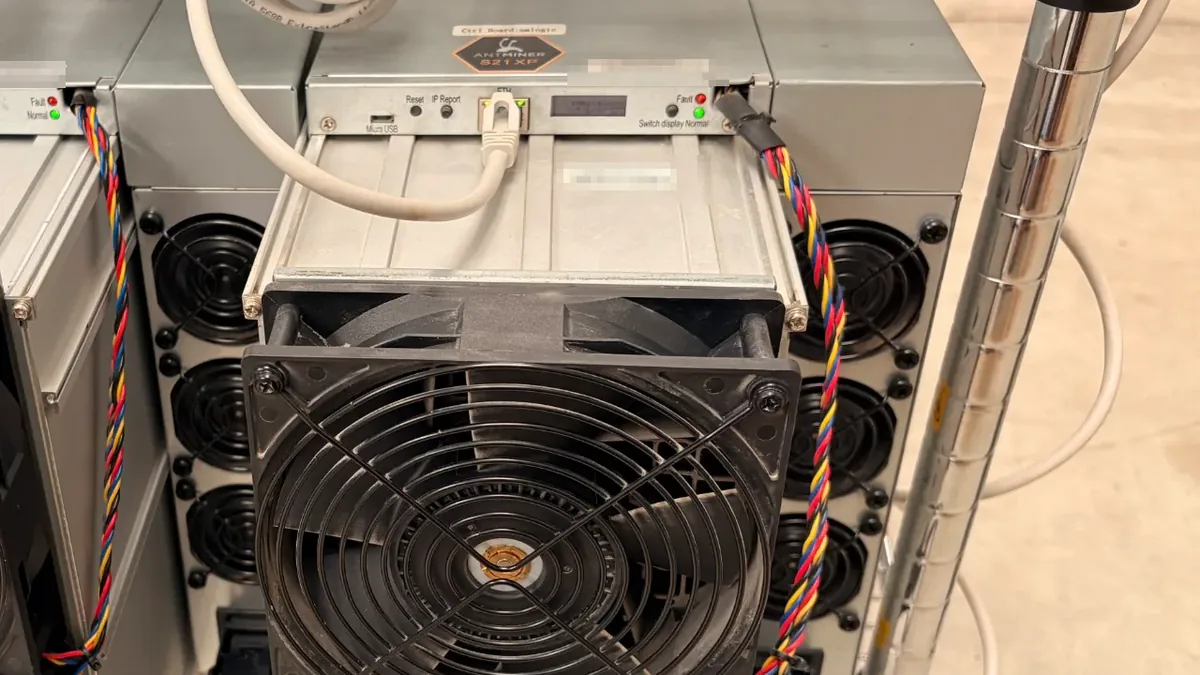
- Unpack and look the miner over. After transport, check whether the hash boards have shifted in their slots, the power connectors are intact, the fan wires still attached. Arrived from the cold, let it stand a few hours at room temperature or condensation forms inside.
- Put the unit on a rack or shelf with the air inlet and outlet clear. Leave at least 20 to 30 centimetres between the case and the wall. The hot exhaust of one miner must not blow into the intake of the next.
- Connect the power cable. An industrial unit of 3,000 to 3,800 W pulls 13 to 17 A from a single phase supply, so it needs its own line and its own breaker. Not an extension lead, not a household socket with other loads on it. Requirements for the line, the breakers and the cable cross section are in the power supply section.
- Connect Ethernet. Twisted pair holds a steady latency and does not drop from interference, and any break in the link to the pool is idle time on a miner still eating full power. Wi-Fi adapters in miners are either missing or work badly next to power cables.
- Switch on and find the IP of the miner. Easiest is the DHCP client list in the router, or a scan of the subnet with the maker's own utility. Some models show the address on a display or on the IP Report button.
- Open the web interface at that address and change the password right away. Everyone knows the factory login and password pairs, and a miner with the default password on a shared network is an open door.
- Enter the pool address, the port and the worker name into the three settings slots. The name format is usually
account.worker, payout schemes are in the pools section. - Save the settings and let the miner come up to speed. Rated hashrate does not appear at once: fans spinning up, boards warming through and averaging over shares take 20 to 40 minutes. The first minute tells you nothing.
- Check board and chip temperatures, fan speeds, the HW error counter. A temperature spread between boards over 10 degrees, a rising error count or a board that has dropped off mean stop and look into it, see typical faults.
- Read the system log for the first half hour. It shows miner restarts, pool disconnects and thermal protection trips. The main screen shows none of that.
Then three settings people forget most often. Time zone: get it wrong and every log entry drifts, and matching a reboot to a power cut or a temperature spike stops being possible. Set the zone of the site, not the factory one. Fix a permanent address while you are in there: a MAC reservation in the router, or a static IP in the network settings. Otherwise the address changes after a router reboot, you hunt for the miner again, and external monitoring loses sight of it.
Firmware. Check the version before the miner goes into permanent service. Bitmain factory builds are in the stock firmware catalogue, installation through the installer is in the HashCore Toolkit guide. Flash a cooled unit, on stable power and over cable: an interrupted write leaves the control board dead. And do not update the whole fleet at once. One miner first, a day of watching, then the rest.
Backup pool. Fill every free slot, not just the first. The main server goes into maintenance, and a miner with no backup spins its fans and burns electricity until you notice. Second slot, the same pool in another region. Third, a different pool on a separate account, so one operator's bad day does not stop the work.
After that it is routine: dust cleaning, temperature checks, checking the mountings. What to do and how often is in the maintenance section. If the miner has not reached its rated hashrate within the hour, write to the support chat with the model, the firmware version and the temperatures.
Back to contents ↑14Firmware
Firmware is the program on the control board. It polls the hash boards, sets frequency and voltage per chip, holds the pool connection and draws statistics in the browser. Same model, same hardware, different behaviour: real hashrate and power draw come from the firmware, temperatures follow. The spread is wide.
Stock firmware
The maker writes the stock image for one revision of the control board and hash boards. It covers normal work: network, up to three pools with priorities, one mode from the short factory list, telemetry on temperatures and fans, an error log, web updates. What it lacks is just as clear: per chip autotuning, free voltage per chain, a power cap in watts. Only the steps the factory left open. No oversight there: the narrower the settings, the fewer miners come back to the bench.
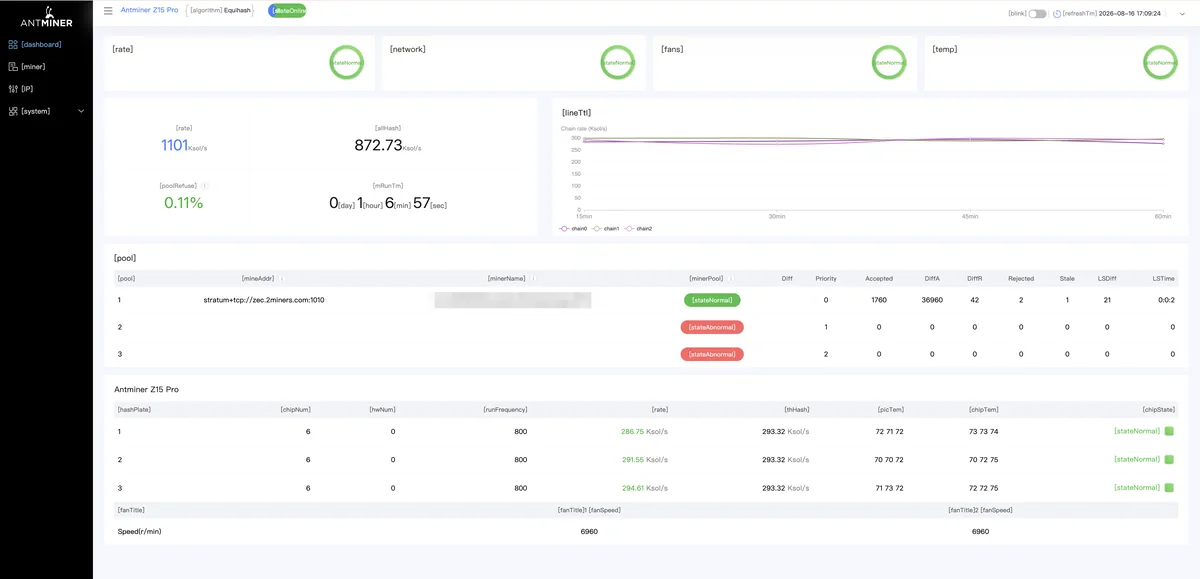
Going back to stock happens more often than you think. A warranty claim: the miner goes to service on the factory image. A sale: the buyer wants a clean unit. An odd fault, where hardware must be told from settings. An official update written for the factory base. Images for Bitmain miners, with model, version and a checksum per file, are in the stock firmware catalogue. Rolling back is what we try first when the cause is unclear.
AsicBoost custom firmware
AsicBoost is our own build for Bitmain miners. It has one job: open the parameters the factory closed and set them automatically, so nobody types frequencies into dozens of chains by hand.
- Autotuning. The firmware loads the chips and finds working frequency and voltage per chain, by the response of the hardware, not by a generic table for the model.
- Power profiles. Several ready made modes, from economical to maximum. Switching does not mean reconfiguring the miner.
- Power limit. You set a target draw in watts, the firmware holds it. Useful where the ceiling is the site wiring, not the owner's wish.
- Manual overclocking and undervolting. Frequency and voltage by hand, when the ready made profiles are not enough.
- Web monitoring. Hashrate per chain, temperatures of chips and boards, fan speeds, rejected share ratio, plus logs and charts. All in the browser, no outside tools.
- Fleet work. Bulk operations and shared access to a group of miners, instead of opening each by IP.
The developer fee is 2.8 percent. That much of the miner's time hashes for the developer, the rest goes to your pool. No other payments, but count that percentage beside the pool fee, see profitability. Supported: 28 models of the 212 in the catalogue, Antminer S19 and S21 series plus T9+, T19, T21, L7 and L9. By algorithm, SHA-256 and Scrypt, nothing else. Whatsminer, Avalon, IceRiver or Goldshell have none, they stay on the factory image. Current versions are in the firmware section.
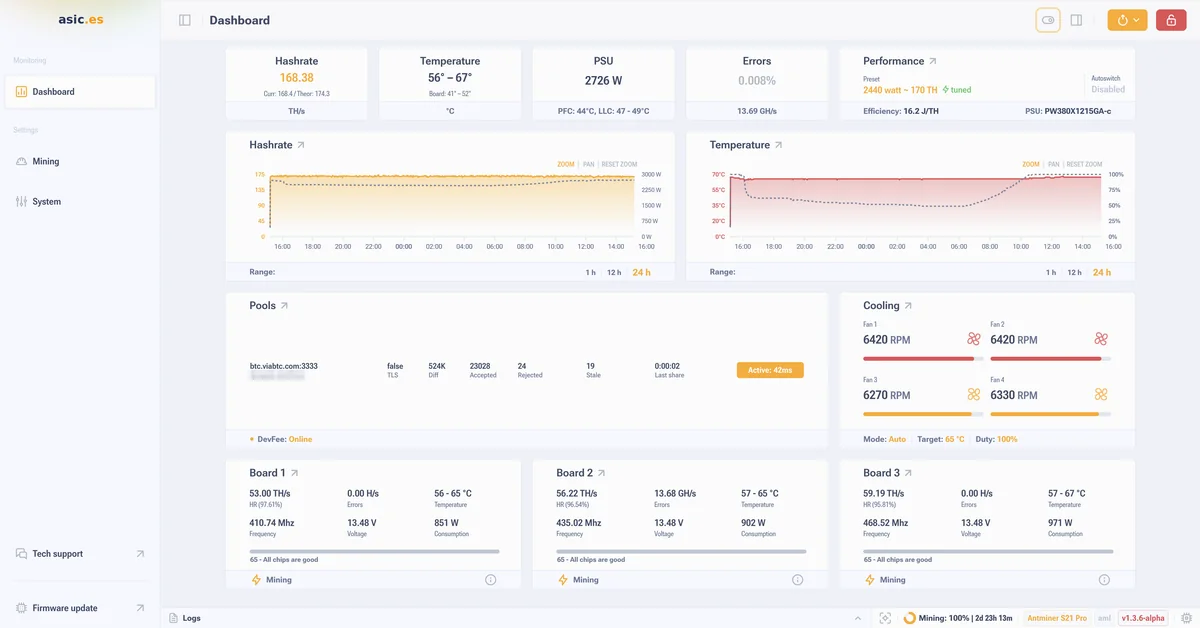
Installation
AsicBoost goes on through HashCore Toolkit. The installer finds the miners on the local network, shows model and version, picks the file and writes it. By hand through the web interface also works, but on ten devices it drags and models get mixed up.
- Check the network: miner and computer on one segment, IP known, web interface opening.
- Write down the starting point: version, pool settings, the hashrate and the power before the flash. Otherwise there is nothing to compare.
- Confirm the model and the control board revision, take the file that matches.
- Leave power and network alone until the flash is done. Wait for the reboot and the interface.
- Let autotuning run right through, then compare the figures with what you wrote down.
Unlocking control boards on Amlogic chips
Some Bitmain models came with Amlogic based control boards, whose bootloader the maker closed. A third party image will not go on until a separate procedure is done: an SD card and physical access to the miner. The steps, the board list and the usual mistakes are on the AML unlocking page. If the board will not give in: keep the stock firmware, or change the board, which is repair already.
Overclocking and undervolting
Overclocking raises the frequency, and voltage follows. Hashrate grows, power draw grows faster: dynamic power in silicon scales roughly linearly with frequency, quadratically with voltage. Efficiency in J/TH therefore always gets worse. The question is whether the extra hashrate pays for the extra watts. It works out where electricity is cheap and both miners and rack slots are few.
Undervolting works the other way. Voltage and frequency come down, hashrate drops, power draw drops harder, J/TH improves. The miner runs cooler, the fans howl less, chips and PSU wear slower. Choosing between the modes is arithmetic, not taste: on an expensive tariff undervolting almost always wins, on a cheap one overclocking wins more often. Work both out in the profitability calculator before touching the settings.
Risks
Custom firmware means interfering with the device. Listing honestly how that ends is more use than promising gains.
- Warranty. The rollback settles it: before a service visit the miner goes back to the factory image with the same installer.
- Overheating. An aggressive profile with weak ventilation drops frequencies on protection at best, kills chips at worst.
- Dead chips and chains. Autotuning weeds out unstable sections, but hardware at its limit for years may not survive the next round.
- A failed flash. Power goes away mid write, the board is left without a bootloader. Then a programmer or a new board.
- Builds from unchecked sources. A file from a forum or a messenger can carry a backdoor and looks like any other.
- Hidden fees. The declared percentage and the real one differ, part of the work goes past your pool.
- Payout address swapping. The nastiest: the image rewrites the wallet address or worker name, the miner shows a normal hashrate, the pool balance does not grow.
15Profitability: what it depends on
Profitability is not a property of the model but the result of several variables, and the owner controls two or three. The rest comes from the network and the market. Any figure holds on the day it was counted and does not live long. A seller who names a monthly income in euros with no caveats either never did the maths or did it on a good day.
How the result adds up
The scheme is the same for any coin. Your hashrate is divided by the total network hashrate, that share is multiplied by what the network pays out in a day, and out comes the daily amount in the coin. Then the coin goes to euros at the current rate. Electricity comes off the revenue, then the pool fee, then the firmware fee. What is left is the result worth talking about. Electricity is the easiest line: power in kilowatts times 24 hours times your tariff. It is the one cost you can know in advance, exactly.
- Miner hashratestarting figure
- ÷Total network hashrateyour share of the network
- ×Daily network rewardamount in the coin
- ×Coin rate in eurosrevenue for the day
- −Electricity: kilowatts × 24 × tariff
- −Pool fee and firmware fee
- =Net result for the day
The order is the same for any coin. Only the numbers change: network hashrate, reward, rate and your tariff.
What the network and the market set
- The coin price. The most restless variable: revenue is recalculated with it every day, while the costs in euros stay where they were.
- Difficulty and total network hashrate. New capacity comes online, your share gets smaller, the same hardware brings in less coin. At your site nothing has changed at all.
- Block reward and halving. Bitcoin halves the reward roughly every four years, other networks on SHA-256 and other algorithms have their own schedules. After a halving the income in coin drops a step, even with the price standing still.
- The share of transaction fees in the reward. Small in a quiet network, noticeably higher in a busy one. Not a steady source.
What depends on you
- The electricity tariff. The main thing you control. In Spain a household kilowatt hour runs around 0.13 to 0.16 euros, the figure moves by hour and season, depends on the type of contract, and an industrial connection is counted differently.
- The pool fee. Usually a few percent. The payout scheme changes the size and the evenness of what arrives, see the section on pools.
- The firmware fee. With AsicBoost, 2.8 percent of working time, counted the same way as the pool fee.
- Model efficiency. The spread inside one algorithm is huge: on SHA-256 the catalogue runs from 9.45 to 157.53 J/TH. For the same hashrate, miners burn very different amounts of energy.
- Downtime and degradation. Outages, overheating, the summer drop in frequencies, one hash board of three failing: each takes away part of the day or part of the hashrate, and none of it is in the datasheet. Even a tidy site budgets a few percent a year.
- Maintenance and spare parts. Cleaning, fans, power supplies, shipping, service labour. Irregular spending, but over a year it adds up to real money, see maintenance.
- Taxes and reporting. The rules depend on the country and on the owner's status, from the private individual regime to running a business. Check with your own adviser.
Why calculators disagree
Two calculators easily give different numbers for the same miner, and neither is lying. The inputs differ. The rate comes from different exchanges at different moments. Difficulty goes in as current or as an average. Power draw is taken from the datasheet or measured at the socket. Pool and firmware fees are counted in some places and not in others. The tariff goes in with taxes or without. Overclocking and undervolting are a separate source of disagreement: after them the unit no longer matches its datasheet.
Hence the practice: count again about once a month, and after every event that moves the inputs, be it a new tariff, a reflash, a halving or a jump in the price. A year ahead is pointless. For the current month it is a working tool. Your model, your tariff and your fees go into the profitability calculator, and daily and monthly consumption in kilowatt hours comes from the built in power calculation.
16Pools and payout schemes
A pool is a server that piles the power of many miners together and splits the reward by contribution. Solo mining means you look for a block on your own. Do the sum: if your share of network hashrate is 0.001 percent and the network closes a block about every 10 minutes, your turn comes round in years. The payout is either huge or zero. A pool turns that lottery into a flat stream of small credits. The full breakdown, with reviews of eight services, the payout schemes and a picker by coin, sits on the separate page about mining pools.
It all runs on shares. The miner takes a job from the pool and looks for a solution at the difficulty the pool set, far below the network difficulty. Each solution is a share, proof of work done. Once in a while one comes out good enough to be a network block. A worker is the name of one miner inside your account, usually account.worker. In the statistics it shows which unit has sagged or dropped off.
Payout schemes differ on one thing: who pays for bad luck. The pool finds fewer blocks than probability says it should, and somebody covers the shortfall. Under FPPS and PPS that is the pool, under PPLNS you, in solo you alone.
| Scheme | How it is counted | Risk | Who it suits |
|---|---|---|---|
| FPPS | A fixed rate per share plus a cut of network average transaction fees | On the pool | Most people, the most predictable income |
| PPS | A fixed rate per share, block reward only, no transaction fees | On the pool | Anyone wanting a flat payout, lower than FPPS |
| PPS+ | PPS for the reward plus transaction fees from blocks the pool actually found | Mixed | A middle ground between FPPS and PPLNS |
| PPLNS | A cut of the blocks actually found, over the last N shares | On the miner | Steady work without breaks, over the long run |
| SOLO | The whole block reward to whoever found it, minus the fee | Fully on the miner | Only as a deliberate bet, never as a plan |
Over the long run the schemes differ little, in behaviour a lot. FPPS pays the same every day whether the pool got lucky or not, and the premium for that risk is already in the rate. PPLNS rewards continuity: switch miners on and off often and you lose on the transitions, because the window of the last N shares refills slowly. SOLO makes sense only if you are knowingly ready to see nothing for months.
Fee, minimum payout, delay
The pool fee usually sits between 0 and 4 percent and depends on the scheme: PPLNS cheaper, FPPS dearer, because the pool carries the risk. Comparing pools on the fee alone is wrong, count the total with the scheme. Minimum payout is the threshold below which the balance is not sent. On a modest hashrate a high threshold means the money sits in the pool account for weeks, and for those weeks the platform risk is yours. The payout delay is usually 24 hours to a few days and comes from confirming the blocks found.
Look separately at the network fee on withdrawal. Where the transaction is expensive, raise the payout threshold, or the fee eats a visible part of the transfer. How these costs land is in the profitability section, with a field for your own parameters in the calculator.
Server location and backup
Pools keep servers in several regions, for Spain usually the European nodes. Low ping shortens the time to deliver a job and send a share back, so fewer shares go stale and get thrown out. On a decent link that fraction stays under 1 percent. On a bad connection or a distant server it grows and eats into the result. Pick the nearest region and test the response, not the pool name.
The connection address looks like stratum+tcp://eu.pool.example:3333, with the port after the server name. Different ports on one pool often mean a different starting share difficulty, or encryption. For a powerful miner take the port with high difficulty, or it chokes on the number of small shares. Fill all three slots in the miner settings: the same pool in another region second, a different pool third. How that is typed in is shown in the connection section.
What to check before leaving a pool for good:
- Whether the pool statistics hashrate agrees with what the miner reports. A gap over 3 percent is a signal.
- Whether worker offline alerts reach your email or messenger.
- Whether block statistics are transparent and the payout per share can be checked.
- Whether the pool supports your network and merged mining where it exists, for example for Litecoin and Dogecoin.
- What account size and what withdrawal pass without verification. The rules depend on the country and the platform.
17Electrical supply
Wiring is the part where a mistake costs more than the miner. An industrial ASIC draws 3,000 W and up, and some catalogue models reach 20,000 W, like the Whatsminer M79S. They run around the clock, no pauses, no drop in load. Household wiring was never built for that. It was designed for short peaks, not for constant current at the limit.
One phase or three
- Supply: single phase 230 V or three phase 400 V
- Fire protection stage, 100 to 300 mA
- Group breaker, curve C, 20 to 30 percent margin
- RCD or RCBO, 30 mA
- Copper cable, section chosen for the breaker
- ASIC: from 3 000 W, around the clock
On a single phase 230 V supply, current is power divided by voltage. A 3,500 W miner works out at about 15 A. In Spain the usual domestic steps of contracted power are 3.45, 4.6 and 5.75 kW, so one such unit eats almost the whole limit and two mean raising the contract. On three phase 400 V, with the load spread evenly, current is power divided by 400 and by the factor 1.73, and the same 3,500 W come out at roughly 5 A per phase. Which is why anything past two miners goes on three phases: less current per conductor, thinner cable, cheaper switchgear.
The first rule of a three phase board is balance. Miners are spread across the phases so the load sits about equal. An imbalance shifts the neutral, raises the voltage on the lightly loaded phase and heats the neutral conductor. You work the balance out in kilowatts when planning, then check it on the spot with a clamp meter.
Breakers and cable
The breaker rating is taken with a 20 to 30 percent margin over the calculated current: for a 15 A load you fit 20 A, for 25 A you fit 32 A. The margin is there because a breaker held at 100 percent of its rating day after day starts tripping on the thermal element for no reason. Curve C suits switching power supplies.
Cable cross section follows the breaker and the way the line is run. Guide figures for copper: 2.5 mm² under a 16 A breaker, 4 mm² for 20 to 25 A, 6 mm² for 32 A, 10 mm² for 40 to 50 A. The real value depends on the length of the run, on temperature, on the installation method, on how many cables share a conduit, so the final calculation belongs to the electrician. Aluminium has no place on mining lines.
People are protected by an RCD, or an RCBO, at 30 mA on group lines, with the fire stage of 100 to 300 mA upstream. Switching supplies have leakage current of their own, and the leakage of several units adds up. So miners get split across groups, otherwise one RCD keeps tripping for no visible reason. Earthing is mandatory on every case and on the rack: without it the leakage has nowhere to go and the case ends up live.
Distribution and power quality
From the board the supply goes to a PDU, the distribution strip in the rack. Plain PDUs only hand out sockets, metered ones show current and power per group, managed ones reboot a socket remotely and save trips to the site. A managed socket earns its keep on miners that sometimes hang after a power cut, see the startup order. Connectors on mining power supplies are usually C19 and C20, or industrial IEC 60309 at 16 and 32 A. Add up the load on the PDU and stay under the rating of its inlet connector.
Miner power supplies are built for roughly 200 to 240 V. When voltage sags the current climbs, the PSU runs hotter, the miner can restart itself. A drop of up to 5 percent on a long run is acceptable, more than that is thin cable or a poor contact. Check the terminals separately. A terminal that heats up is the most common cause of fires in farm boards, and retightening every six months is not optional.
Switching supplies draw a noticeable inrush, and ten miners starting together will trip the main breaker. Start them one at a time, with pauses of 10 to 30 seconds, by hand or through a managed PDU that delays by group. The same order applies when the power comes back after an outage.
Below is one real 75 kW board: three single phase lines of 17 kW, one three phase line of 18 kW, plus ventilation, lighting and a service socket.
| Item | Rating |
|---|---|
| Supply | 3N/PE ~400/230 V, 50 Hz, TN-S system, 75 kW |
| Main breaker | 4P 125 A, Icu 25 kA, curve C |
| Main RCD | 4P 300 mA, In 200 A, type S, selective |
| Surge protector | Type 1+2, 4P, In 20 kA, Up ≤ 1.5 kV |
| PDU 1 to 3, single phase | 17 kW, 230 V, RCBO 2P 80 A 30 mA type A, cable 3×25 mm² |
| PDU 4, three phase | 18 kW, 400 V, RCBO 4P 40 A 30 mA type A, cable 5×10 mm² |
| Ventilation | 2 kW, 3~, breaker 4P 10 A curve C, cable 5×2.5 mm² |
| Lighting and service socket | breakers 1P 10 A and 1P 16 A, curve C |
| Line from the meter | 80 m, 4×35 mm² |
| Busbars inside the board | 16 mm² on L, N and PE |
| Total | 69 kW on the PDUs plus ventilation, lighting and socket, 75 kW |
| Standards | IEC 60364, EN 61439 |
This is one worked example, not a standard design. Ratings, cable sections and selectivity depend on line length, installation method, temperature and the terms of your supply contract. An electrician does the calculation and the installation on site.
UPS, the contract and outages
A full UPS for a farm is rarely installed: a battery bank of tens of kilowatts costs more than the equipment and holds the load for minutes. You protect what has to survive the dip: the router, the switch, the cooling loop controller and the pumps. Surge protection goes at the incomer, and where outages are frequent a generator is planned for the cooling, not for the miners.
In Spain the ceiling is set by contracted power, the figure written into your supply contract. Up to 15 kW the 2.0TD tariff applies, three energy periods and two power periods. Above 15 kW you move to 3.0TD, six periods and a separate contracted power charge in each. On a domestic supply, going over the limit trips the ICP, the limiting device at the meter. On tariffs for larger loads the excess is usually billed as a surcharge on what the maximeter recorded, and raising contracted power means an application to the distribution company and, as a rule, a fresh certificate for the installation. Those names are local, the logic of a contracted ceiling is not. Ask your supplier before you buy hardware, not after: the kilowatts you have are the first item when choosing a model.
If the power goes out often, set the miners to start on their own when it returns, but stagger that start. And read the log. Every hard shutdown under load is stress on the PSU and the control boards, and part of the failures in the faults section grows out of exactly that. The heat all this power dumps into the room is counted separately, see room ventilation.
18Room ventilation
Ventilation for a farm is arithmetic, not comfort. A miner gives the air back practically everything it consumed, since in the mechanical sense it does no work. So the heat load of the room equals the total draw of the equipment, worked out already in the section on power supply. Everything else follows from that figure.
Working out the air change
It fits on one line: about 300 cubic metres of air an hour per kilowatt of heat, if you hold 10 degrees between intake and exhaust. Want a different delta? Divide three thousand by the number of degrees and multiply by the kilowatts. That coefficient of three thousand is the density and heat capacity of air rolled into one number. Going finer for a site is pointless.
Now in practice. One 3.5 kW miner at a 10 degree delta asks for about 1,050 cubic metres an hour. Ten of those is 35 kW and 10,500 cubic metres an hour, which means an industrial in line fan, not a kitchen hood. Push the delta to 15 degrees and the flow drops to about 7,000 cubic metres an hour. The price is simple: air into the miners gets hotter, the fans spin up, the noise grows. Somewhere between 10 and 15 degrees is probably the sensible compromise for an average site.
Count on what happens, not on the fan data sheet. Rated flow is measured at zero system resistance, and a live duct with a grille, a filter and a couple of bends eats a serious part of the pressure. Leave headroom. And measure temperature at the miner inlet, not at the ceiling, where it always looks better.
Hot aisle and cold intake
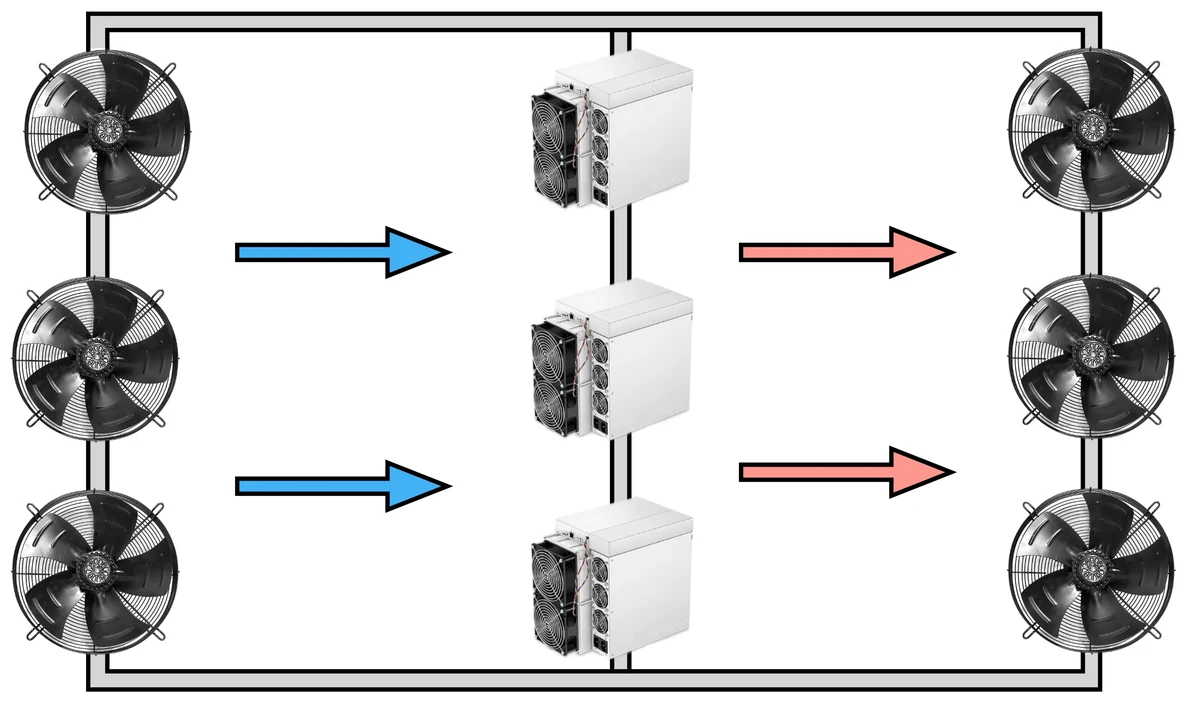 Cold aisleHot aisle
One basic rule: hot and cold air must not meet. Miners stand in a row exhausting into a shared hot aisle, the aisle is cut off from the room by a partition, film or ducting, and the extract takes air only from there. The intake goes into the cold zone, low down and diffuse, so the jet does not hit one unit. Any gap that lets hot exhaust back to a neighbour's inlet raises board temperatures and kills efficiency faster than an extra fan makes up for.
The ratio of intake to extract sets the pressure in the room. A slight positive on the cold side keeps dust from being sucked through gaps and doors, but then the intake has to come through filters. Bare extract with no organised intake is the worst case: the vacuum drags street dust in from everywhere and the flow falls too.
Intake filters and salt in coastal air
A coarse filter on the intake pays for itself in one season: a clean board runs cooler and lives longer. The filter has a price too. It adds resistance, and as it loads up the flow falls, so you need fan headroom, a replacement schedule, ideally a differential gauge on the cassette. Humidity is kept inside the rated limits of the miners. The danger is not the moisture but condensation: a cold unit is carried in from outside, switched on straight away, and water collects on the boards. Let the hardware warm up to room temperature, then give it power.
On the coast of Spain, salt in the air comes on top of dust. Salt aerosol speeds up corrosion of contacts and connectors, heatsinks pick up a film, so a site by the sea is built with a filtered intake and connections get looked at regularly, not once a year. That is one reason owners of coastal sites end up going liquid, where boards never see outside air: see immersion and hydro.
Noise, winter heat and why air conditioning does not help
Noise leaves with the air. Attenuators in the duct help, so does a bigger duct cross section that drops the air speed, turning the exhaust away from neighbours, sound absorption in the hot aisle enclosure. It only gets properly quiet on liquid, details in the overview of cooling types.
In winter the heat goes back to work. A recirculation damper mixes some hot air back in so the boards do not get an ice cold stream, and the surplus heats a workshop or a store. It is the cheapest way to get any use out of the heat, and it needs almost no pipework.
Air conditioning does not usually solve the problem. To take 35 kW of heat away you need a chiller rated for the same 35 kW of cold, and it eats a quarter to a third of that again by itself. So on top of the mining bill comes a separate bill for cold. With the tariff in Spain at about 0.13 to 0.16 euro per kWh in the domestic segment, and moving besides, the arithmetic eats the result. It earns its place in one case: the intake air cannot physically give the delta you need, say a closed room with no way out to the street.
19Immersion cooling
Immersion is cooling by submersion. Miners go down into a bath of dielectric fluid, which does not conduct current and takes heat straight off the chips, the heatsinks, the power stages. There is no air path, so no dust and no fan whine, and the temperature across a board stops jumping from edge to centre. Where this sits among the rest is in the overview of cooling types.
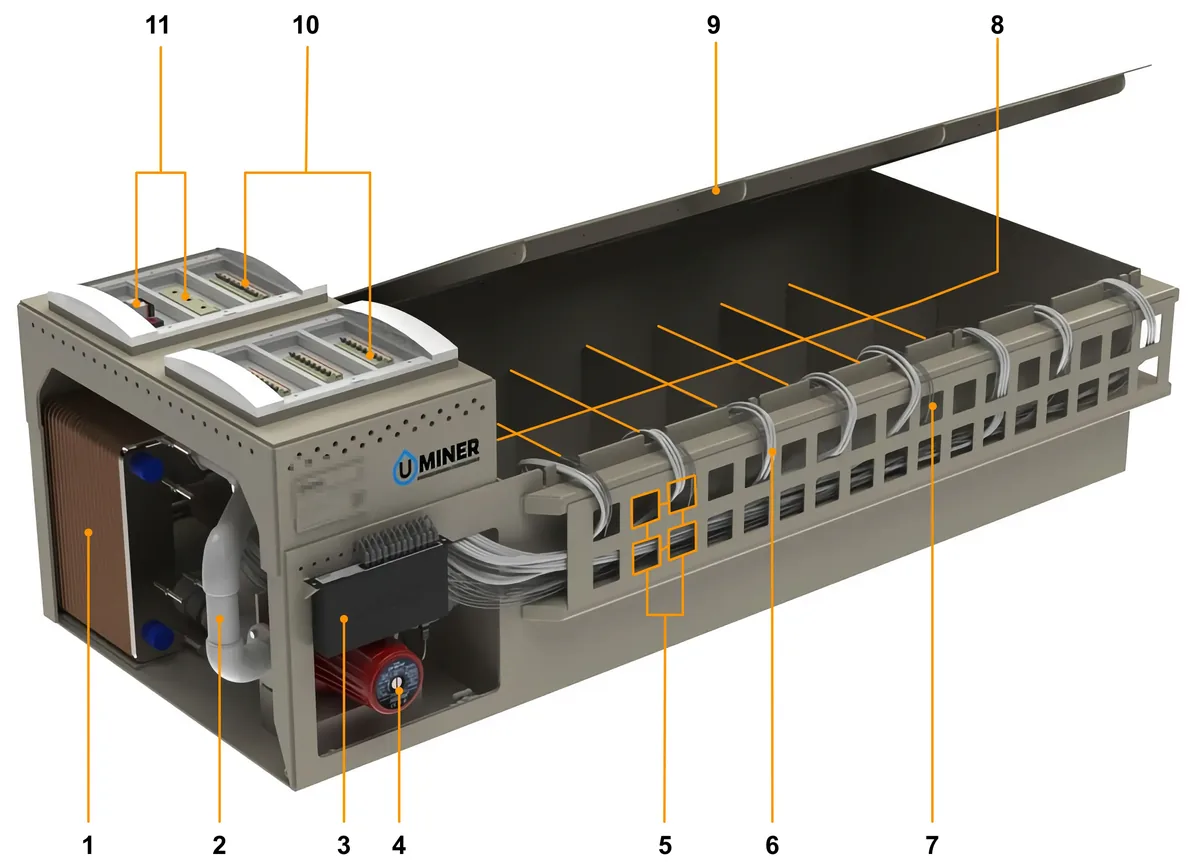
- Heat exchanger
- Circulation pipe
- Network switch
- Circulation pump
- Cable entry holes
- Power cable
- Network cable
- Bays for submerged ASIC units
- Immersion tank lid
- Circuit breakers
- Automation and control modules
Single phase and two phase systems
Single phase is the common one. The fluid stays a fluid, a pump moves it round through a heat exchanger, and that dumps the heat into an external water loop or a dry cooler. The hardware is simple and repairable, the fluid realistic to get hold of. The bath also works as a thermal buffer: if the pump stops, temperature climbs slowly and the operator has time to get there.
The two phase version works on boiling: a fluid with a low boiling point evaporates at the hot surfaces, the vapour rises and condenses on the cold lid of the bath. Heat removal is excellent. It is rarely used, though. The fluid is expensive, the bath has to be sealed or the fluid walks away, and fluorinated coolants in the EU fall under tighter rules on persistent compounds. For a commercial farm it is still exotic.
Fluids and preparing the miner
People run mineral and synthetic hydrocarbon oils, sometimes special esters. What you look at: dielectric strength, viscosity at working temperature, a high flash point, no water in it, and how the fluid gets on with plastics, board lacquer and the seals inside the miner. Transformer oil from the shop down the road, and motor oil even more so, is not up to this job.
Preparation is not optional. Fans come off, otherwise they churn the fluid and die quickly, and the firmware has to take the missing tacho signal calmly. Paper and plastic labels are removed: in oil they delaminate and end up in the filter. Thermal interfaces get checked separately: oil washes some pastes and pads straight out, and those are swapped for compatible ones. And the power supply, since not every PSU is made for submersion, some projects put the power outside the bath.
What can be submerged
The catalogue carries factory Immersion versions, for example the Antminer S21 Immersion at 301 TH/s and 4,967 W and the Antminer S21 XP Immersion at 300 TH/s and 4,050 W. Materials and layout are sorted on those, and there is no air path by design. A normal air cooled unit cannot go under without rework, and here is why. Oil creeps into connectors and looms by capillary action. Labels and some polymers break down. The manufacturer's warranty is void after submersion. And with the fans on and the fan logic untouched, the miner goes into protection before it has warmed up.
A word on overclocking. In oil the temperature spread between chips on one board is minimal, no hot spots at the edge of the heatsink, so custom firmware holds raised frequencies more steadily than on air and undervolting gives a predictable gain in efficiency. Which models such firmware exists for is in the AsicBoost section. Submersion by itself does not raise hashrate. It lifts the thermal limit, the rest is the firmware.
Servicing and where the fluid goes
A bath needs filtration: a fine filter in the loop collects the dust brought in during the install and the wear particles. The fluid is checked now and then for water and contamination. Any repair starts the same way: unit out, stood up to drain, and you wait. So the room needs a bench with a tray, somewhere to drain, and gloves within reach. Used fluid is waste, it does not go down the drain, it goes to a licensed operator. The rules depend on the country and region, ask a specialist.
Immersion is worth costing when you have hit a limit on density per square metre, on silence next to people, or on summer heat that makes the intake air hot on its own. One more argument is service life. With no dust, no vibration and no fans, a whole class of failures disappears, and boards live at a steady temperature with no daily swings. At small volumes the baths and the fluid do not pay off, the pipework even less, and it is more honest to stay on air or take a hydro loop, easier to service and with no separate corner needed for dirty work. The usual order: immersion gets costed first and bought later, when the site runs steadily and is growing, and noise, space or summer heat have become the limit. Not when you fancy squeezing a bit more out of a couple of miners.
Back to contents ↑20Hydro cooling
Hydro cooling is a closed water loop: the hash boards are clamped in water blocks, the heat goes into the coolant and from there outside. Air takes no part in the cooling. That is why the room is almost quiet and a rack takes several times more kilowatts than on air, comparison in the overview of cooling types.
- Miner: water blocks on hash boards
- Row manifolds and quick disconnects
- Supply and return mains
- Heat exchanger or dry cooler outside
- Pump group and expansion vessel
- Cooled water back to the miners
Which water to use and what temperature to hold
The internal loop is filled with treated water: demineralised or softened, with a corrosion inhibitor and a biocide. Hard tap water leaves deposits in the narrow channels of the water blocks, the channel closes up, heat removal falls and the board above it cooks. The external loop in a cold climate is protected with glycol. Just remember a glycol mix carries heat worse than clean water and needs extra flow.
Inlet water temperature is held inside the rated window of the model, on current models usually from 25 to 45 degrees, with exact values in the spec of the particular unit. Water that is too cold is no gift either: condensation forms on the case and pipes. The difference between supply and return sets the flow you need, and it is the first thing checked at commissioning. Pressure requirements go by model, usually a few bar, and the system has to hold a test pressure above the working one.
Leaks: why they get spotted late
Water next to electronics is the owner's main fear, and the cure is discipline during the install. The thing is, a weeping joint rarely looks like an accident: a badly crimped fitting seeps drop by drop, the water runs down the pipe, and you find it as a puddle under the rack or as a unit that shut down further along the loop. Hence the rules: proper quick disconnects with shut off, no mixed metals in one loop, fittings crimped with a tool and not by hand, trays under the rows, leak sensors on the floor. Automation pays here: a pressure switch and a flow sensor cut power if the pump stops or the loop loses pressure. The first day the loop runs on water with no power on the miners, so weeps show up early.
On noise and density. There is not one fan inside a hydro miner, so what is left in the room is the hum of the pump group, and that is it. The main noise source, the dry cooler, stands outside and can go well away from anyone's windows. Density now runs into pipe sizes and the capacity of the supply rather than air change, so one rack takes several times more kilowatts than on air and floor area stops being the bottleneck.
Starting the loop
- Build the whole loop: manifolds, trays under the rows, leak sensors, nothing left for later.
- Fill the system with treated water and bleed the air through the air vents. An air pocket in a water block is a local hot spot.
- Pressure test above working pressure, hold it, and walk every joint by hand.
- Run the loop on the pumps with no power on the miners, check the flow on each branch, balance it.
- Only now give it power: bring the miners up to full load gradually and log supply and return temperatures.
What the catalogue has
A hydro miner without a loop is metal that will not switch on. So the water gets planned along with the equipment, not after it. In hydro form the catalogue has the Antminer S21 Hydro at 335 TH/s and 5,360 W, the Antminer S21+ Hydro at 319 TH/s and 4,785 W, and the most efficient SHA-256 miner in the whole catalogue, the SealMiner A4 Ultra Hydro at 9.45 J/TH. For Scrypt there is the SealMiner DL1 Hydro at 0.15 J/MH, the best figure in its algorithm.
A side benefit of the loop is low grade heat, already collected into one pipe. Putting it into space heating or a process is easier than messing about with the air ductwork covered in the ventilation section. If you need neither silence nor density and the budget is tight, the answer is honest and boring: air is cheaper to get into, liquid wins at scale and near people. The other liquid route is in the immersion section.
Back to contents ↑21Typical faults
A miner has few parts, so the symptom list runs out fast. About fifteen of them, then it repeats. Many calls close without a soldering iron. Dust on the heatsinks. A ribbon half out of its socket, a tired wall socket, a typo in the pool address, a power supply past its best. The rest comes down to hash boards and power circuits, which is workshop work. Below, symptom by symptom: what shows from outside, what is usually behind it, what the owner checks alone.
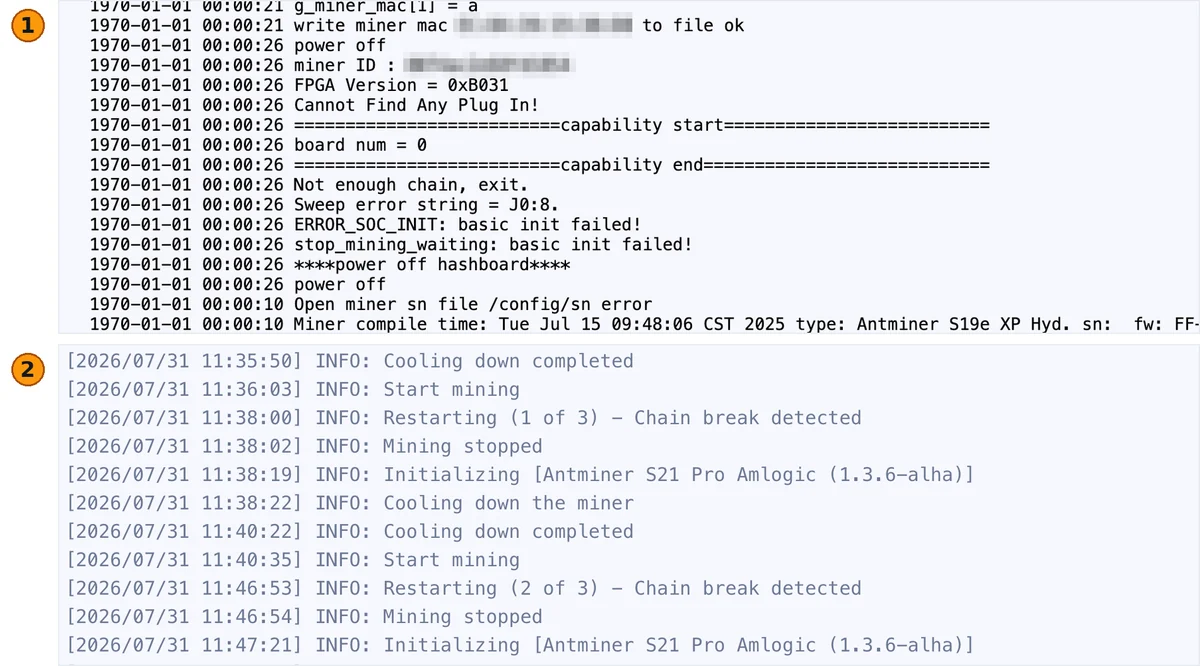
- Stock firmware, hlog tab: no board found, board num = 0, start up stops
- AsicBoost, Status tab: a broken chain and three restart attempts in a row
Where to look first
Diagnosis starts in the web interface, not with a screwdriver. The status page carries four readings that answer most questions: chip count per chain, hash board temperatures, fan speeds (current models usually have 4 fans), share reject rate. On a healthy miner chip counts are equal across chains and match the model spec. Board temperatures sit within a few degrees, fans are not pinned at maximum, rejects stay in tenths of a percent. Anything off that picture is a clue.
The second source is the system log, the kernel log. It shows how the miner booted, which chains came up, where the chip scan broke off. The symbol of the missing chip is there too, with the errors that repeat boot after boot. Pull the log before you reboot. A restart wipes it and the technician hunts the fault from scratch. If the unit reboots by itself, take the log while it is fresh.
| Symptom | Likely cause | What you can check yourself |
|---|---|---|
| Will not power on, no lights | No voltage on the line. PSU protection tripped, or the PSU is dead | Breaker and socket under load. Cable and plug. A swap with a known good PSU of the same rating |
| Fans spin, no hashrate | Control board did not come up, or hash boards were not picked up. Pool settings missing | Whether the web interface opens, control board LEDs, pool address with worker name, how the data ribbons are seated |
| Hashrate below spec | Thermal throttling, dust on the heatsinks, weak airflow. Chips lost, or the firmware profile set low | Board temperatures in the log, chip count per chain, heatsink cleanliness, intake air temperature, selected profile |
| One hash board not detected | Break in the ribbon, no power at the board, first chip of the chain dead | Seating of ribbons and power terminals. Swap ribbons between boards: if the error moves with them, the ribbon or port is at fault |
| Chips dropping off the chain | A chip lifting off its pads, contact with the heatsink going bad, a local hot spot | Where the scan breaks off along the chain, whether it is the same address every boot, overheating marks on the heatsink |
| Fan error | Seized bearing, tacho wire broken, connector unplugged or corroded | Whether the impeller turns by hand with the power off, connector seating on the control board, the speed in the log |
| EEPROM error | No link to hash board memory, corroded contacts, calibration data damaged | Board number in the message, how tight the ribbon sits, whether the error follows the board to another port |
| PIC error, or power controller error | Board controller firmware glitch, input voltage sagging, a converter failing | Mains voltage under load. A full power down for a minute. Whether the error returns on the same board |
| Overheating and throttling | Dust, hot air at the intake, recirculation. Dried out thermal interface or a clogged filter | Gap between intake and exhaust temperature, heatsink cleanliness, whether cold and hot aisles are kept apart |
| Reboots on its own | Mains sagging, overheating, a faulty PSU, overclocking set too high | Voltage under load, how long it runs before falling over, behaviour on the stock profile |
| No IP, or the pool is not seen | No DHCP reply, bad patch cable, wrong static settings, a typo in the address, a closed port, filtering upstream | Link on the switch port, another cable and port, the IP report button, pool address with port, backup pools in the list |
| Lots of rejected shares | Unstable link, high latency to the pool, a wireless hop in the path, overclocking pushed too far | Reject rate in the statistics, latency to the pool server, a cable in place of the radio bridge, frequencies one profile down |
| Noise and vibration | Worn fan bearing, unbalanced impeller, loose fasteners, resonance with the rack | Which fan is the noisy one, whether it has play, the case screws, vibration isolation under the miner |
| Burnt smell, soot, melted connector | Breakdown in the power circuit, a scorched power contact, a short circuit | Cut the power right away and do not switch it on again. Inspect connectors and terminals. The unit goes to service |
What you can fix yourself
Dust is cause number one. Going by what comes through service, most talk about lost hashrate starts there. A layer on the heatsink fins works like a blanket: chips run hot, the firmware drops the frequency, the owner sees the hashrate gone and no error in the log. A blow out puts the miner back to normal in half an hour. Second is contact. Data ribbons and hash board power terminals work loose from vibration and thermal cycling, and a corroded connector gives floating EEPROM errors and chains that come and go.
Network and pool problems need no screwdriver. A typo in the address, the wrong port, a forgotten worker name, one pool in the list with no backups: a two minute fix in the settings. A PSU is tested by substitution, the fastest way to tell a power problem from a board problem, and it gets replaced whole. A worn fan bearing is also a job for the spot. Size and speed have to match, the tacho signal is not optional, or the miner keeps complaining. Picking compatible parts is in the spare parts section.
Firmware settings are a group of their own. An overclocking profile set too high gives reboots, a rising reject rate, chips dropping off the hottest boards. Going back to stock, or to a moderate profile, is the first diagnostic step. Symptom gone, the profile was to blame and the hardware is fine. Factory images sit in the stock firmware catalogue, installing a custom build is described in the AsicBoost firmware section.
What only the workshop can do
Chip soldering, repair of hash board power circuits, bringing a dead domain back, replacing converters and chokes, work on the control board, PSU repair: all of it needs a bench and proper tooling. Bottom heating, a soldering station, a hot air gun, stencils cut for that chip package. Warming a board with a household hair dryer and a 60 watt iron will not work. Usually that attempt moves the job from a chip replacement into a board write off. How it is set up and when it pays off is in the repair section.
Before you send a unit in, put together the minimum package: model and serial number, a screenshot of the status page, the piece of log with the error, what you checked and when the symptom appeared. That saves a day of diagnosis. Symptom questions get sorted out in the support chat, equipment comes in through the shop contacts.
Back to contents ↑22Repair
Repairing a miner comes down to four units: hash boards, power supply, control board, mechanics (fans, connectors, fasteners). Symptom by symptom diagnosis sits in the faults section. This one is about what happens to a miner once the workshop has taken it in.
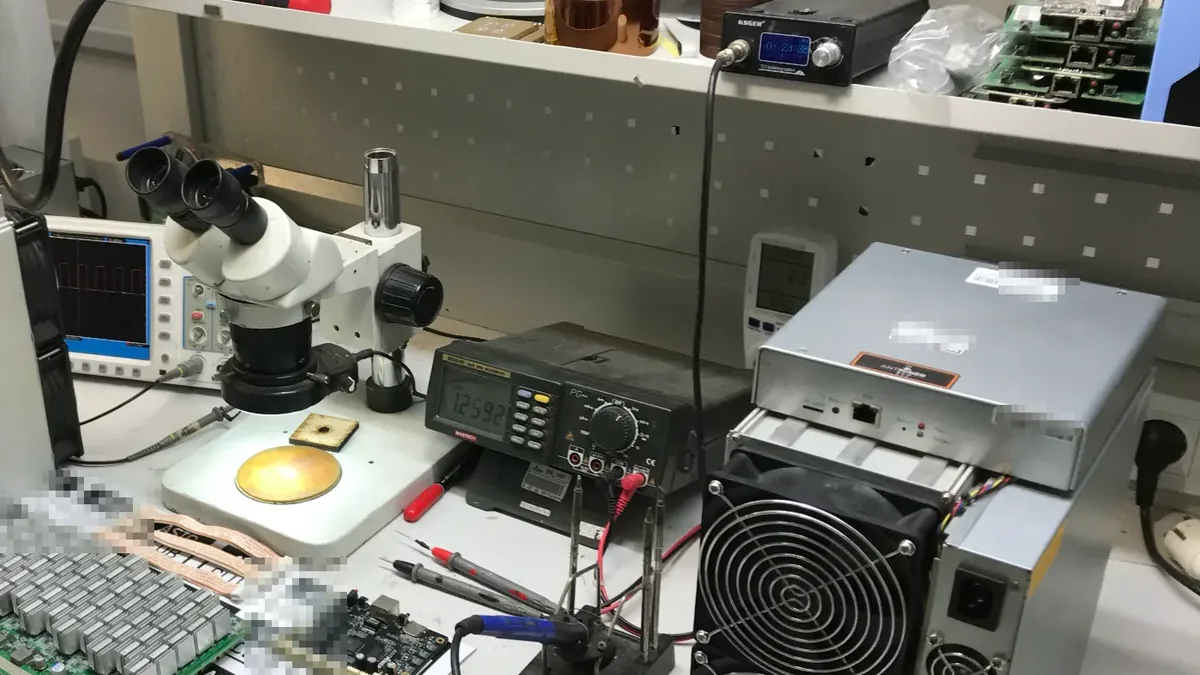
What gets repaired
The hash board is the main object. Its chip chain is powered in groups called domains, not as one piece: voltage runs through several chips in series, so one failed part takes the whole group down. That is why the log rarely loses a single chip. What disappears is a neat block of the chain. The work here: replacing failed chips, repair of the power side (converters, chokes, capacitors, switches), restoring traces and vias, cleaning after moisture or corrosion, reballing the pads.
A power supply gets repaired at the fan, input circuits, fuses, bulging capacitors, output connectors. Worth doing while the fault stays local. Once the power section has broken down, replacing the unit whole is faster and safer. Control boards are brought back through the power rails, the memory and the connectors. Boards on Amlogic chips are a story of their own: they need a separate AML control board unlocking procedure first. Fans, ribbons, connectors are almost always replaced outright. Too cheap to risk a second failure.
Some things do not get repaired. A board with a burnt out patch of laminate, one that stood flooded long enough to grow corrosion, one with lifted pads under several chips goes to the donor pile: live parts come off it for other units. A power supply goes the same way after a breakdown in the power section, if the input circuits went too.
When repair is worth it
Count in fractions of what the board costs. Absolute sums say little here. A hash board repair runs to a noticeable but not decisive share of the price of a new board, and on a current model it almost always beats replacement. Once the bill creeps up to the price of a new board, repair stops making sense. At unit level the rule is the same: if the repair total is close to what the same miner costs used, and the model is old and weak on energy efficiency, the sensible move is something newer from the miner catalogue. One more thing we see in practice: when a miner with badly dated chips sends in its third board in a row, the rest usually follow.
How service diagnosis is organised
- Intake: model, serial number, symptom, photos
- Inspection: moisture, soot, overheating, signs of tampering
- Bench: a known good control board and power supply
- Domain by domain measurement, thermal image taken
- Unit repaired, measured again
- Load run, report to the owner
The test bench is a separate control board, a known good power supply and a fixed environment where a suspect hash board is checked alone. That settles the eternal question of who is at fault, board or controller, in minutes. Without a bench it takes a day of swapping parts inside the case. A thermal camera shows what a multimeter cannot: a cold stretch of chain means those chips are dead, a hot spot on a converter gives away a shorted part in seconds. Bottom heating and a hot air gun are needed because of the board itself. It is multilayer, with a lot of copper pulling heat away, and without even warming you cannot lift a chip without tearing the pads beside it.
Warranty and turnaround
The manufacturer warranty dies with an opened case and broken seals, with soldering done at home, with traces of flooding and corrosion, with mechanical damage. Firmware is not on that list: it is reversible, and before a claim the miner goes back to the factory image. A miner under warranty flips the usual order: first the seller, the screwdriver later. Terms differ by manufacturer and by batch, so ask before you touch anything, through contacts or the support chat.
On timing, roughly this. Diagnosis takes one working day to several, a routine hash board repair a few days, and the longest wait is for scarce chips or a board for a rare revision. After repair the miner always goes on a load run: a short test misses defects that surface on a warm board hours later. Intake and current turnaround are in the repair section, replacement parts in the spare parts section.
Back to contents ↑23Spare parts
A spare part for a miner is picked by model plus revision plus chip version. The model name alone guarantees nothing. Parts from neighbouring runs of one series look identical and are not interchangeable. That is where nearly every bad order comes from.
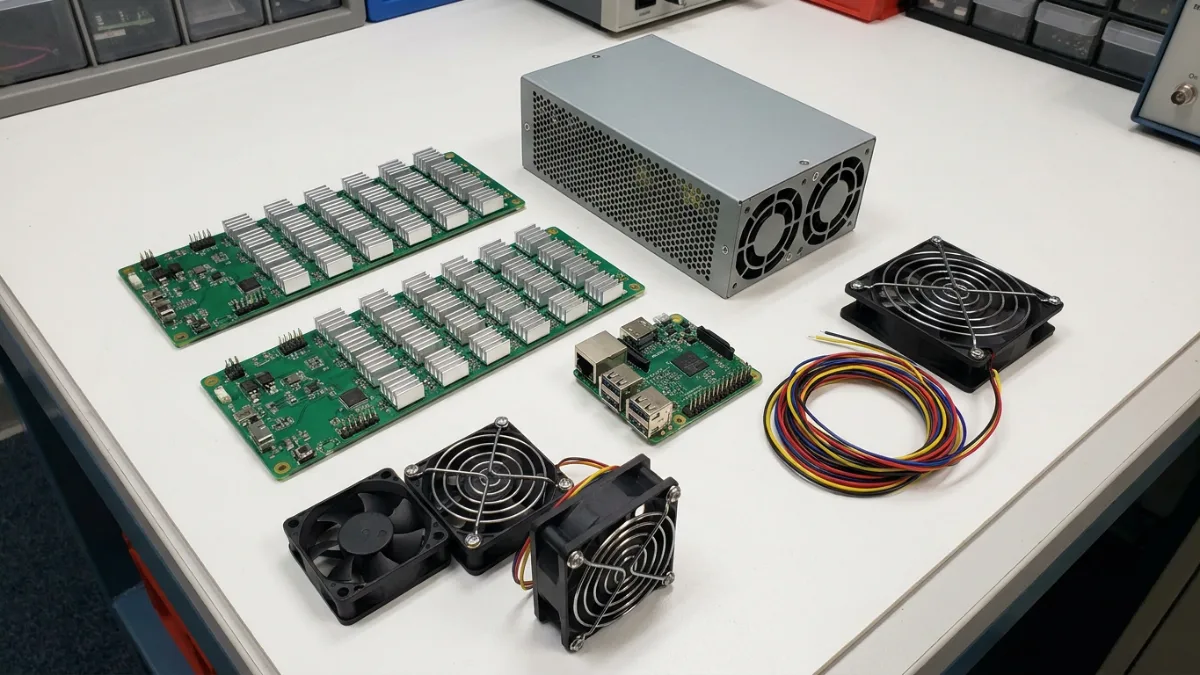
Hash boards
A board is tied to the miner on several counts at once: type and number of chips, the domain layout with its working voltage, the connector pinout, the calibration data in board memory, the controller firmware version, which has to know that revision. A board from a neighbouring model will not run even if the connector fits: the controller does not recognise the chain and throws an error. Within one model there are revisions on different parts, so the laminate marking matters more than the label on the case. Keep the set of boards in a miner uniform. A mix of revisions gives different temperatures and a different response to overclocking, plain to see on AsicBoost firmware profiles.
Power supplies
Four things matter: headroom of around 15 to 20 percent over what the miner draws, the type and number of power connectors, input voltage range, efficiency class. The headroom is not for show. A unit working at its limit runs hot, ages faster and is first into protection when the mains sags. The efficiency class shows up in the electricity bill and in how hot the unit gets: at these wattages the gap between mid and high class is easy to feel. Check the signal line between unit and control board separately, without it the miner does not see the power supply and will not start. Cable cross section and breaker sizing are in the power section.
Control boards and fans
A control board is picked by series and memory size. Some Bitmain models carry boards on Amlogic chips, which need a separate procedure before firmware goes on, described on the AML unlocking page. Fans are chosen by size (on industrial Antminers 120 by 38 millimetres, on low power home models much smaller), by speed with the pressure they make, by connector type, by tacho output. Desktop miners like the Avalon Nano 3 live by their own rules, there is a Canaan write up on that line. A fan with no tacho output reads as stopped and throws an error, even when the impeller turns. Change fans in pairs: different speeds front and back wreck the airflow.
Small stuff that decides things
- Cables and data ribbons: length, conductor count, crimp quality. A cheap ribbon gives floating chain errors that people chase for weeks.
- Power cables and terminals: cross section matched to the miner's current, contacts intact with no scorching, torqued properly.
- Heatsinks and thermal interface: paste and pads of exactly the right thickness. Thinner than needed leaves a gap, thicker fights the clamp.
- Fasteners and case parts: screws, standoffs, rails, duct blanking plates. Without the plates hot air comes back to the intake.
- Filters and intake grilles, if the miners sit in a room of their own. Treat them as consumables.
What to tell us when ordering
- The full model name, with the Pro, XP or Hydro suffix and the hashrate version.
- Take the revision from the silkscreen on the board, the case sticker is no good for this.
- The miner's serial number: it identifies batch and generation.
- Photos of markings, connectors, the damaged area, in good light.
- What you checked already: ribbons swapped, power supply substituted, behaviour on the stock profile.
Those five points close almost every question of matching parts. Without the data to hand it is easier to bring the unit in than to guess by message: matching at the service centre with the part on the table is quicker and more accurate. Compatibility questions go to the support chat and the shop contacts. Rare revisions are ordered against the serial number, with longer lead times.
Risks of non original parts
- Remarked chips off scrapped boards. They run a few weeks, then drop off the chain again.
- Rebuilt hash boards with no load run. The seller tested five minutes, the defect shows up on a warm board.
- Power supplies without proper protection. On a short circuit they take the hash board and control board with them.
- Fans with no tacho signal and reduced speed. A permanent fan error, then overheating.
- Cables rated for more current than they carry. The connector heats up, then scorching and the smell of burning.
24Maintenance
Maintenance comes down to three things: keep the heatsinks clean, watch temperatures and logs, change consumables on time. The calendar decides little, it all depends on conditions. A miner in a dusty shed by the road wants attention several times more often than the same unit in a filtered room. Below is what farm owners hold in their heads.
| Job | How often | What you need |
|---|---|---|
| Blowing out heatsinks and case | Every 1 to 3 months where it is dusty, every six months in a clean filtered room | Compressed air free of oil and moisture, soft brush, respirator, a separate spot for blowing out |
| Fan inspection | Once a month by eye, by ear all the time | Torch, the speed log, a spare pair of fans |
| Temperatures, logs, share reject rate | Weekly by hand, or continuously through monitoring | Miner web interface, monitoring system, alerts to a messenger |
| Fasteners, connectors, terminal torque | Once a quarter | Screwdriver, wrench, pyrometer or thermal camera for contacts running hot |
| Firmware update | As versions come out, on one unit first | HashCore Toolkit installer, a settings backup, a stable network |
| Thermal paste and thermal pads | Only when indicated: the board is apart anyway, or temperatures keep climbing. Usually no more than once every 2 years | Paste, pads of the right thickness, isopropyl alcohol, lint free wipes |
| Washing a hash board | Only after flooding, water damage or heavy contamination | Service: ultrasonic bath or dedicated solution, full drying, inspection |
| Cleaning the intake filters | Monthly, more often on the coast and in the dusty season | Spare filters. Washable cassettes get rinsed and dried |
| Electrics: breakers, cables, connectors | Every six months | Thermal camera or pyrometer, a wrench for retorquing, a log of readings |
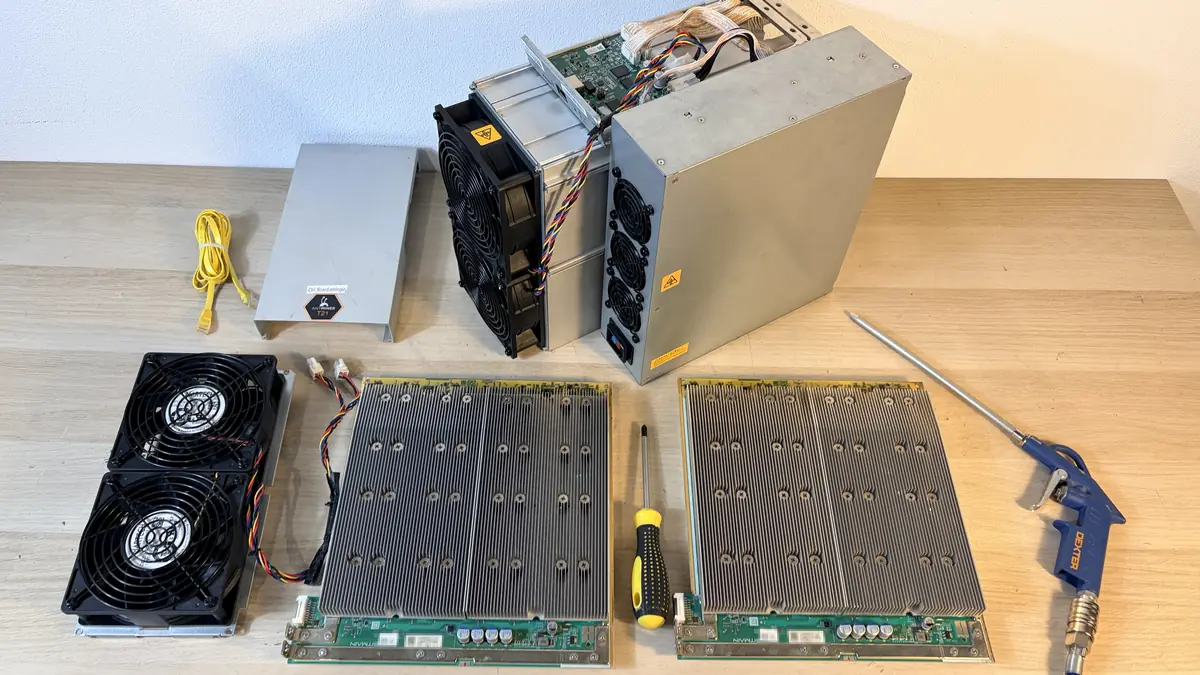
What to clean with, what not to do
The kit is simple: a compressor with a moisture and oil filter or a can of compressed air, a soft brush, a vacuum. The vacuum stands beside you and picks up what you raise, it never touches the boards. Blow outdoors or in a separate room, otherwise the dust settles on the miners around and returns an hour later. Hold the fan impeller while you blow. Spun up by the air stream, a fan works as a generator and can damage the control board. What not to do: a compressor with no water trap, water on a board, a stiff brush on contacts, work without an antistatic strap.
Washing a board is a procedure of its own, not a bigger clean. It is justified after flooding, salt fog or condensation, when corrosion has started on the parts. It is done at service: a dedicated solution or an ultrasonic bath, then full drying in a heat cabinet. The home version with tap water and a hair dryer leaves salts under the chips, and the miner fails a month later.
Thermal interface and fasteners
Thermal paste and pads are not changed on a schedule. The reason appears when the board is apart anyway, when certain zones creep up in temperature with clean heatsinks, when the compound has visibly dried out. The danger is in the thickness. A thin pad leaves a gap, a thick one fights the clamp, either way the chip overheats and in time leaves the chain. On many boards the heatsinks sit on thermally conductive glue, pulling them off blind is a bad idea: the chip comes away with the heatsink. Check the fasteners by hand. Vibration loosens case screws and terminals, and a loose power contact heats up and scorches, more on that in the faults section.
Firmware, transport, storage
Update firmware deliberately: one miner first, a day of running, then the rest of the farm. Save the settings before the update and a rollback takes minutes. Factory images are in the stock firmware catalogue, the step by step install is in the HashCore Toolkit guide.
Transport breaks more miners than running them does. Hash boards are heavy and hang on a few screws, so vibration on a bad road tears chips off and cracks solder joints. Ship in a rigid box with foam, boards in their original position, nothing loose inside the case, and brace the boards extra over long distances. Store the unit dry at moderate temperature, in closed packaging with a desiccant. The main storage risk is condensation: a miner brought in from the cold goes on only after it warms to room temperature. Drain the hydro loop before a long idle period.
Seasons in Spain
In summer the intake air is hot to begin with, and a miner that ran quietly in winter throttles. The measures are the usual: a lower profile by day, more intake air, aisles kept apart, heavy modes at night. The air exchange calculation is in the room ventilation section. The dry season adds dust and pollen, and the cleaning interval halves for that stretch. On the coast salt comes on top of the dust. The aerosol settles on the board and eats contacts, you see it as a green film and a growing count of floating errors. Filtered intake air and a regular look over the connectors both help. A unit that has started to corrode is better shown to the service centre before the first domain drops off.
Back to contents ↑25Comparison: ASIC against GPU, FPGA and CPU
All four classes of hardware compute the same hash function, the difference is what it costs them. A processor is universal and therefore slow. A graphics card is parallel and moderately flexible. An FPGA is rebuilt at the level of its logic. An ASIC does exactly one thing, three orders of magnitude more cheaply than the rest. Compare them by one pair of numbers: hashes per second out, watts in.
CPU
Flexibility
4 of 4
Efficiency on the algorithm
1 of 4
GPU
Flexibility
3 of 4
Efficiency on the algorithm
2 of 4
FPGA
Flexibility
2 of 4
Efficiency on the algorithm
3 of 4
ASIC
Flexibility
1 of 4
Efficiency on the algorithm
4 of 4
| Criterion | CPU | GPU | FPGA | ASIC |
|---|---|---|---|---|
| Flexibility | Any task and any algorithm | Many parallel algorithms, the coin changes in minutes | The logic is reflashed for a new algorithm | One algorithm, baked into the silicon for good |
| Efficiency on the algorithm | Extremely low | Low on tasks where an ASIC exists | Middling, clearly above a GPU | The highest, the gap in energy per unit of work runs into thousands of times |
| Entry price | Everybody has one already | Moderate, built up one card at a time | High at small volumes | From home models to industrial miners |
| Noise | Quiet | Audible but bearable | Moderate | Around 75 dB on air, quiet on hydro and immersion |
| Obsolescence | Slow, the miner stays useful | Slow, the card is good for other work | Medium, depends on demand for the algorithm | Fast, a new generation pushes the old one out |
| Second hand market | Wide, plenty of buyers | Wide, there is demand outside mining too | Narrow, the buyer is a rare thing | Alive, but the price is tied hard to the coin price and difficulty |
| Availability | Sold everywhere | Sold everywhere | Small batches and custom builds | A narrow circle of makers and suppliers |
| Role today | A few memory bound algorithms | Algorithms where there is no ASIC or it is weak | A niche and experiments | The backbone of industrial mining |
Why graphics cards left the ASIC algorithms
The reason is arithmetic. On the same algorithm a specialised chip puts out hundreds of times more hashes per watt: no die area goes on cache, an instruction decoder and general purpose blocks. As soon as ASICs take a noticeable share of the network, difficulty pulls up to their combined power, and the card's share of the reward drops below its own electricity bill. That is how it went with SHA-256, then Scrypt, later X11, and by 2018 Equihash. The card farm keeps running and honestly shows its hashrate in the interface. The revenue stops covering the energy. Cards leave because of the bills, not because developers decided so.
Where a GPU still makes sense
Sense remains where the algorithm deliberately gets in the way of a specialised chip, or where the network is too small to pay back the design of a die. The first case is memory heavy algorithms: the ASIC advantage shrinks, because the bottleneck is access to data, not logic. The second is young networks and frequent switching between coins, where flexibility is what you want. A card moves to another algorithm in minutes, an ASIC cannot. A graphics card also has a life after mining: it sells to gamers and for compute work, which is more than you can say about a specialised miner. The other side is obvious: where an ASIC exists, no tariff makes cards competitive.
Why FPGAs never went mainstream
An FPGA is a matrix of logic blocks whose connections are set by the firmware, so the hardware really is rebuilt for a new algorithm. Such a board beats a graphics card comfortably and loses to a specialised chip: you pay for the reconfiguring with die area and clock speed. Add the price of chips at low volumes and the rare engineer who can describe the logic. Spare parts and support barely exist. So FPGAs sit in a niche: an early start on a new algorithm, lab work, the odd closed project. Once an algorithm goes mass market an ASIC comes out for it and the space narrows again.
The weakness of an ASIC is its strength
A specialised miner is unbeatable on its own algorithm and useless on any other. A network changes its algorithm, loses its price or merges its power with a neighbour, and the fleet turns into cases with power supplies inside. Hence the practical rule when buying. What you choose is a pair, algorithm plus network, and what counts is its history, an economy you can follow and its liquidity, more than the numbers in the calculator. A catalogue of 212 models across 11 algorithms gives you the choice, but hedging by switching algorithm, as you would on a graphics card, is not an option. Work it out beforehand, see the downsides of ASICs.
Back to contents ↑26Advantages of ASICs
A specialised miner has one advantage: it does its own job for less energy and in less space than any general purpose hardware. The rest follows, from predictable numbers to readiness for industrial work. The list below is for a buyer comparing places to put money.
- Efficiency on its own algorithm beats graphics cards and FPGAs, and the gap is measured in orders of magnitude, not percent.
- Compute density. One unit replaces a rack of cards on the same square metre and kilowatt, and hydro and immersion push it higher still.
- Predictability. Hashrate and power draw are stable, so the electricity bill and the main breaker load are known in advance.
- Ready out of the box: the pool is set in the web interface, no drivers, no operating system, no motherboard.
- A fleet is simple to run. The units are alike, maintenance is cleaning plus fans and power supplies.
- Repairable at the level of units: hash board, control board, PSU and fans are replaced separately, see the repair section.
- Fine control of the mode: power profiles, undervolting, a limit in watts. The miner is fitted to the tariff and to the site.
- The infrastructure is in place: pools, spare parts, service, a second hand market. You can buy a miner and later sell it.
- The waste heat comes out concentrated and is worth reusing, especially on hydro miners.
- Scale from a wall socket to an industrial feed: the catalogue holds models at 65 W and units at 20,000 W.
27Downsides of ASICs
The downsides come out of the same strengths, and there is no point softening them. A buyer who learns them after delivery pays twice: first for rebuilding the site, then for selling in a hurry. Every point below is a cost or a limit, and they all want checking before you pay.
- One job for life. The ASIC cannot be retuned to another algorithm, and your money follows the fate of one network.
- Fast obsolescence. A new chip generation moves the efficiency bar, and yesterday's top model goes negative first when difficulty rises.
- Noise. An air cooled miner sits at around 75 dB. Not compatible with living space, and often not with the neighbours.
- Heat and ventilation. Kilowatts go into the air, you need organised intake and extraction, and in Spain in summer that is a job for an engineer.
- Demands on the wiring. A dedicated line, a breaker and an RCD, and a 20,000 W unit wants a three phase feed. All of it calculated and installed before the purchase.
- Dependence on the tariff. A household kilowatt hour in Spain is about 0.13 to 0.16 euros. At the upper end the miner goes negative first, and the coin price is out of your hands.
- Degradation and failures. Dust, power spikes and constant work at temperature kill fans, power supplies and individual chains on the hash boards, see typical faults.
- A limited circle of suppliers. Batches follow the maker's schedule, and dates, prices and the board revision can change without warning.
- Second hand prices are unstable and follow the coin with a lag. Selling a fleet fast and without losses rarely works out.
- Nobody guarantees the income. Network difficulty grows regardless of what you spent, and the money comes back through hours of work, not through the purchase.
28Tools: converter, power sums, miner picker
The three sums people need most often before they buy. They run in the browser and send nothing anywhere. For full earnings with the exchange rate and the difficulty, use the profitability calculator.
Hashrate unit converter
Converts H/s, kH/s, MH/s, GH/s, TH/s, PH/s and EH/s into each other. Units from different algorithms cannot be compared, the converter works inside one network.
1 TH/s is a trillion hashes per second, 1 PH/s is a thousand TH/s.
Power draw and electricity bill
Pick a model from the catalogue or type the power in by hand. Put your own tariff in, it differs a lot by country and by time of day.
The sum uses rated power. Real draw at the socket is usually 3 to 7 per cent higher, and noticeably higher when overclocked. The heat load on the room equals the consumption.
ASIC picker by algorithm, network and power
The list is built from the shop catalogue: 212 models and 11 algorithms. Sorted by energy efficiency, the best ones on top.
29Questions and answers
What is an ASIC in plain words?
A box of chips that compute one hash function, nothing else. The logic is burned into silicon at the factory: no firmware or setting changes it later. Inside are hash boards with dozens or hundreds of chips, a control board, a PSU, fans. On its own algorithm the ASIC is thousands of times cheaper to run than general purpose hardware. Longer version in the section on what an ASIC is.
How does an ASIC miner work?
The control board takes a job from the pool: block header template, difficulty target, working parameters. The job goes to the hash boards, and every chip runs through its own counter values, hashes them, checks the result against the target. That search speed is the hashrate. Results that fit go back through the control board to the pool, and the cycle never pauses. Fans or liquid carry the heat off, and the firmware watches temperature and voltage: the moment the miner runs too hot, it cuts frequency.
What is the difference between an ASIC and a graphics card?
A graphics card is programmable. Today it renders a scene, tomorrow it computes another algorithm, the day after it goes to a gamer on the used market. An ASIC knows only its own function, and it is about a thousand times cheaper per unit of work. The other side: zero flexibility, a thin resale market, the ASIC tied to one network. The card loses badly on efficiency, but it always sells outside mining. Comparison with GPU, FPGA and processors is in a separate section.
Can I mine at home?
You can, only for most people it is over in a week. The electricity bill is rarely what stops them, the noise is. A miner of 3 to 3.5 kW howls like an industrial extractor, wants a line of its own and gives everything it draws back into the room as heat. In a house with a garage it works. In a flat it almost never does. The domestic tariff in Spain usually lands between 0.13 and 0.16 euros per kWh and it moves, so do the sums on your own bill, not on a forum post.
How much power does an ASIC use?
The spread in the catalogue is huge: from 65 W on the smallest home model up to 20,000 W on the top hydro unit. Mainstream air cooled SHA-256 miners sit between 3 and 5.5 kW. The spec sheet figure is what the wall socket sees at factory settings. In practice it drifts a few percent either way with air temperature, firmware profile, the state of the PSU. What that means for your wiring is in the section on power.
Which ASIC should a beginner buy?
The one you can physically put somewhere. Dull, but this is where people get burned: first they count the profit, then the miner arrives, and only then do they think about the noise and the hot air. Answer three questions first: how many kilowatts your supply gives, where the warm air goes, how much noise the neighbours will take. Then compare efficiency inside one algorithm. For a home there are quiet low power models, for instance in the Avalon line from Canaan. Scenarios are quick to try in the profitability calculator.
What temperature is normal for an ASIC?
For air cooled miners the guide is this: board sensor no higher than 80 degrees, the spec ceiling of the S19 series. Chips read hotter than the board, as they should. Intake air is better kept under 35 degrees. Absolute numbers are half the picture. The other half is the spread between coolest and hottest hash board: a few degrees already point to a clogged heatsink or a dead spot in the airflow. Near the alarm threshold the firmware cuts frequency itself, then stops the miner. Constant overheating eats chip life and dries the thermal paste early.
Can you overclock an ASIC?
You can. Custom firmware raises frequency along with voltage and adds hashrate. You pay for it unevenly: consumption climbs faster than performance, J/TH gets worse, chips age quicker. It makes sense with cheap electricity and serious cooling, usually hydro or immersion. On a domestic tariff the opposite move, undervolting, pays off more often. Before you push anything, check two things: whether the PSU has headroom, and whether temperatures are already against the ceiling.
What is J/TH and how do I read that number?
Joules per terahash: how much energy the miner spends on a unit of work. Lower is better. Divide watts by TH/s. On SHA-256 the catalogue runs from 9.45 to 157.53 J/TH, more than a tenfold gap between generations, and that gap decides whether a miner lives to the next halving or switches off before it. One rule cannot be broken: J/TH compares only inside one algorithm, because a terahash of SHA-256 and a terahash of another function are different work. Units in the section on specifications.
What is TH/s?
Terahash per second, a trillion hash computations in a second: that is how speed is measured on SHA-256 and its relatives. Next to it sit GH/s, a thousand times smaller, and PH/s, a thousand times larger. Other algorithms have their own units, MH/s on Scrypt or kSol/s on Equihash. SHA-256 miners in the catalogue run from 4 TH/s on a desktop model to 1,350 TH/s on the flagship.
What is the hashrate of a miner?
How many attempts to find a suitable hash the miner makes in a second. For one box it is performance, for the network the power of everyone in it added up. In practice there are three values and they rarely agree: the spec sheet one, the real one on the miner, the one the pool credits from your shares. The last is counted from what you send in and jumps about, so read it averaged over several hours. A drop of tens of percent means chips have fallen out, or a whole board.
What is a nonce?
A counter the miner puts into the block header so that every attempt gives a fresh hash: the transaction list is left alone, only this field and a couple of service fields change. All the work of the chip comes down to running through counter values until the hash lands below the difficulty target. The whole path, from pool job to found result, is in the section on how the miner works.
What is a share on a pool?
A result that passes the easier target of the pool but is no good for the network. The pool lowers difficulty on purpose, so proof of work arrives regularly instead of waiting for rare luck. Every share proves the hardware is really computing, and your part is credited by how many you send. Once in a while a share is good for the network too: then the pool finds a block. Fractions of a percent rejected is normal. Steadily above one percent, look at the link and the settings.
What is a mining pool for and why can I not mine alone?
A pool is a server that pulls thousands of miners into one job, hands out work over Stratum and splits the reward by the shares it receives. Alone you would be waiting decades: your chance goes with your weight in the network, and with the network around 950 EH/s a single 200 TH/s miner waits many tens of years for its block on average. The pool swaps rare large payouts for small predictable ones and takes a percentage. Payout schemes and how to pick a site are in the section on pools.
What is the halving and what does it do to a miner?
The block reward is cut in half every four years, written into the rules of the network. In bitcoin it has been that way from the start, and issuance walks down towards zero. For the owner of a miner: same work, same electricity bills, half the coins per block. The weakest miners go dark after a halving, difficulty can step back over a couple of retargets, then crawls up again with the new hardware. Buying is planned with an eye on the nearest halving date, or you end up with a miner built for a market that will not be there in a year.
How loud is an ASIC and how do I quieten it?
Under load an air cooled miner is on the level of a powerful vacuum cleaner: talking next to it is hard, and the low frequencies walk through the wall to the neighbours. Three routes work: move the hardware into a space nobody lives in, build a sound box with ducting, go to hydro or immersion where there are almost no fans. Swapping fans for quiet ones gives little and brings overheating easily. Air flows are laid out in the section on ventilation.
Can I put an ASIC in a flat?
An ordinary air cooled unit of several kilowatts has no place in a lived in flat: the noise bothers you and the neighbours below, the heat is surplus in winter and unbearable in summer. The home scenario works only with low power models of tens or hundreds of watts: quieter, and they plug into a normal socket. Canaan builds such things in the home branch of Avalon. The second route is a hydro miner with heat sent into a heating loop, but that needs a design and space. And read your tenancy agreement with the building rules, it is not a formality.
Do I need a separate breaker and what wiring does a miner need?
Yes, a separate line for every miner. A domestic socket circuit is not built for round the clock load near its rating, and a miner lives exactly that way. The practice: own breaker with about 25 percent of current headroom, cable cross section from run length and current, an RCD with earthing, industrial connectors, no household splitters or extension leads. A single phase 230 V supply in Spain carries up to 14.49 kW of contracted power, so a miner of 3 to 5 kW lives on one phase without drama. Three phases come in when the site total gets close to 15 kW. Sums and layout in the section on power.
Can one ASIC mine different coins?
Only the ones that live on its algorithm. A SHA-256 miner switches between bitcoin and neighbouring networks of the same family by changing the pool address: a minute of work, no reflashing. A different algorithm is physically beyond it, and that is not a matter of settings. Which model goes with which algorithm is in the section on algorithms. Some pools switch coins automatically by current profitability, still inside one algorithm.
What happens if a network changes its algorithm?
The miner turns into scrap metal instantly: the chip cannot be reprogrammed, it knows one function. This is the main technology risk of the purchase, and there is no real insurance against it. Large networks with mature infrastructure hardly ever go there, because the move writes off the capital of everyone at once. The risk lives in young projects with small capitalisation and active development, where rules change more easily. One sensible defence: take an algorithm with a long history and several coins on it. A fresh network with a single coin is a lottery.
How many years does an ASIC last?
At sane temperatures, on clean power and with regular cleaning, the hardware runs about five to eight years, some units longer. Physical wear rarely gets the last word: the economics die first. Difficulty grows, more efficient generations arrive, and the old miner stops paying for its electricity. What kills it is dust, damp, overheating, voltage spikes, constant switching on and off. Careful running with a service every few months buys more than any fiddling with firmware settings.
What breaks most often in an ASIC?
First place, by a long way, goes to power supplies and fans: the most loaded parts, and they die predictably. Then come the hash boards: a chip lifting off, a burnt out converter, a broken circuit after overheating. The control board reaches the bench less often, usually because of memory or a dead storage card with the firmware on it. A separate story is not a fault at all but the environment: dust in the heatsinks, oxidised connectors, thermal paste dried to powder. In our workshop these are a fair part of the flow, fixed with a clean and two cheap parts. Symptoms and diagnosis order in the section on faults.
Can a hash board be repaired?
Often yes. The tech finds the bad area by heat and by voltage drop, changes the component and runs the board on the bench at full load for several hours. Power circuits, single chips, chokes, sockets: all of that is repairable. What is not: boards with the laminate burnt over a large area, water marks, corrosion all over. The line is simple, repair makes sense while it stays clearly cheaper than a working board on the used market. How it works with us is in the repair section.
Is a used ASIC worth buying and what should I check?
Worth it if you know what you are looking at. Run it under load for several hours and read the real hashrate, temperatures of all boards with how evenly they sit, the percentage of rejected shares. Then use your hands: water marks, rust, rework, the state of the fans, whether the PSU is original. Check the firmware version and access to the web interface. A locked control board, or a seller with no clear history of use, are two reasons to walk away. Criteria for choosing are in the section on choosing.
What is custom firmware for?
Stock firmware gives you one mode and that is it. A custom build opens frequency and voltage per board and per chain, efficiency profiles, chip autotuning, telemetry, fleet control. Overclocking is not the main thing here: more often the miner goes the other way, into an economical mode, and wins on J/TH at the same hashrate. Model list in the AsicBoost firmware section.
Does custom firmware void the warranty?
No, because firmware is reversible: it is software, not an intervention in the hardware. The miner goes back to the factory image at any moment with the same installer, all it needs is a live control board. The practical rule is simple: before a service visit you roll back to stock, and the unit arrives there in factory state. Terms still differ between sellers, so check them when you buy.
What is DevFee and how do I count that commission?
It is the fee of the firmware developer: part of the working time of the miner is computed for them. In AsicBoost the rate is 2.8 percent, sewn into the code, and it does not switch off. Judging it on its own makes no sense. The 2.8 percent comes off revenue, while the gain from an economical profile arrives through the electricity bill. Count it like this: kilowatt hours saved against the slice of hashrate lost. In practice it is shown in the section on firmware.
What is undervolting and why do people do it?
Lowering the voltage on the chips, usually with a small drop in frequency. Consumption falls faster than hashrate, so joules per unit of work improve, the miner runs cooler, fans are quieter, components live longer. The move is at its best with expensive electricity and in a hot room. Every miner has its own limit: squeeze too far and calculation errors start, with rejected shares going up. So the mode is picked in steps, and each step sits a full day under load.
Does a miner need a static IP?
An external static address from the provider is not needed, the miner knocks on the pool from the inside out. A fixed address on the local network is worth having: otherwise the miner moves after a router reboot and you hunt it with a scanner, so tie the address to the MAC in the router. Do not put the miner web interface out on the internet, use a secure channel for remote access.
My miner is not visible on the network, what do I do?
Go in order. Lights on the network socket, the right cable and port, the same subnet on the computer and on the miner. Then scan the network with the search tool from the maker. Nothing found, connect the miner straight to a laptop with a cable and reset the network settings with the button on the control board. Fans spinning but no link: usually the control board or its storage. Nothing helped, write to the support chat, we will work it out.
What is the difference between hydro cooling and immersion?
In hydro the liquid runs around a closed loop inside the miner: it takes heat off the water blocks on the chips and gives it away in a dry cooler or heat exchanger, and the unit itself stays dry. In immersion the boards lie whole in a dielectric fluid in a tank, and a pump carries the heat out through an external exchanger. Hydro is more compact and easier to service. Immersion holds off dust and damp better, but it wants a tank, filtration, careful work with the fluid, room for all of it. Both are in the sections on immersion and on hydro.
What is better, one powerful miner or two weak ones?
Count by efficiency inside one algorithm, not by the number of cases. Usually one modern unit gives the same hashrate at lower consumption than a pair of old ones, takes less room and asks for one set of power and servicing. Two miners have their own trump card, fault tolerance: one dies, the farm runs at half speed. The single unit has fewer points of failure, less noise, simpler electrics. Compare on total watts and on J/TH. Price per terahash is a poor adviser here.
30Glossary of terms
Here are the terms you meet in a spec sheet, in the miner interface, in pool statistics, in a talk with the service desk. Definitions are short and working: enough to read a model description, read the logs, not get lost in the units. We go from the miner and its parts to the network, then firmware and modes, then cooling and payout schemes. This is the base set. The full dictionary, over a hundred terms with a page each, lives in the mining glossary.
- ASIC
- In mining, the slang name for the industrial mining unit; it comes from the single task chip inside it. It computes its hash function and nothing more, and on that job it is orders of magnitude cheaper than general hardware. The logic goes into silicon at the factory and stays there. The catalogue holds 212 such models on 11 algorithms. More in the first section.
- Hashrate
- Search speed: how many hash computations the miner does in a second. The unit depends on the algorithm: TH/s, GH/s, MH/s, kSol/s. Three values always: the spec sheet figure, the real one on the miner, the one the pool credits from shares. They differ by a few percent, and that is normal.
- Hash
- The result of an irreversible conversion of any input into a string of fixed length. The same input always gives the same output, and one shifted bit changes the result completely. A hash cannot be worked out in advance, so the one you need is found by brute force.
- Hash board
- A board with rows of mining chips, heatsinks, power circuits. A miner usually has three of them, less often one, two or four. Almost all the hashrate and almost all the consumption sit there, so a dead board takes its share of performance with it. The build is in the section on construction.
- Control board
- A small single board computer inside the miner. It holds firmware, web interface and network, takes jobs from the pool, hands work to the hash boards, drives the fans, watches temperature and voltage. If it fails, the unit drops off the network though the chips are alive.
- ASIC chip
- The die with the circuit of one hash function laid out in hardware. No instruction set, no cache: the whole area goes to compute cores. A hash board carries from a few dozen to a few hundred of them, wired into a chain polled in sequence.
- Nonce
- A service field of the block header that the miner changes on every attempt to get a new hash. Running through this counter is the whole work of the chip. As soon as the hash lands below the difficulty target, the attempt counts.
- Pool
- A server that brings miners of different owners into one job and splits the reward by shares sent in. It swaps rare large payouts for frequent predictable ones and takes a percentage. Payout schemes and criteria for choosing are in the section on pools.
- Stratum
- The protocol the miner speaks with the pool. The pool sends jobs and refreshes them when a new block turns up, the miner sends back the shares it finds. The address goes into miner settings as host and port, and recent versions can encrypt the connection.
- Worker
- The name of one unit in a pool account, usually account, dot, device label. It exists so you can see statistics per box. Without workers, in a farm of fifty identical cases, you will not find the one whose hashrate has dropped.
- Difficulty
- A network parameter: how small a hash has to be for the block to be accepted. It recalculates automatically so blocks are found at the same interval, however many miners come. Difficulty grows, your part falls at the same hashrate.
- Block
- A portion of transactions with a header, a link to the previous block and service fields. Mining hashes the header. A block the network accepts joins the chain, and rewriting what is inside means redoing all the work that came after.
- Block reward
- What the finder of a block gets: new coins plus fees of the transactions inside it. The issuance part is cut on the network schedule, the fee part moves with how busy the network is and rises a lot on hot days.
- Halving
- The scheduled halving of the issuance part of the reward. In bitcoin it happens roughly every four years. For a miner it is revenue falling on the same bills: the least efficient units go dark, difficulty steps back over a couple of retargets, then grows again.
- Proof of Work
- The agreement mechanism of the network, where the right to write a block is earned by real computing work. The result is checked instantly but comes only from brute force, so rewriting history costs more than you would make on it. More in the section on how mining works.
- Firmware
- The program of the control board. It sets chip frequencies and voltages, fan logic, temperature protection, the web interface, pool settings. It comes as a factory version from the maker and a custom one from an outside developer, and the second has far more settings.
- AsicBoost
- The custom firmware the shop installs: manual and automatic mode tuning, efficiency profiles, detailed telemetry, control over a whole fleet. It runs on 28 models of the catalogue, including the Antminer S19 and S21 series. Developer fee 2.8 percent. List and terms in the firmware section.
- HashCore Toolkit
- A desktop installer that writes firmware to the miner over the local network. It finds devices, matches model against version, installs the firmware and lets you work through several units in a row. Step by step order in the Toolkit section.
- DevFee
- The fee of the firmware developer: a slice of the working time of the miner goes to them. In AsicBoost the rate is 2.8 percent and it cannot be turned off. Looking at it on its own makes no sense, you count it together with the efficiency of tuned modes.
- Overclock
- Raising the chip frequency, usually with the voltage, for extra hashrate. Consumption grows faster than performance, efficiency drops, and heat with wear speed up. Justified with cheap electricity and good heat removal, more often on liquid cooling.
- Underclock
- Lowering the working frequency of the chips. Hashrate and consumption fall, and so do temperature and noise. It gets used to fit inside a line limit, unload an overheated room or stretch the life of a miner. Usually goes together with a drop in voltage.
- Undervolt
- Lowering the voltage on the chips for better efficiency. Consumption falls faster than hashrate, so joules per unit of work improve. Every ASIC has its own limit: squeeze too hard and calculation errors start, with rejects going up. Pick it in steps, test each step for a day.
- Power Limit
- A consumption ceiling set in the firmware. The miner picks frequency and voltage itself to stay inside it. Handy when a fleet has to fit the supply, say those same 14.49 kW of a single phase connection, and editing every power domain by hand is no fun.
- Efficiency
- Consumption over performance, the main economic number of a miner. Written as J/TH, J/MH, J/GH or J/kSol, depending on the algorithm. Comparing values is correct only inside one algorithm, and the catalogue has 11 of them. Units in the section on specifications.
- J/TH
- Joules per terahash, how efficiency is written for algorithms with hashrate in TH/s. Divide watts by TH/s. Lower is better. In the catalogue SHA-256 values lie between 9.45 and 157.53 J/TH, and behind that gap stands about ten years of chip development.
- PSU
- The power module that makes the low voltage for the hash boards out of the mains. It lives under constant load near its rating and often wants 230 V at the input. One of the most common failures there is, so a spare is kept in every farm.
- PDU
- A socket distributor for a rack or a row of miners. It gives industrial connectors and current protection, and managed models also measure consumption and cut individual ports. Handy when a frozen unit needs a reboot and you are elsewhere.
- Throttling
- An automatic drop in frequency when temperature or current leaves the allowed range. Chips are fine, hashrate is gone. Regular throttling means clogged heatsinks, weak airflow, intake air too hot or a mode too eager. On air cooled miners the board threshold is usually around 80 degrees.
- Immersion
- Cooling by submersion: the boards lie whole in a dielectric fluid, and a pump carries the heat out of the tank through an external exchanger. No dust, almost no noise, but you need a tank, filtration, prepared units. Details in the section on immersion.
- Hydro
- Heat taken away by liquid in a closed loop through water blocks on the chips, the miner staying dry. Power density air cannot reach: the strongest model of the catalogue is 20,000 W, and it is hydro. Needs a pump group, a dry cooler, leak monitoring. See the section on hydro.
- Uptime
- The share of the period the miner actually worked. The figure matters more than peak hashrate: a box with a pretty spec sheet but weekly reboots brings in less than a neighbour that runs flat. Counted from pool statistics and control board logs.
- Firmware rollback
- Putting the miner back on the factory version of the software. Needed before a warranty claim, when selling the unit or when a custom build behaves oddly. Done with the same installer, needs a live control board.
- AML (Amlogic control boards)
- The generation of control boards where the maker closed off installation of third party firmware. Such a board is unlocked first by a separate procedure: writing goes from an SD card and you need physical access to the miner. Steps in the unlock section.
- FPPS
- A payout scheme where the pool pays both the issuance part of the reward and the share of transaction fees, block or no block. Income comes out flat and predictable, and the site fee for this mode is usually the highest.
- PPLNS
- Payouts by the last shares sent in: the reward goes to those who worked in the window before the block was found. Income jumps about more, but over distance, staying on one pool, it often comes out a little higher. Bad for those who hop between sites.
- SOLO
- Mining without splitting the reward: found a block, took it all, found nothing, got nothing. For a single miner the chance is tiny, the average wait is measured in decades. It makes sense as a lottery you have chosen knowingly, or with very large power of your own.
- Merge mining
- Mining two networks on one algorithm at once: work for the main chain counts in the auxiliary one too. No extra hardware, no extra kilowatts, it is set up on the pool side. The addition can be large: in the Litecoin and Dogecoin pair most of the revenue comes from the auxiliary network, and the split moves with rates and difficulty.
31Technical specifications: how to read a spec sheet
A spec sheet is the passport of the miner: algorithm, hashrate, power draw, efficiency, operating conditions, dimensions, warranty. You read it by priority rather than top to bottom, and you hold on to where the numbers came from. They were taken in the manufacturer's lab.
The first trap is that one model name often covers several revisions. The maker changes the chip generation or the PSU and leaves the name alone, so versions with different efficiency and different hashrate live on the market side by side. What you want is the sheet for that exact revision, with a date, not a general description in a product card. The check is simple: the efficiency figures have to land inside the catalogue range for their algorithm, which is set out in the section on the key specifications.
Nameplate values are taken on a bench at about 25 degrees of air, stable mains, clean heatsinks. In a real room at 30 to 35 degrees at the inlet the hashrate will be lower and the draw higher, because the fans run at raised speed. A difference of 3 to 7 percent between the bench and the working rack is normal. Not a defect, and no reason to write to service.
Hence the tolerance the manufacturer prints in the specification itself: usually plus minus 3 to 5 percent on hashrate and on power. The reason is the spread of die parameters within a batch. Chips off one wafer differ in voltage and leakage current, and the ASIC tunes its clock to the weakest chip in the chain. So two identical models out of the same box can show different figures and both be healthy. A warranty claim makes sense when the deviation goes beyond the stated tolerance and stays there, not when the pool graph dips for a couple of hours.
Power draw we suggest checking at the socket every time. The main brands print wall power in the specification, but sheets do turn up with the figure at the PSU output, and then the real consumption is 5 to 7 percent higher. The socket figure is the one you need for the bill and for choosing a breaker, so a wattmeter on the input settles it in a minute. Take the reading on a warmed up unit, at least half an hour after start: a cold one draws less, its fans are not up to working speed yet.
The reading order is simple. Algorithm first, it decides what can be mined at all and cannot be changed. Then efficiency in J/TH or in the unit of its own algorithm, the main basis for comparison. Then power draw, which the wiring and the bill depend on. After that the conditions: temperature, humidity, noise, cooling type. Hashrate is the last of the key numbers you read, it follows from the first two. Dimensions, weight, warranty: check them before you pay, together with the delivery terms, because a rack shelf knows nothing about nameplate millimetres, and a goods lift even less. Lining models up by the numbers is easiest in the calculator, and a doubtful point gets cleared faster in the support chat.
| Parameter | What the specification says | How to check it |
|---|---|---|
| Device type | ASIC miner, form factor, generation | Match the markings on the case against the web interface |
| Intended use | Industrial, home or heater | Judge by noise and power draw, not by the description |
| Algorithm | SHA-256, Scrypt, kHeavyHash for example | Visible in the web interface. It cannot be changed |
| Hashrate | Nominal with a tolerance of plus minus 3 to 5 percent | Take the daily average at the pool, not the instant value |
| Power draw | Watts, wall power on the main brands | Wattmeter on the input, then compare with the sheet |
| Efficiency | J/TH, J/MH, J/GH or J/kSol | Work it out yourself: measured watts divided by measured hashrate |
| Control interface | Ethernet RJ-45, web interface, board type | Log in by IP, look at the version and the control board type |
| Cooling | Air, hydro or immersion, number of fans | Count the fans, check their speed in the interface |
| Input voltage | 200 to 240 V for example, 380 V on the heavy models | Match against the phases on the line and the breaker rating |
| Operating temperature | Inlet air range, from minus 20 to plus 45 or from minus 5 to plus 35 depending on the brand | Thermometer at the inlet plus the die temperature log |
| Humidity | Usually up to 90 percent without condensation | Hygrometer in the room, and watch the dew point |
| Noise level | Value in dB, 72 to 85 on industrial miners | Sound meter at one metre with the fans at full speed |
| Dimensions and weight | Case size, gross and net weight | Hold it against the rack shelf and the shipping rate |
| Warranty | Term and the list of exclusions | Read it before opening the case and before reflashing |
32The future of ASICs
Forecasts with dates do not survive long in this industry, so what follows is only the directions already visible in the equipment being shipped and in the way large sites are built. How fast each moves depends on the coin price, on regulation, and on where cheap energy turns up. None of the three can be predicted.
Silicon runs into physics
Most of the efficiency gain of recent generations came from the move to a finer process and from tidying up the circuit. Neither source is endless: each step between process nodes buys less than the last, and designing a die keeps getting dearer. Jumps like those between the first miners and today's are probably not coming back. On SHA-256 the catalogue now sits between 9.45 and 157.53 J/TH, and the lower bound will move in small steps from here, through layout and power delivery as much as through the chip. Cooling will add its share.
Cooling as a way to lift the ceiling
When silicon stops giving an easy win, people look for it in heat removal. Hence the growing share of hydro miners and immersion setups: a cold chip is more stable, holds a higher overclock at the same voltage and lives longer. The side effects are pleasant: quieter in the room, higher density per rack, easier to reuse the heat. At home it is still awkward and expensive. On industrial sites the share of such systems grows, and makers more often release the hydro version together with the air one instead of a year later.
Automation and monitoring
Tuning every miner by hand is over once you have ten of them. Profiles, automatic frequency search per chain, bulk operations and telemetry are becoming part of the firmware rather than an adventure for the owner. Our firmware section is heading the same way. Next comes the link to outside systems: one panel for the whole fleet, automatic alerts on failures, and after that rules of the kind: drop the power under these conditions, with no human in the loop.
Energy: from consumer to market participant
Mining is a flexible load that gets cut or switched off within seconds, and grids are starting to value that. Sites sign contracts to reduce power at peak hours, take up surplus renewable generation, load capacity that would otherwise sit idle. Heat reuse grows alongside: greenhouses, drying, hot water. The economics depends heavily on local rules and tariffs, so carrying somebody else's experience over directly is a bad idea.
Second life for miners, and the limits of the market
Old equipment does not disappear, it moves to where energy is cheaper or where there is nowhere else to put it. The second hand market, hash board repair and unit replacement stretch the service life by years, and that segment grows with the fleet. There is a risk pointing the other way: the number of networks where an ASIC makes sense can narrow, if projects move off their algorithms or lose liquidity. Today the catalogue holds 212 models across 11 algorithms, and 136 of them are SHA-256, so the tilt is already heavy. The insurance is simple, pick a network with a history rather than the prettiest calculation for today.
EU regulation adds a frame of its own: reporting on energy use, attention to where the energy comes from, tax rules, the accounting of crypto transactions. The wording changes from country to country and over time, so the specifics get checked at the moment of purchase, with your own adviser.
33Where to go next
This page ties the parts of the site together. From here you can go deeper in any direction: a manufacturer, an algorithm, a network, one specific model, firmware or service.
This material was updated 2 August 2026. The catalogue numbers are recalculated every time the page is built. Found a mistake or want advice on a particular model: write to the support chat.